The short version
Fusion extensions in APEX often need two kinds of REST service, and until 26.2 that meant extra authentication work:
- Two families of endpoints. ADF services live under
/resources/. BOSS services live under/api/boss/. - One sign-in in 26.2. The starter app asks for both resource scopes plus
urn:opc:resource:multiresourcescope, and APEX keeps a separate token for each. - One field picks the token. Each REST Data Source has an Invocation Scope that names the Web Credential’s named scope:
OAUTHfor ADF,BOSSfor BOSS. - Existing apps. The upgrade changes nothing. Adding BOSS is a short, manual list.
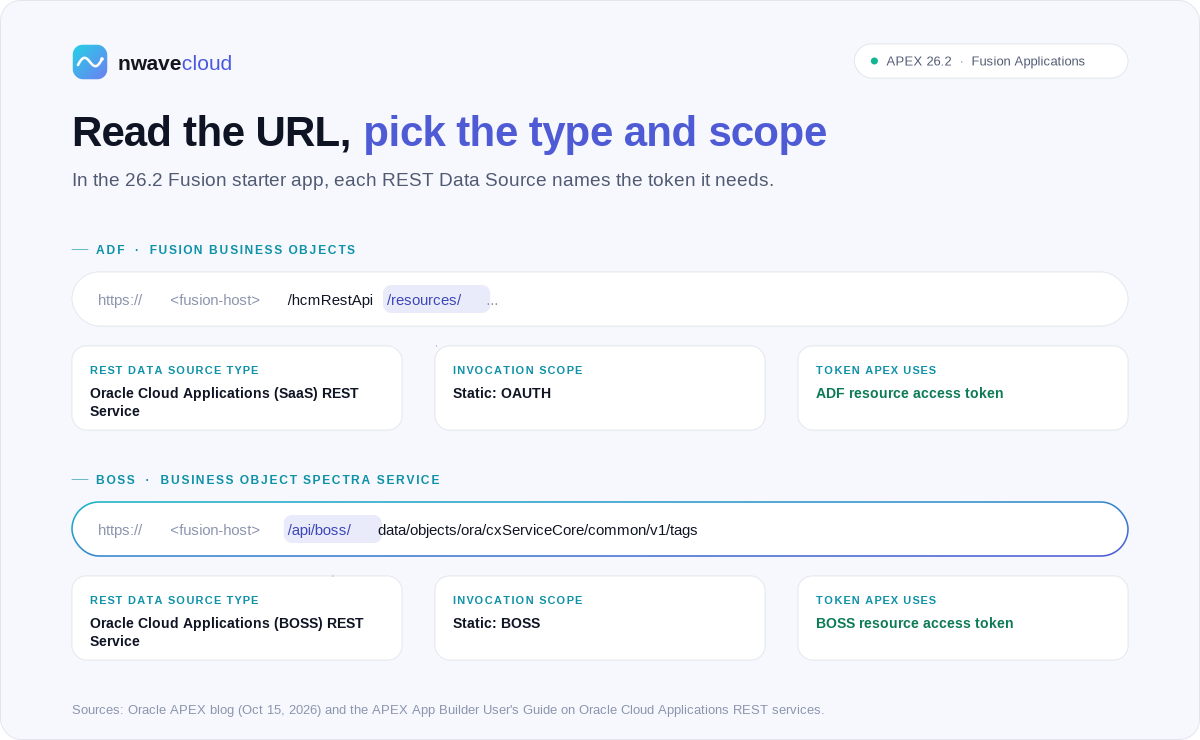
ADF or BOSS: read the URL
Oracle’s documentation makes the choice mechanical. If a Fusion REST API URL contains RestApi/resources/, for example /hcmRestApi/resources/, create a REST Data Source of type Oracle Cloud Applications (SaaS) REST Service. If it contains /api/boss/, use Oracle Cloud Applications (BOSS) REST Service.
The BOSS type exists for a reason: its goal is “delegating a maximal amount of functionality for filtering, sorting, attribute selection, and pagination to the BOSS backend.” Oracle’s 26.2 blog adds that both families support create, retrieve, update and delete, but “differ in how requests are structured, including some parameter names and interaction patterns.”
What the 26.2 starter app sets up
Oracle’s blog lists what the generated application does when the integration is configured with both resources:
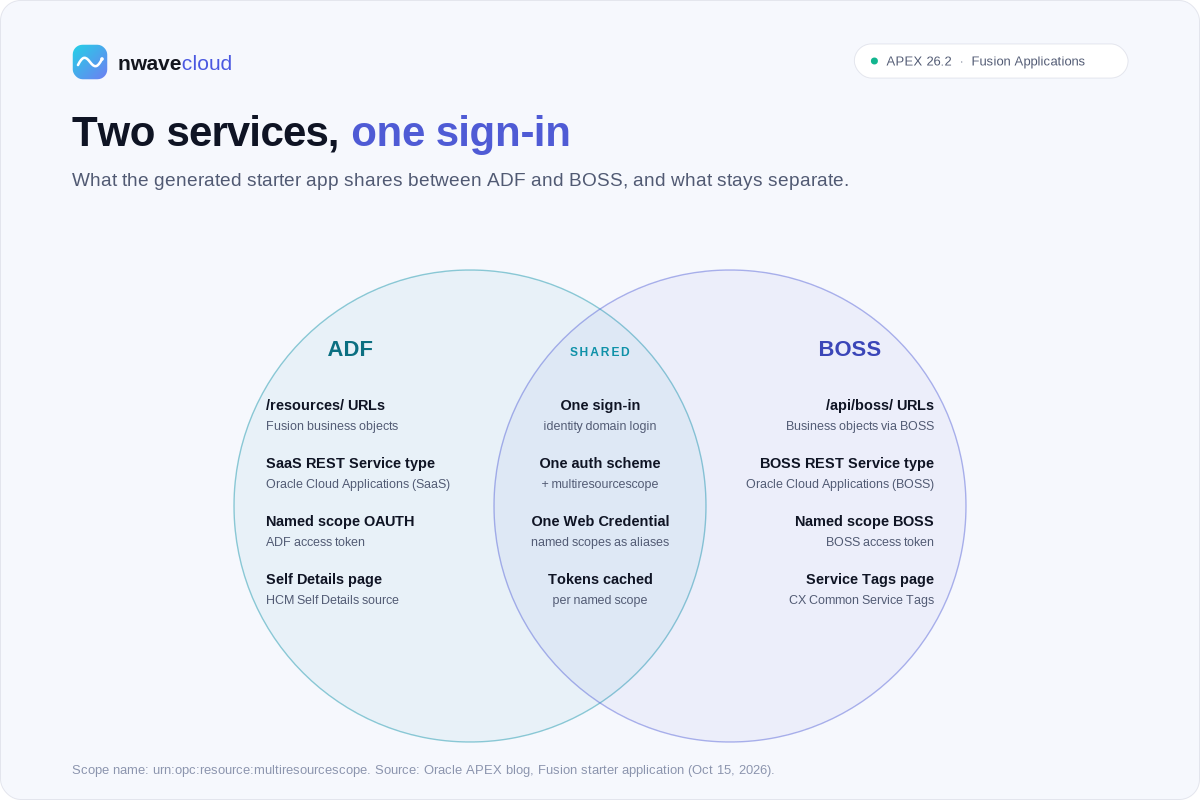
- Authentication scheme. Includes the ADF and BOSS scopes, “together with the
urn:opc:resource:multiresourcescopenamed scope”. That scope “enables the authentication request to obtain separate access tokens for multiple resources.” - Configuration source. Values come from the Database Tools Fusion Integration Wizard “through the
AUTHENTICATION_SUBSTITUTIONSinstance parameter”. - Web Credential. Two named scopes:
OAUTHfor ADF andBOSSfor BOSS. Named scopes are aliases for the real OAuth scopes. - REST Data Sources. An ADF and a BOSS example, each with a static Invocation Scope pointing at its named scope.
- Token cache. APEX “caches the returned access tokens and any refresh tokens against their corresponding named scopes.”
The two sample pages show it working. Self Details reads the signed-in user’s language, date format and time zone from the HCM Self Details ADF service. Service Tags reads tags from the CX Common Service Tags BOSS endpoint, URL path prefix api/boss/data/objects/ora/cxServiceCore/common/v1/tags. The user still needs the Fusion roles for that endpoint. If the page returns an access error, Oracle points you to your Fusion administrator.
Before you run the wizard
The 26.1 setup guide, which Oracle’s 26.2 post links to, lists the prerequisites: a Fusion Applications subscription, an Autonomous AI Database with a Data Warehouse or Transaction Processing workload, and SQLNet connections to an Oracle Database in the same tenancy. The flow is two wizards: the Database Tools Fusion Integration Wizard creates the connection, then App Builder > Create > Create Fusion Integration generates the app. For BOSS, the integration must include the BOSS resource scope.
Adding BOSS to an existing extension
Apps generated before 26.2 keep their ADF-only configuration after the upgrade. Oracle’s steps to add BOSS:
- Update the IDCS confidential app to include the BOSS resource scope.
- Add the actual BOSS scope value to the application’s authentication scheme, “rather than a substitution variable”, alongside
urn:opc:resource:multiresourcescope. - Add a BOSS named scope to the Web Credential.
- Set the Invocation Scope on each REST Data Source to the named scope of the resource it calls.
Oracle’s tip is a good one: generate a fresh 26.2 starter app as a reference. Creating it does not modify your existing application.
A short checklist
- Each REST Data Source typed by its URL:
/resources/is SaaS,/api/boss/is BOSS - Authentication scheme scopes: ADF, BOSS and
urn:opc:resource:multiresourcescope - Web Credential named scopes for each resource
- Invocation Scope set on every REST Data Source
- Fusion roles checked for every BOSS endpoint you call
- A fresh 26.2 starter app generated as a reference
Running Fusion extensions on a managed APEX environment is something we do on nwavecloud Cloud Hosting. See the plans page.
Bottom line
APEX 26.2 turns “ADF plus BOSS” from an authentication project into configuration: one sign-in, one named scope per resource, one Invocation Scope per data source. Read the URL, pick the type, name the scope.
FAQ
How do I know whether a Fusion endpoint is ADF or BOSS?
By the URL. Paths with RestApi/resources/ are ADF and use the SaaS REST Service type. Paths with /api/boss/ are BOSS and use the BOSS REST Service type.
What is urn:opc:resource:multiresourcescope for?
It lets one authentication request obtain separate access tokens for multiple resources. APEX caches each token against its named scope.
How does a REST Data Source pick its token?
Through its Invocation Scope. In the starter app it is Static, with the value OAUTH for ADF or BOSS for BOSS, matching a named scope on the Web Credential.
Does upgrading to 26.2 add BOSS to my existing Fusion app?
No. Existing apps keep their authentication configuration. Add the BOSS scope, named scope and Invocation Scope yourself, using a newly generated starter app as a reference.
Why does the Service Tags page show an access error?
The signed-in user lacks the Fusion roles or privileges for the CX BOSS endpoint. Your Fusion administrator can check them.
Sources
- Oracle APEX 26.2: Simplifying ADF and BOSS Integration with the Fusion Starter Application (Oracle APEX blog, October 15, 2026)
- Integrating APEX with Fusion Applications (APEX 26.1 App Builder User’s Guide)
- About Oracle Cloud Applications (BOSS) REST Services (APEX 26.1)
- About REST Data Source Support for Oracle Cloud SaaS Applications (APEX 26.1)
- Oracle APEX 26.2 Release Notes: New Features