The short version
APEX counts outbound web service calls per workspace, and at some point it says no:
- The limit.
MAX_WEBSERVICE_REQUESTS: “The maximum number of outbound web service requests allowed for each workspace in a rolling 24-hour period. Default is 1000.” - The symptom.
ORA-20001: You have exceeded the maximum number of web service requests per workspace. Please contact your administrator. - New in 26.2. A workspace administrator can request an increase from Manage Service. The instance administrator approves or declines it.
- The real fix. Know your traffic. A nightly sync job and one polling dashboard can use a thousand calls before lunch.
How the limit works
Three facts from Oracle’s documentation define it:
- Per workspace, rolling 24 hours. The instance setting Maximum Web Service Requests is “the maximum number of web service requests, within a rolling 24-hour period, that APEX supports for each workspace in this instance.”
- Workspace overrides. “You can configure a more specific value at the workspace-level.”
- Instance parameter. The same value is
MAX_WEBSERVICE_REQUESTSinAPEX_INSTANCE_ADMIN, default 1000.
On Autonomous AI Database, Oracle documents the same default of 1,000 for new databases (“some older databases may have a larger limit”) and shows how an administrator raises it, for example to 250,000:
begin
    apex_instance_admin.set_parameter('MAX_WEBSERVICE_REQUESTS', '250000');
    commit;
end;
/
What happens at the limit
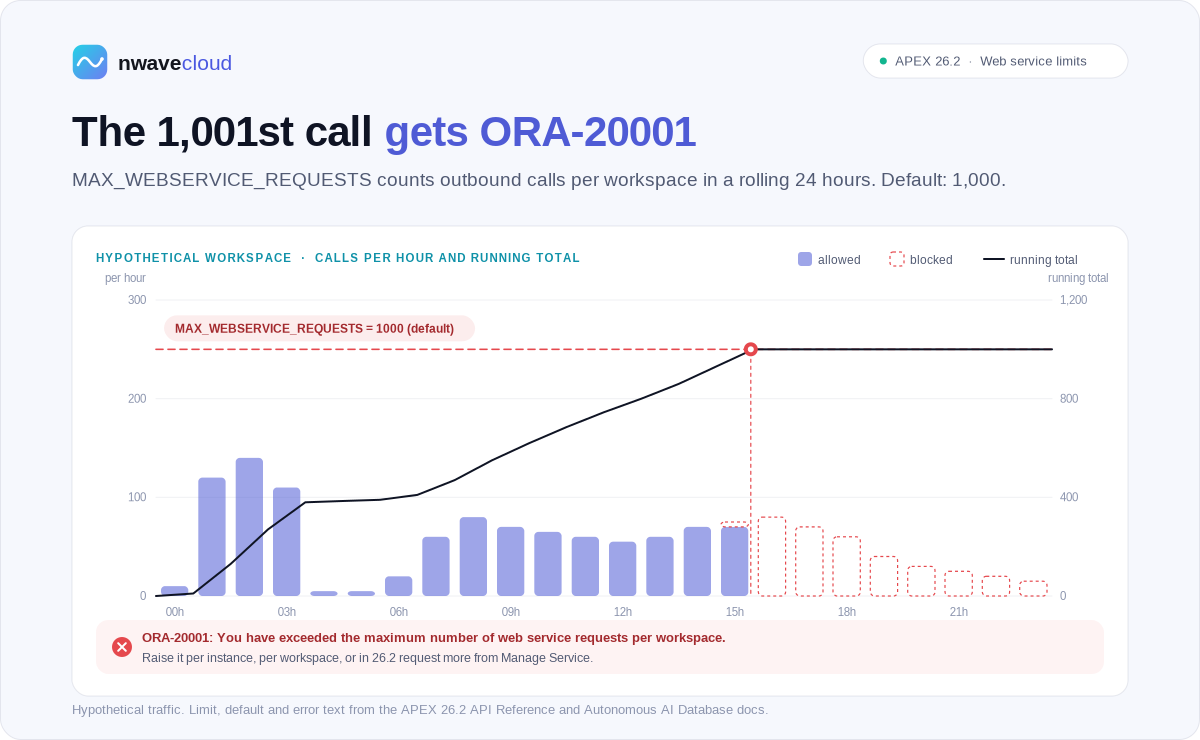
Oracle’s Autonomous AI Database guide describes it: “If the limit of outbound web service calls is reached, the following SQL exception is raised on the subsequent request and the request is blocked”:
ORA-20001: You have exceeded the maximum number of web service requests per workspace. Please contact your administrator.The tricky part is where it shows up. A REST Data Source on a page shows an error to a user. A scheduled job or automation fails in a log nobody reads until the data is stale.
Requesting more in APEX 26.2
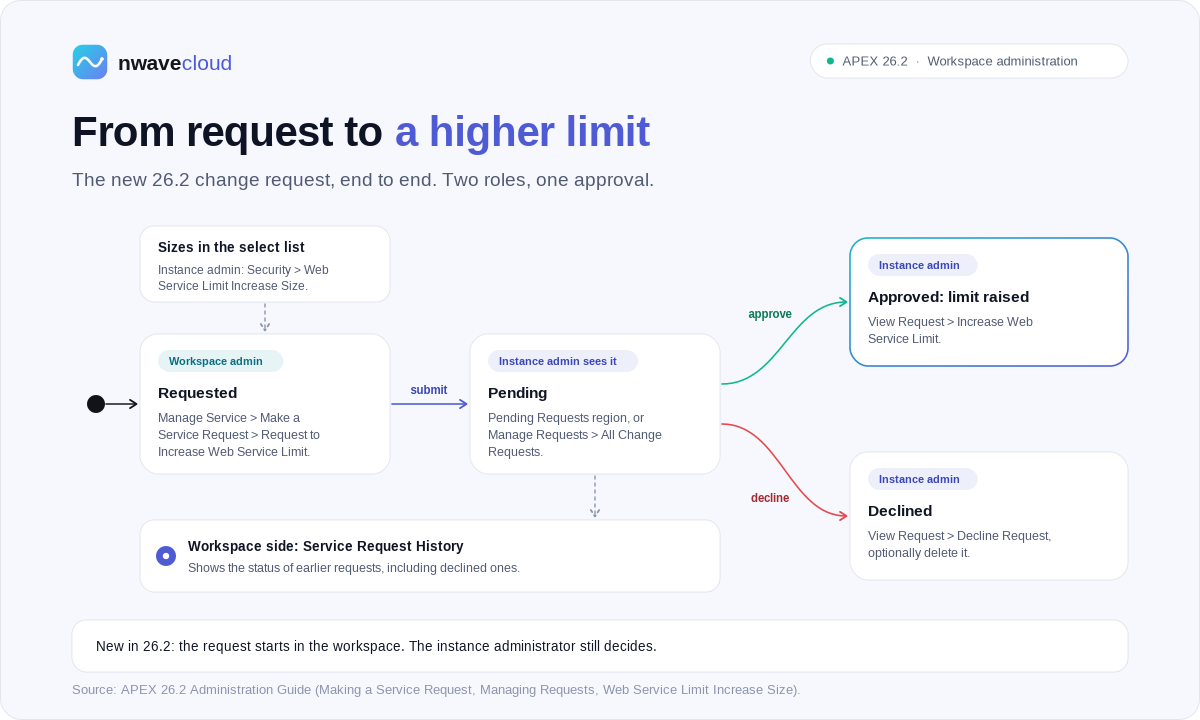
The 26.2 release notes: “Workspace administrators can now request Web Service Limit increases directly from the Manage Service wizard.” The Administration Guide has the steps.
Workspace administrator:
- Administration > Administration, then Manage Service.
- Make a Service Request, then Request to Increase Web Service Limit.
- Choose Number of Web Service Requests to add, click Next, confirm with Request Limit Increase.
- Follow it under Service Request History.
Instance administrator:
- Pending requests appear in the Pending Requests region of Administration Services, and under Manage Requests > All Change Requests.
- View Request, then Increase Web Service Limit to approve, or Decline Request.
- The sizes users can pick are configured under Manage Instance > Security > Web Service Limit Increase Size: Request Size, Display Value and Default Size.
Sizing the limit
A request needs a number. Estimate it before you are blocked, not after:
- Count the scheduled work. Sync jobs, automations and nightly loads: calls per run times runs per day.
- Count the polling. Pages that refresh REST-backed regions on a timer multiply by open sessions.
- Count the integrations. REST Data Sources, REST synchronizations and
APEX_WEB_SERVICEcalls in your packages. - Watch the log. The
WEBSERVICE_LOGGINGinstance parameter controls the web service activity log: always, never or per workspace setting. - Keep headroom. Request what peak days need, then review after a month.
Nobody should learn about this limit from a user. If you would rather not run instance administration yourself, that is what nwavecloud Cloud Hosting is for. See the plans page.
A short checklist
- Current limit known, instance and workspace level
- Daily outbound calls estimated: jobs, polling pages, AI services
- Web service activity logging on where you need numbers
- Increase sizes configured by the instance administrator
- Increase requested and approved before go-live, not after ORA-20001
- Background jobs alert on failures
Bottom line
The web service limit protects shared instances, and 1,000 calls a day is small for integration-heavy apps. APEX 26.2 makes asking for more a two-click change request. The work is knowing the number to ask for.
FAQ
What is the default web service limit in APEX?
1,000 outbound web service requests per workspace in a rolling 24-hour period, set by the MAX_WEBSERVICE_REQUESTS instance parameter.
What error do I get when the limit is reached?
Oracle’s Autonomous AI Database documentation shows ORA-20001: You have exceeded the maximum number of web service requests per workspace. Please contact your administrator. The request is blocked.
Can a workspace administrator raise the limit?
In APEX 26.2 a workspace administrator can request an increase from Manage Service > Make a Service Request > Request to Increase Web Service Limit. An instance administrator approves it.
Can the limit differ per workspace?
Yes. The instance value applies to every workspace, and a more specific value can be configured at the workspace level.
Where does an instance administrator approve the request?
Under Manage Requests > All Change Requests, with View Request and then Increase Web Service Limit.
Sources
- Oracle APEX 26.2 Release Notes: New Features
- APEX_INSTANCE_ADMIN Available Parameter Values (APEX 26.2)
- Making a Service Request (APEX 26.2 Administration Guide)
- Managing Requests (APEX 26.2 Administration Guide)
- Configuring Web Service Limit Increase Size (APEX 26.2 Administration Guide)
- Isolating All Workspaces in an Instance (APEX 26.2 Administration Guide)
- Using the Manage Service Page (APEX 26.2 Administration Guide)
- Use Web Services with Oracle APEX (Autonomous AI Database)