The short version
Multilingual APEX apps can now take the APEXlang route to Git:
- 26.1: “applications that use the Application-Based translation method cannot be exported in APEXLang format.”
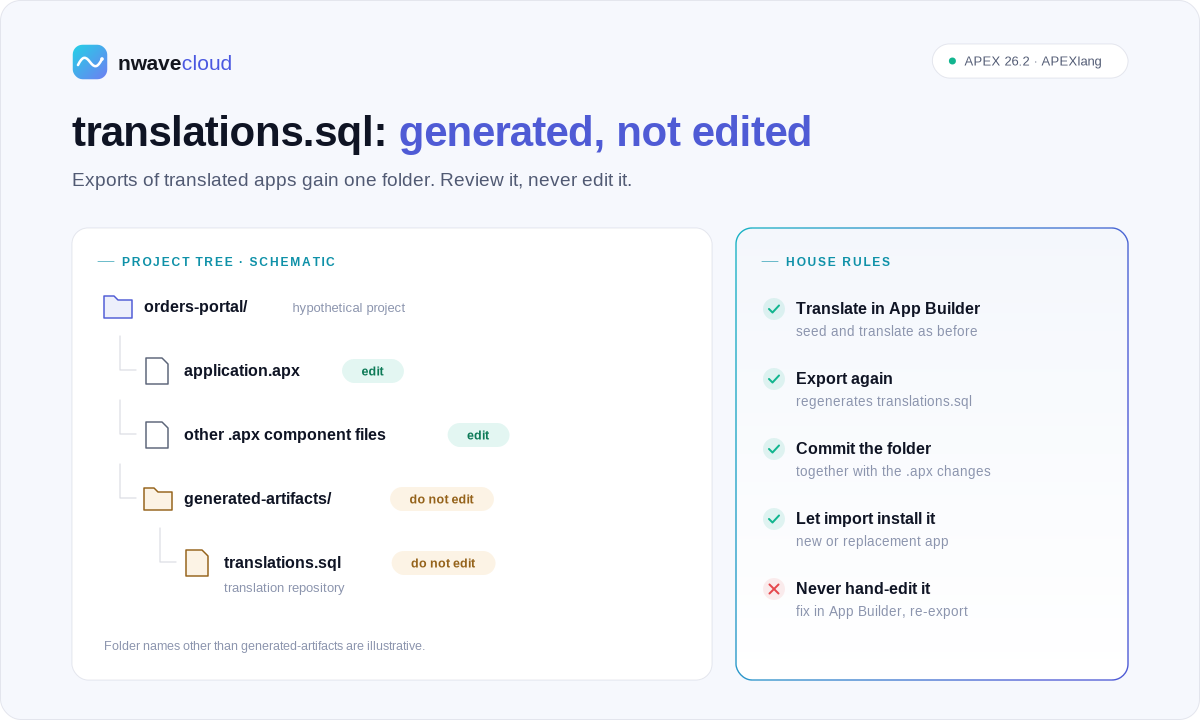
- 26.2: “This limitation is removed.” The translation repository is exported to translations.sql in a generated-artifacts folder.
- On import: “APEX automatically reads and installs the translation repository data from this file.”
- The rule: “Files in this folder should not be modified manually.”
The workflow stays App Builder first: translate there, export, commit.
What the export now contains
An APEXlang export of a translated application gains one folder. Oracle’s release notes describe it as part of the export: “the translation repository data is exported to a translations.sql file in the generated-artifacts folder.”
Oracle’s 26.2 platform post adds how that data finds its way home: “During import, APEX uses the application component information in the export to connect each translation record to the right component.” It names the two paths that matter:
- Installing the application as a new application. APEX “establishes the translation repository for the newly created application and resolves the component references during import.”
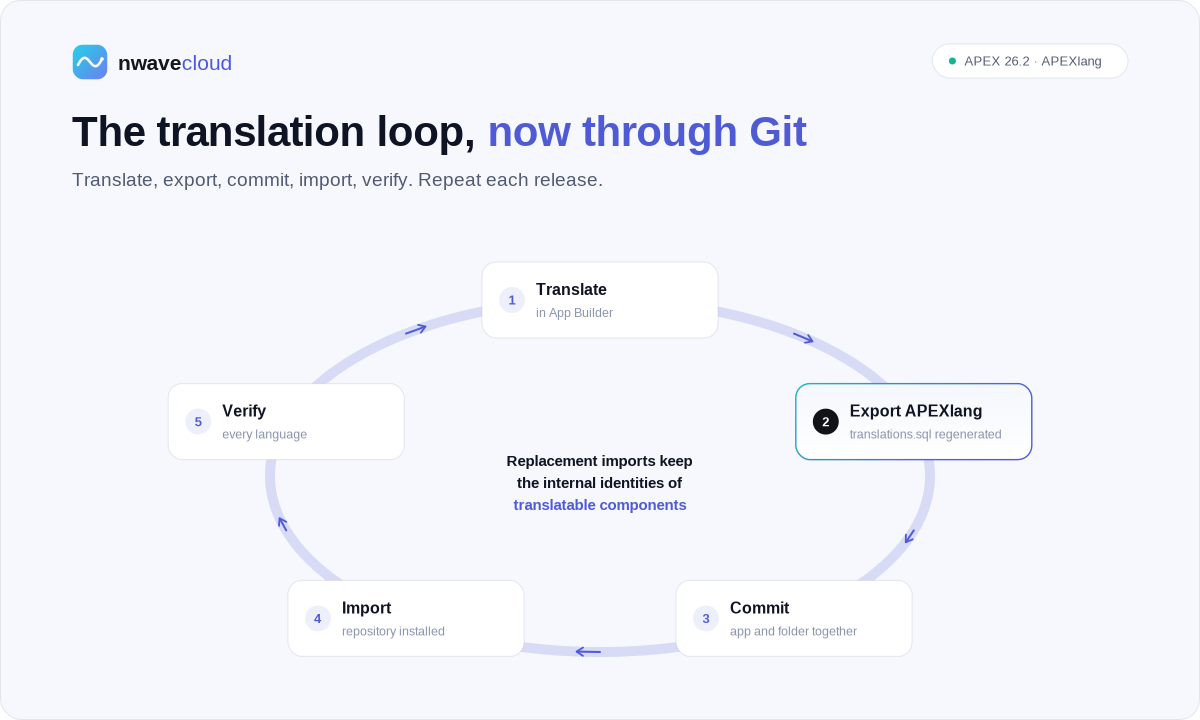
- Replacing an existing application. “APEX retains the internal identities of translatable components,” so existing translation records stay connected to the right regions, items, buttons and shared components.
Why the folder is off limits
Everywhere else in an APEXlang project, editing the files is the point. Oracle’s APEXlang upgrade post draws the line: “Unlike other files in an APEXlang project, those in the generated-artifacts directory are not editable.” The same post notes that the folder “may appear in your project after the upgrade” and contains .sql files reflecting translation repository strings for multilingual applications.
That makes generated-artifacts an output, like a lock file. Treat it the same way in your repository:
- Commit it with the application, so a clean checkout can be imported with its translations.
- Review changes to it, but do not resolve merge conflicts by hand-editing. Re-export from App Builder instead.
- Tell your AI coding agent the same thing. An agent editing
.apxfiles is fine, an agent rewritingtranslations.sqlis not.
The day-to-day loop
Translation work itself does not move. You still seed and translate in App Builder. What changes is that the result now round-trips through source control:
- Change the primary application and translate the new strings in App Builder.
- Export the application as APEXlang.
translations.sqlis regenerated. - Commit the
.apxchanges and the regenerated folder together. - Import into the next environment, as a new application or a replacement. APEX installs the translation repository from the file.
- Open the application in each language and check the new strings.
What to test after import
Oracle’s notes describe the repository being installed on import. Your test should confirm the result the user sees:
- Every language loads. Switch to each translated language and open the pages that changed.
- New strings are translated. A string added in this release and translated in App Builder should appear translated in the target environment.
- Text messages and dynamic translations. The App Builder export documentation says these “are always included in the application export”, so check them alongside the repository strings.
- A replacement import keeps old translations. Spot-check strings that did not change in this release.
If something is missing, fix it in App Builder, export again and redeploy. That keeps the repository and translations.sql in step.
Bottom line
APEX 26.2 closes the last big gap for translated apps in APEXlang. The translation repository travels as translations.sql, import installs it, and replacement imports keep translations attached. The discipline is simple: generated-artifacts is generated. Edit the app, never the folder.
FAQ
Can I export an app with Application-Based translation as APEXlang?
Yes, from APEX 26.2. In 26.1 this was not possible. The translation repository is exported to translations.sql in the generated-artifacts folder.
Can I edit translations.sql?
No. Oracle’s release notes say files in the generated-artifacts folder should not be modified manually. Translate in App Builder and export again.
Do I have to import translations separately?
No. When importing the APEXlang application, APEX automatically reads and installs the translation repository data from translations.sql.
Do translations survive a replacement import?
According to Oracle’s 26.2 platform post, a replacement import retains the internal identities of translatable components, so existing translation records stay connected.
Should generated-artifacts be in Git?
We commit it with the application so a clean checkout imports with its translations, and we never hand-edit it.