The short version
If your APEX app calls OCI Generative AI, 26.2 makes its deployment cleaner:
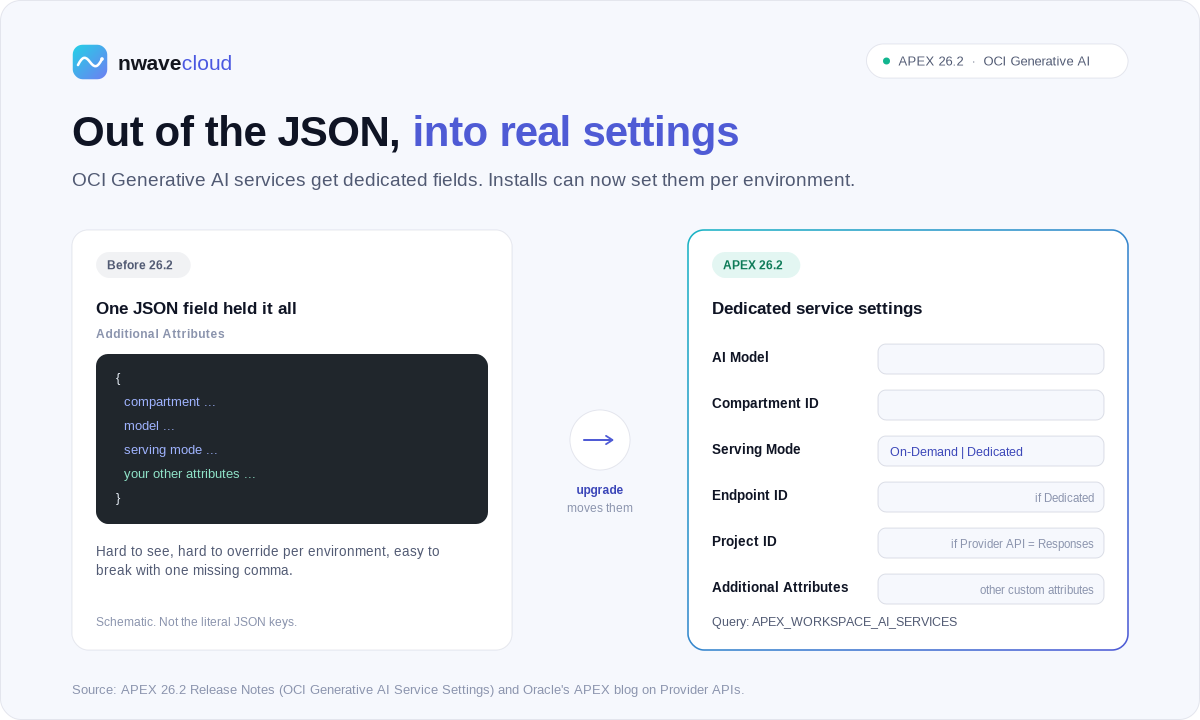
- Real settings. Model, Compartment ID, Serving Mode, Endpoint ID and Project ID are now fields, not keys inside the Additional Attributes JSON.
- Set at import.
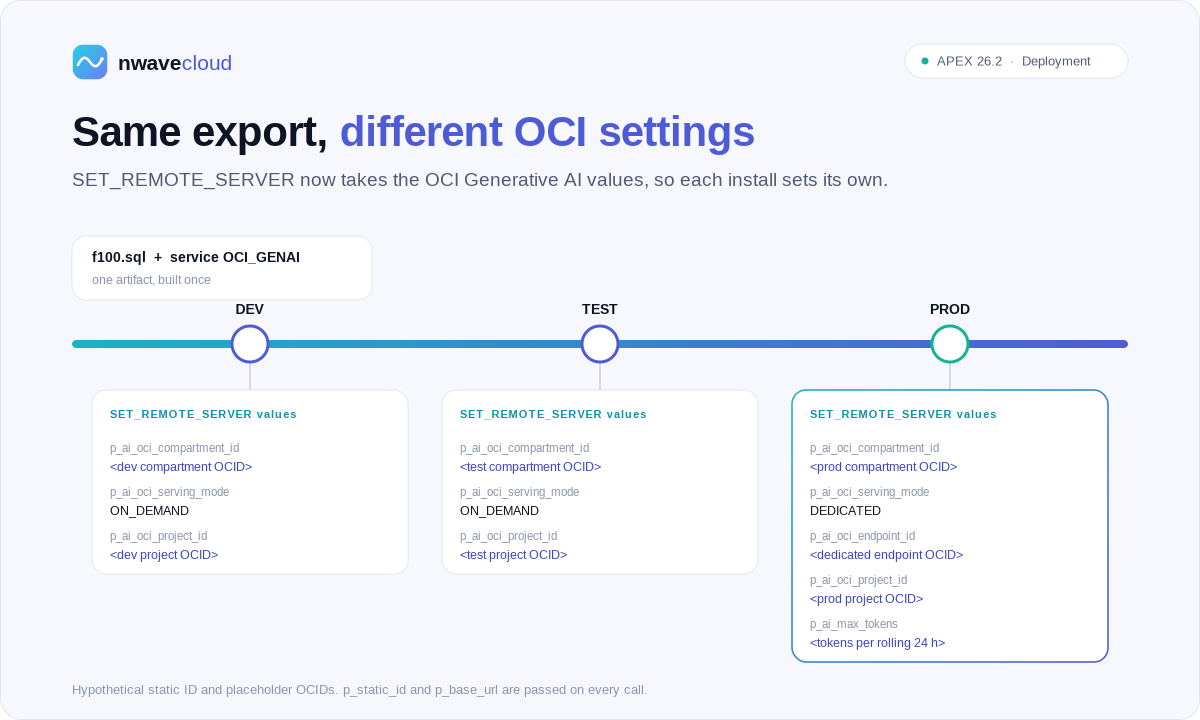
APEX_APPLICATION_INSTALL.SET_REMOTE_SERVERgainsp_ai_oci_compartment_id,p_ai_oci_serving_mode,p_ai_oci_endpoint_idandp_ai_oci_project_id. - The payoff. One export, three environments, each with its own compartment and serving mode, set by the install script.
- Also handy.
p_ai_max_tokenscaps tokens per environment, in a rolling 24-hour window.
What moved out of the JSON
From the release notes: “OCI Generative AI Services now use dedicated settings for: Model, Compartment ID, Serving Mode (On-Demand or Dedicated), Endpoint ID, required for Dedicated serving mode, Project ID, required when Provider API is Responses. These values are no longer stored as part of the Additional Attributes JSON object.”
Oracle’s Provider API blog adds what the upgrade does: OCI services remain on the Generic Provider API, and compartment, model and serving mode values move out of Additional Attributes into service properties, while remaining custom attributes are preserved.
The new SET_REMOTE_SERVER parameters
SET_REMOTE_SERVER sets values for the remote servers of the imported application, identified by their Static ID, and its p_ai_* parameters apply to Generative AI Services. Oracle’s own getter example uses a static ID like my-ai-service. The 26.2 signature:
apex_application_install.set_remote_server (
    p_static_id              in varchar2,
    p_base_url               in varchar2,
    p_https_host             in varchar2 default null,
    --
    p_default_database       in varchar2 default null,
    p_mysql_sql_modes        in varchar2 default null,
    --
    p_ords_timezone          in varchar2 default null,
    --
    p_ai_model_name          in varchar2 default null,
    p_ai_http_headers        in clob     default null,
    p_ai_attributes          in clob     default null,
    p_ai_max_tokens          in number   default null,
    --
    p_ai_oci_compartment_id  in varchar2 default null,
    p_ai_oci_serving_mode    in varchar2 default null,
    p_ai_oci_endpoint_id     in varchar2 default null,
    p_ai_oci_project_id      in varchar2 default null );
What the new ones mean, in Oracle’s words:
| Parameter | Meaning |
|---|---|
p_ai_oci_compartment_id |
OCI Gen AI Compartment ID to use for OCI Generative AI requests |
p_ai_oci_serving_mode |
OCI Gen AI serving mode: ON_DEMAND or DEDICATED |
p_ai_oci_endpoint_id |
OCI Gen AI Dedicated Endpoint ID. Required when Serving Mode is DEDICATED |
p_ai_oci_project_id |
OCI Gen AI Project ID. Required when Provider API is Responses |
p_ai_max_tokens |
Maximum number of tokens in a rolling 24-hour window APEX is allowed to make to this service |
p_base_url has no default, so pass the service’s base URL on every call. For OCI, that is the regional endpoint without /openai/v1.
One export, three environments
A hypothetical install script for production. The static ID OCI_GENAI, the region and the OCIDs are placeholders:
begin
    apex_application_install.set_workspace('PROD_WS');
    apex_application_install.set_remote_server(
        p_static_id             => 'OCI_GENAI',
        p_base_url              => 'https://inference.generativeai.<region>.oci.oraclecloud.com',
        p_ai_oci_compartment_id => '<prod compartment OCID>',
        p_ai_oci_serving_mode   => 'DEDICATED',
        p_ai_oci_endpoint_id    => '<dedicated endpoint OCID>',
        p_ai_oci_project_id     => '<prod project OCID>',
        p_ai_max_tokens         => 2000000 );  -- hypothetical daily cap
end;
/
@f100.sql
Development and test run the same script with their own values, for example ON_DEMAND and no endpoint ID. The export stays identical. Only the install script differs per environment, which is exactly where environment differences belong.
Checking what is installed
- Dictionary view. The release notes say the new values “are available to query in the
APEX_WORKSPACE_AI_SERVICESdictionary view”. Query it after each install. - Install-time getters.
APEX_APPLICATION_INSTALLalso has functions such asGET_REMOTE_SERVER_AI_OCI_COMP,GET_REMOTE_SERVER_AI_OCI_SRVMD,GET_REMOTE_SERVER_AI_OCI_ENDPTandGET_REMOTE_SERVER_AI_OCI_PROJwhich return what will be used for a remote server during application import. - A real prompt. Then run one prompt per environment. A wrong compartment or a model missing in the region only shows up when you call it.
If you use the Responses Provider API on OCI, the Project ID is required, and Oracle’s blog notes that APEX sends the compartment identifier in an HTTP header for Responses. Our Provider API article covers that switch.
A short checklist
- OCI services checked after the upgrade: model, compartment and serving mode in their fields
- Leftover Additional Attributes reviewed
- One install script per environment with
SET_REMOTE_SERVER - Endpoint ID set wherever Serving Mode is
DEDICATED - Project ID set wherever the Provider API is Responses
p_ai_max_tokensset as a cost guard where it makes senseAPEX_WORKSPACE_AI_SERVICESqueried and one real prompt run after each install
Per-environment deployments are part of what we run on nwavecloud Cloud Hosting. See the plans page.
Bottom line
APEX 26.2 turns OCI Generative AI settings from JSON you edit after import into parameters you set during import. One export, one script per environment, no hand edits in production.
FAQ
Which OCI Generative AI settings became dedicated fields in 26.2?
Model, Compartment ID, Serving Mode (On-Demand or Dedicated), Endpoint ID for Dedicated serving and Project ID for the Responses Provider API.
Does the upgrade move my existing values?
Yes. Oracle’s blog says compartment, model and serving mode move from Additional Attributes into the new properties, and other custom attributes are preserved. Check each service afterwards.
How do I set them per environment?
Call APEX_APPLICATION_INSTALL.SET_REMOTE_SERVER before the import with the service’s static ID and the new p_ai_oci_* parameters.
When is the endpoint ID required?
When the serving mode is DEDICATED.
Where can I see the values after installation?
In the APEX_WORKSPACE_AI_SERVICES dictionary view, and in the service’s settings under Workspace Utilities.
Sources
- Oracle APEX 26.2 Release Notes: New Features
- APEX_APPLICATION_INSTALL.SET_REMOTE_SERVER Procedure (APEX 26.2)
- APEX_APPLICATION_INSTALL (APEX 26.2 API Reference)
- GET_REMOTE_SERVER_AI_OCI_COMP Function (APEX 26.2)
- Oracle APEX 26.2: Working with Generative AI Provider APIs and Reasoning Effort (Oracle APEX blog)
- Projects in OCI Generative AI (OCI documentation)