The short version
Every Generative AI Service in APEX 26.2 has a new field under Advanced: Provider API. It quietly decides how APEX talks to the model.
- New defaults. Responses for OpenAI, Ollama and OpenAI-compatible services. Interactions for Google Gemini. Generic for OCI Generative AI.
- Deprecated. Chat Completions, and Gemini’s Generate Text. Both still work in 26.2.
- The upgrade. Switches eligible services for you. Services with custom Additional Attributes keep their old API.
- Why bother. Oracle says future capabilities “might only be available through the newer API”. Reasoning Effort for OpenAI already needs Responses.
What the setting does
From the release notes: “APEX uses this setting to select the provider endpoint, construct the appropriate request payload, and interpret the response.” Same prompt, same agent, different wire protocol. Oracle’s blog shows the path: open the service under Workspace Utilities > Generative AI Services, then set Provider API under Advanced.
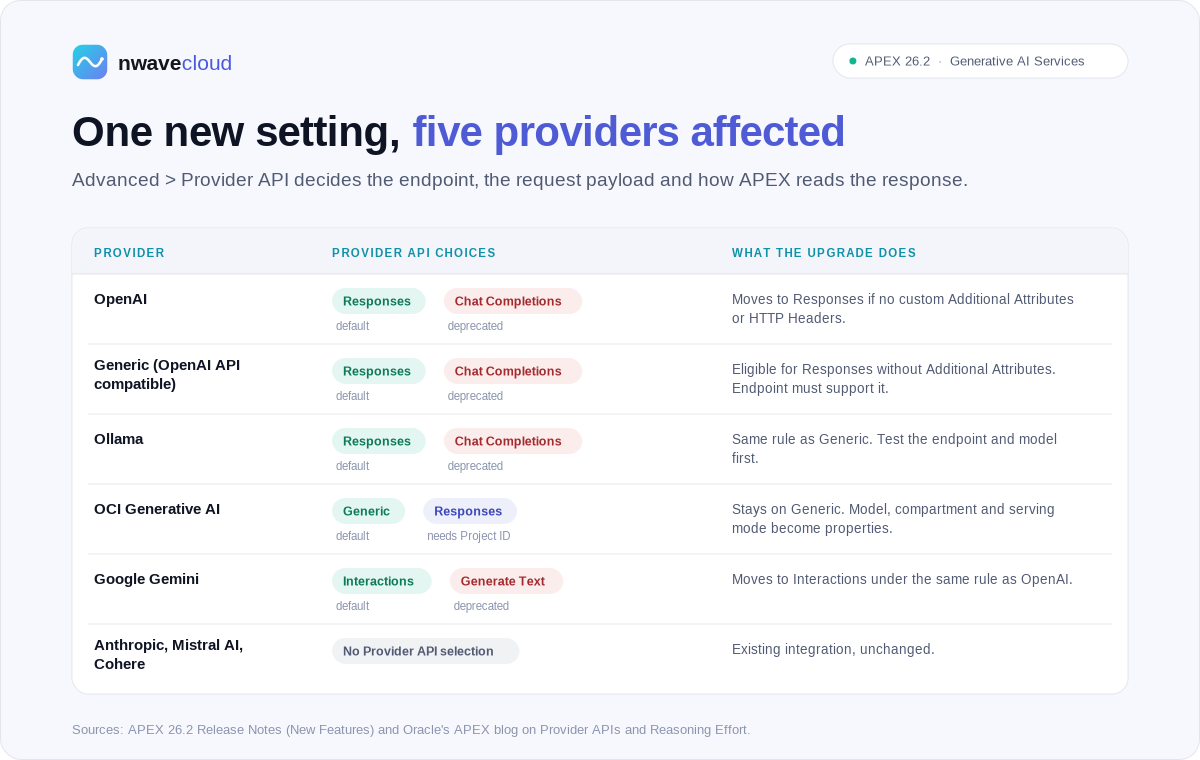
The choices per provider
| Provider | Default for new services | Other choice |
|---|---|---|
| OpenAI | Responses | Chat Completions (deprecated) |
| Generic (OpenAI API Compatible) | Responses | Chat Completions (deprecated) |
| Ollama | Responses | Chat Completions (deprecated) |
| OCI Generative AI | Generic | Responses (needs a Project ID) |
| Google Gemini | Interactions | Generate Text (deprecated) |
For OCI, Oracle’s blog explains why Generic stays the default: “API support varies by model.” Anthropic Claude, Mistral AI and Cohere keep their existing integrations with no Provider API selection.
What the upgrade does to existing services
The release notes give the core rule: “On upgrade or legacy application import, OpenAI and Google Gemini services without custom Additional Attributes or HTTP Headers are automatically migrated to Responses and Interactions respectively.” Oracle’s blog adds the rest:
- Generic OpenAI compatible and Ollama services without Additional Attributes “are also eligible for an automatic change to Responses.”
- Services with custom Additional Attributes keep the legacy API selection.
- OCI Generative AI services stay on Generic. Compartment, model and serving mode move out of Additional Attributes into service properties, and remaining custom attributes are preserved.
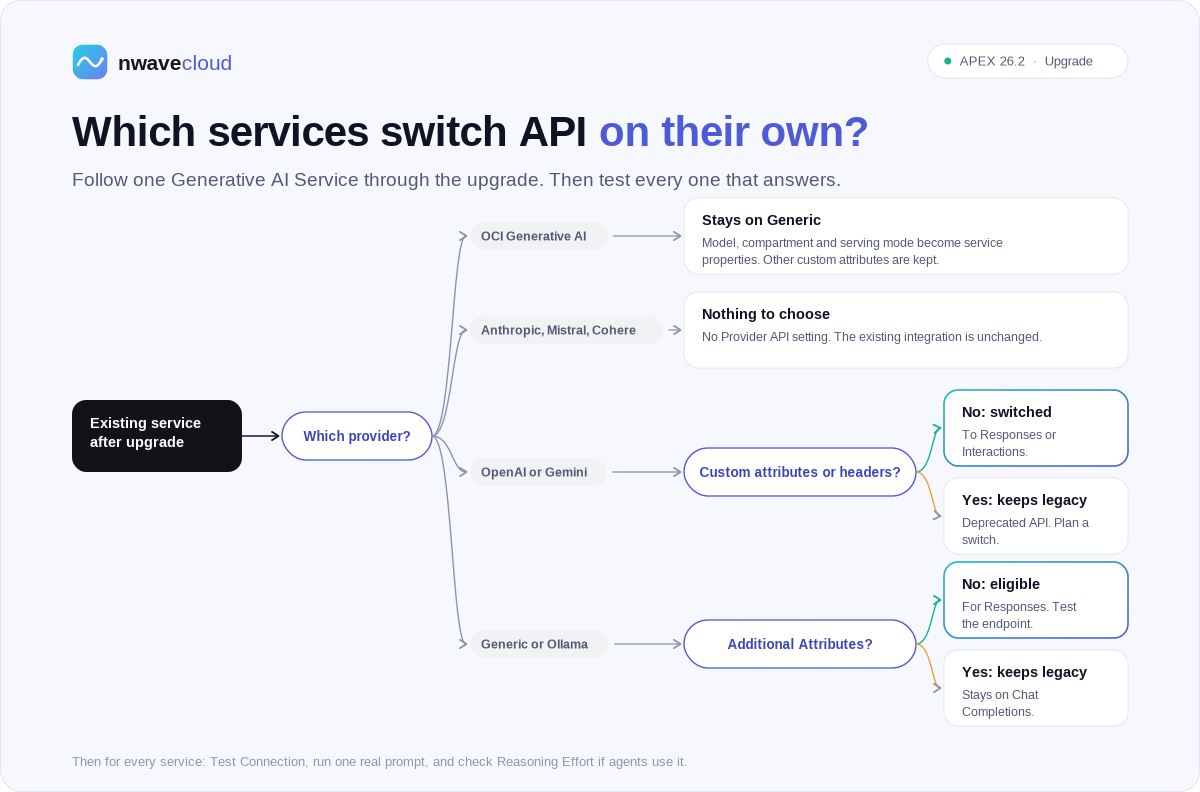
Notice the pattern. The services someone tuned by hand, with extra attributes or headers, are the ones still on a deprecated API after the upgrade. They are usually also the important ones.
Switching a service by hand
- Check the endpoint first. Oracle’s advice: “Before selecting Responses, confirm that your endpoint supports it.” That matters most for self-hosted Ollama and OpenAI-compatible gateways.
- Leave the Base URL alone. For OpenAI, “APEX appends the request path to the Base URL, so do not add
/responsesto that field.” For OCI, the regional base URL does not need/openai/v1appended. - Review custom Additional Attributes. They were written for the old payload. Keep what still applies to the new API and test the rest.
- OCI and Responses. Enter the Project ID, which is required for Responses, and confirm the model is available in your region.
- Test Connection, then a real prompt. Then exercise every agent that uses the service, including tools and any Reasoning Effort level.
Why we would not stay on Chat Completions
Deprecated features keep working until they do not. Oracle states the direction plainly: use the newer API “because future provider and APEX capabilities might only be available through the newer API”. The first example is already here: in Oracle’s blog, Reasoning Effort for OpenAI runs through Responses. Our Reasoning Effort guide covers the levels.
Switching one service at a time, in a test workspace, is a small job. Switching all of them in a hurry when a provider retires an endpoint is not.
A short checklist
- Every Generative AI Service listed, with its Provider API after the upgrade
- Services with custom Additional Attributes or HTTP Headers flagged for a manual switch
- Self-hosted endpoints checked for Responses support before switching
- OCI services on Responses given a Project ID
- Test Connection plus one real prompt per service
- Agents retested, including Reasoning Effort levels
Upgrades with AI services in them are part of what we run on nwavecloud Cloud Hosting. See the plans page and our APEX 26.2 upgrade checklist.
Bottom line
Provider API is a one-field change with a long tail. The upgrade handles the simple services. The customized ones need a person, a test workspace and a prompt that matters.
FAQ
Where is the Provider API setting?
In the Advanced section of each Generative AI Service, under Workspace Utilities > Generative AI Services.
Is Chat Completions removed in APEX 26.2?
No. It is deprecated and still selectable for compatibility. Oracle recommends the newer API where the provider and model support it.
Which services does the upgrade switch automatically?
OpenAI and Gemini services without custom Additional Attributes or HTTP Headers. Oracle’s blog says Generic and Ollama services without Additional Attributes are also eligible for Responses. OCI services stay on Generic.
Does OCI Generative AI need anything extra for Responses?
Yes, a Project ID, which is required when the Provider API is Responses.
Do Anthropic, Mistral and Cohere services change?
No. They have no Provider API selection and keep their existing integration.
Sources
- Oracle APEX 26.2 Release Notes: New Features
- Oracle APEX 26.2: Working with Generative AI Provider APIs and Reasoning Effort (Oracle APEX blog)
- Managing Generative AI Services (APEX 26.2 App Builder User’s Guide)
- Understanding Generative AI Support in APEX (APEX 26.2)
- APEX_AI Constants and Data Types (APEX 26.2)