The short version
Oracle APEX 26.2 has been generally available since October 6, 2026. On-premises installations can upgrade today. Oracle says Autonomous AI Database will follow shortly, with OCI and multicloud rollouts over the coming weeks.
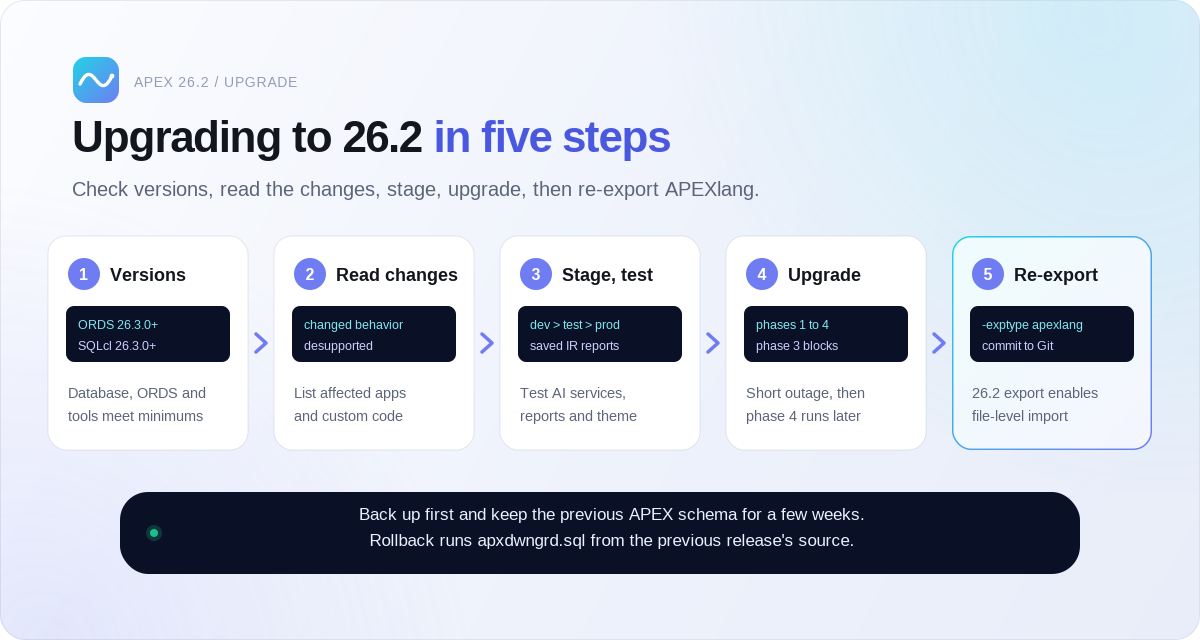
The upgrade script is rarely the hard part. The work is around it:
- Higher minimum versions. APEX 26.2 requires ORDS 26.3.0 and SQLcl 26.3.0 or later. APEX 26.1 needed ORDS 26.1.1.
- Behavior changes. OAuth token handling is stricter, the export wizard changed, and Query Builder and SQL Workshop RESTful Services are desupported.
- Automatic migrations. Eligible Generative AI Services switch provider APIs, and Interactive Reports get a redesigned search bar.
- APEXlang. File-level import needs an export made with 26.2, so every application in Git needs a fresh export.
Here is the checklist we would work through before touching production.
The checklist at a glance
| Step | What to check | Done when |
|---|---|---|
| 1. Platform | When 26.2 reaches your environment | You know your date or upgrade window |
| 2. Versions | Database, ORDS, SQLcl, VS Code extension | Every component meets the minimum |
| 3. Release notes | Changed, deprecated, desupported features | Affected apps and code are listed |
| 4. AI services | Provider API, custom attributes | Each service answers a real prompt |
| 5. UI | Interactive Reports, theme, Compatibility Mode | Key pages pass regression tests |
| 6. APEXlang | Re-export with 26.2 | Fresh export committed to Git |
| 7. Safety net | Staging, backups, downtime, rollback | Rollback steps are written down |
Step 1: Know when 26.2 reaches your platform
On-premises. Available now as apex_26.2.zip (all languages) or apex_26.2_en.zip (English only). Oracle re-released both files on October 9, 2026, so if you downloaded earlier, download again and verify the published SHA256 checksum.
Oracle Autonomous AI Database. Following shortly. Here Oracle applies new APEX releases and you control timing: once a release reaches your region you get a 45-day upgrade window, extendable to 90 days on paid instances. You can upgrade earlier, but cannot book a specific date and time. Oracle says a release can take two to five weeks to reach a region and suggests testing on an upgraded clone first. These parameters show what is scheduled:
SELECT APEX_INSTANCE_ADMIN.get_parameter('UPGRADE_STATUS')   AS upgrade_status
     , APEX_INSTANCE_ADMIN.get_parameter('UPGRADE_DEFERRED') AS upgrade_deferred
     , APEX_INSTANCE_ADMIN.get_parameter('UPGRADE_VERSION')  AS upgrade_version
     , APEX_INSTANCE_ADMIN.get_parameter('UPGRADE_DATE')     AS upgrade_date
  FROM dual;
OCI and multicloud. Over the coming weeks, per Oracle’s announcement.
Step 2: Confirm every version prerequisite
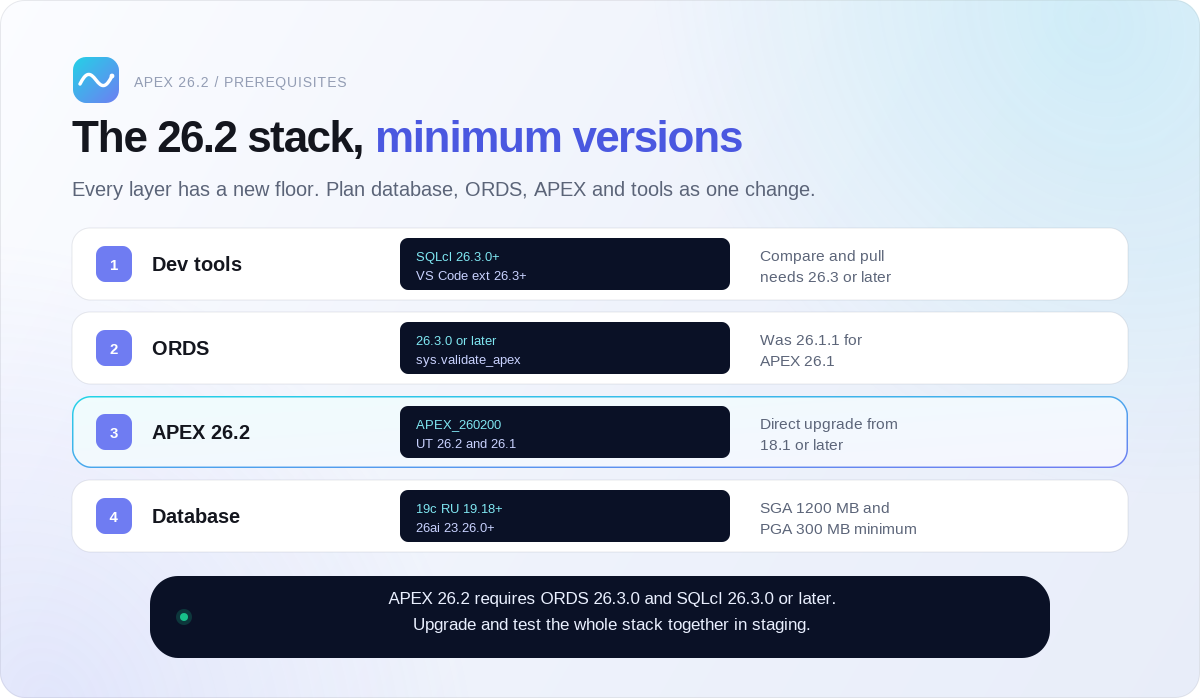
Oracle’s 26.2 release notes, installation guide and APEXlang post set these minimums:
| Component | APEX 26.2 requirement |
|---|---|
| Oracle Database 19c | Release Update 19.18 (January 2023) or newer |
| Oracle AI Database 26ai | Version 23.26.0 (October 2025) or later |
| ORDS | 26.3.0 or later (26.1 required 26.1.1) |
| SQLcl | 26.3.0 or later |
| SQL Developer for VS Code | 26.3 or later for APEXlang compare and pull |
| Memory | At least 1200 MB SGA and 300 MB PGA |
| Upgrade session | WORKAREA_SIZE_POLICY set to AUTO (system-wide in a CDB) |
| Disk space | 762 MB (English only) or 1.25 GB (all languages) for files, 320 MB in the APEX tablespace, 133 MB in SYSTEM |
| Browsers | Current and prior major releases of Chrome, Firefox, Safari and Edge |
| Upgrade path | Direct from 18.1 or later; older releases go to 24.2 first |
Plan ORDS early. At the time of writing, Oracle’s ORDS and SQLcl download pages both list 26.3.0. The installation guide says that after each ORDS upgrade you must run this as SYS:
SET SERVEROUTPUT ON
BEGIN
    sys.validate_apex;
END;
/
Oracle’s ORDS download page also says ORDS 26.4, planned for winter 2026, will no longer run on Tomcat 9 or WebLogic Server 14c (or earlier), so plan that move if it applies. After the upgrade, Help > About in APEX shows the Product Build, and APEX_LISTENER_VERSION under CGI Environment shows the ORDS release serving requests.
Coming from before 26.1? Oracle points you to the Changed Behavior sections of the releases in between, too. As we wrote when 26.1 arrived, plan APEX, ORDS and SQLcl upgrades together.
Step 3: Read changed, deprecated and desupported features
The release notes are the authoritative list; these items most often touch production code.
Changed behavior
- OAuth scopes and tokens. APEX 26.2 enforces token reuse and scope matching. Custom code that requests a token for one scope, sets it with
APEX_WEB_SERVICE.SET_OAUTH_TOKENand calls an endpoint needing another scope can now fail. Align scopes with the Web Credential, or use declarative OAuth as Oracle recommends. - Export Application Wizard. The wizard no longer has a Supporting Objects option, so its exports always include them. To leave them out, use
APEX_EXPORT.GET_APPLICATIONor SQLclapex export. - Static IDs. Values containing a Tab can no longer be saved. Existing values stay until someone edits the component.
- Charts. Lazy-loading charts wait until visible before loading data. Pages that toggle chart visibility outside the supported declarative methods may render differently.
Desupported
- Query Builder. Saved visual queries become SQL Commands saved queries. The SQL survives, the visual layout does not.
- SQL Workshop RESTful Services. Existing ORDS modules remain, but REST Workshop import, export and sample services are removed; use SQL Developer Web. The Swagger UI URL setting is not carried forward.
- Export Repository, and retired OCI Cohere models, which the upgrade migrates to
cohere.command-a-03-2025.
Deprecated, still working: Data Generator in SQL Workshop; Oracle Application Server Single Sign-On authentication (move to Social Sign-In or SAML); APEX Advisor (Oracle points to the enhanced CODESCAN in SQLcl 26.3.0 for APEXlang checks); and the APEX_AI record members t_chat_message.tool_calls and t_chat_response.message.
Upgrading from 21.2 or earlier? Run the known-issues check for long Confirm and Alert dynamic action messages first, or they can be truncated.
Step 4: Review Generative AI Services
Per Oracle’s technical post, the upgrade changes some existing services:
- OpenAI services move to Responses and Google Gemini services to Interactions, but only without custom Additional Attributes or HTTP headers.
- Generic OpenAI Compatible and Ollama services without Additional Attributes are also eligible for Responses. Test these first: the endpoint must support the Responses API.
- Services with custom Additional Attributes keep their legacy API. Review the attributes before switching by hand.
- OCI Generative AI services stay on Generic. Compartment, model and serving mode move into dedicated properties, and other custom attributes are preserved. Responses on OCI needs a Project ID.
- Chat Completions and Gemini generateContent are deprecated but still selectable.
- AI agents keep the Default Reasoning Effort, which sends no value.
In staging, send one real prompt through every service and agent. Our article on AI agents in APEX 26.2 covers the new settings.
Step 5: Regression test reports and the theme
Interactive Reports
The release notes list the redesigned search bar under Changed Behavior: new dialogs, columns in the ribbon, header filtering, multi-select for text, number ranges and custom date ranges, plus changed keyboard shortcuts. Oracle says saved reports, subscriptions, downloads and report management “remain compatible”.
Users will still notice. Test a sample of saved reports, subscriptions and downloads, plus any custom CSS or JavaScript aimed at report markup.
Watch the reset button. The new automatic reset button defaults to off for existing applications. When it is on, the Application Upgrade utility disables your own reset buttons that do the same job. The AI features are covered in AI Interactive Reports in APEX 26.2.
Universal Theme 26.2
APEX 26.2 supports Universal Theme 26.2 and 26.1. Refreshing is optional, but Oracle recommends it after every release, with an export or copy of the application first. Redwood Light is now named Redwood Light [Legacy]. If a master theme subscribes to Universal Theme, read the known issue on template component attributes during a theme switch.
Upgrade Application and Compatibility Mode
Utilities > Upgrade Application enables new functionality for existing components in bulk. Compatibility Mode is adjusted automatically where needed, and Oracle recommends moving it to the latest release after reviewing changed behavior. Any application whose compatibility mode changed belongs in regression testing.
Step 6: Re-export APEXlang after the upgrade
If Git holds your APEXlang source, the upgrade is not finished until each application is exported again on 26.2:
SQL> apex export -applicationid 104 -exptype apexlang- File-level import depends on it. Import File in SQL Developer for VS Code appears only when connected to APEX 26.2 or later, for applications exported with 26.2 or later. Compare and pull needs the extension at 26.3 or later.
- Translations now export. Application-Based translation data lands in
generated-artifacts/translations.sql. Do not edit it. - Leave
.apex/apexlang.jsonalone. It records the metadata version of the export. - Follow Oracle’s procedure. The release notes point Git-first teams to “Upgrading APEXlang Source with a New APEX Release” in the Developer’s Companion.
- Do not file-import
application.apx. Per bug 40091133, doing so can change the application alias and remove the current theme. A full APEXlang import restores both.
Commit the re-export on its own so the diff stays reviewable; our file-level import article covers the daily workflow.
Step 7: Stage, back up and plan the rollback
Stage in Oracle’s order. Development, then test, then production. Oracle suggests covering most complex pages, especially those heavy in JavaScript or PL/SQL, without letting testing drag on.
Back up. Our minimum: a database backup you have actually test-restored, full exports of every application and workspace, and copies of the ORDS configuration and images directory.
Keep downtime short. Appendix B of the installation guide splits the upgrade into apexins1.sql, apexins2.sql and apexins3.sql. Phase 1 affects nobody, phase 2 disables development only, and phase 3 blocks all access. Phase 4 runs as a background job while users are back. Oracle says this can cut downtime from hours to minutes, depending on hardware. It is not supported with APEX in CDB$ROOT.
After any upgrade, confirm that phase 4 succeeded (PDB installation shown):
SELECT log_date
     , status
     , additional_info
  FROM dba_scheduler_job_log
 WHERE owner    = 'APEX_260200'
   AND job_name = 'ORACLE_APEX_COPY_POST_METADATA'
 ORDER BY log_date DESC
 FETCH FIRST 1 ROWS ONLY;
Expect SUCCEEDED. Manage Instance > Install / Upgrade Logs in Administration Services shows the detail.
Plan the rollback. Each major release gets its own schema, APEX_260200 for 26.2, so reverting mainly repoints public synonyms and grants at the previous schema. On-premises that means reverting the images directory if you changed it, running apxdwngrd.sql from the previous release’s source (CDBs use a wrapper script), then removing the 26.2 schema. Changes made after the upgrade are lost. Oracle recommends keeping the old schema for a few weeks, and the existing APEX_LISTENER account is still needed to revert.
Managed upgrades
Every release means a version matrix, behavior changes and a rollback plan, in every environment. If you would rather hand that to a team that does it every release, managed Oracle APEX hosting is what we do. The Cloud Hosting overview explains how environments, upgrades and support work, and the plans page lists the options.
Bottom line
APEX 26.2 rewards preparation. Get ORDS and SQLcl to 26.3.0, check the changed and desupported features against your code, test AI services and Interactive Reports on a copy of production, and re-export APEXlang straight after.
Keep the previous schema and a tested backup until you are sure.
FAQ
Which ORDS version does APEX 26.2 require?
ORDS 26.3.0 or later, up from 26.1.1 for APEX 26.1. After each ORDS upgrade, run sys.validate_apex as SYS.
Which database releases does APEX 26.2 support?
Oracle Database 19c with Release Update 19.18 or newer, and Oracle AI Database 26ai version 23.26.0 or later.
When will APEX 26.2 reach Autonomous AI Database?
Oracle says shortly. Once it reaches your region you get a 45-day upgrade window, extendable to 90 days on paid instances, and you can upgrade earlier.
Will saved Interactive Reports survive the upgrade?
Oracle says saved reports, subscriptions, downloads and report management remain compatible. The search bar and filters change, so regression test them anyway.
Do I need to re-export my APEXlang applications?
Yes, for file-level import, which requires an export made with 26.2 or later. Compare and pull also needs SQL Developer for VS Code 26.3 or later.
Can I roll back an on-premises upgrade?
Yes. Because 26.2 lives in its own schema, apxdwngrd.sql from the previous release points APEX back at the old one. Changes made after the upgrade are lost.
Sources
- Announcing Oracle APEX 26.2 General Availability
- Oracle APEX 26.2: Working with Generative AI Provider APIs and Reasoning Effort
- Introducing File-Level Import with APEXlang in Oracle APEX 26.2
- Oracle APEX 26.2: What’s New in Interactive Reports and AI Interactive Reports
- Oracle APEX Downloads
- Oracle APEX 26.2 Known Issues
- APEX 26.2 Release Notes: About These Release Notes
- APEX 26.2 Release Notes: New Features
- APEX 26.2 Release Notes: Changed Behavior
- APEX 26.2 Release Notes: Deprecated Features
- APEX 26.2 Release Notes: Desupported Features
- APEX 26.2 Release Notes: Open Bugs and Known Issues
- APEX 26.2 Installation Requirements
- APEX 26.1 Installation Requirements
- Upgrading from a Previous APEX Release
- Downloading and Installing Oracle APEX
- Maximizing Uptime During an APEX Upgrade
- Performing Post Installation Tasks for Upgrade Installations
- Reverting to a Previous Release
- Upgrading Oracle APEX Applications
- Using SQLcl with APEXlang
- Control Oracle APEX Upgrades on Autonomous AI Database
- Oracle REST Data Services Download
- Oracle SQLcl Download