The short version
AI agents arrived in Oracle APEX 26.1: a shared component that bundles a system prompt, a welcome message and a set of tools, and powers the AI assistant in your application.
Until now, an agent could answer and act through its tools, but the conversation stayed in the chat window. APEX 26.2, generally available since October 6, 2026, changes that and adds two controls that matter for production use:
- Page navigation. An agent can send the user to the relevant report, form or detail page, using only destinations the developer allowed.
- Reasoning Effort. You decide how much reasoning a supported model applies, per agent or per request.
- Provider APIs. Generative AI Services support OpenAI Responses and compatible APIs, Google Gemini Interactions and OCI Generative AI models.
This article explains each one, why the navigation design is safer than it might first sound, and what we would check before turning it on for real users.
Quick recap: what an APEX AI agent is
In APEX, an AI agent is a shared component under Shared Components > Generative AI > AI Agents. It centralizes:
- The Generative AI Service it uses
- A System Prompt and Welcome Message
- AI Tools the model can use
Tools come in a few built-in types: Retrieve Data (from a SQL query, a PL/SQL function body or static text), Execute Server-side Code and Execute Client-side Code, plus custom tool plug-ins. A tool either runs with every message to augment the system prompt, or on demand when the model asks for it.
The control points are what make agents usable in business apps. Each tool can have an Authorization Scheme and a Server-Side Condition, on-demand tools can require user confirmation before they run, and agents and tools respect build options. Agents are used through components such as Show AI Assistant and Generate Text With AI, or from PL/SQL through the APEX_AI package.
New in 26.2: agents that take users to the right page
Picture a user asking the assistant for overdue invoices this month. In 26.1 the best an agent could do was describe the invoices in the chat. In 26.2, the agent can also link the user straight to the invoice report, the matching form or a specific detail page.
The interesting part is how. In Oracle’s words, developers define the destinations and parameters the agent may use, and trusted application code constructs the final APEX URL and checksum.
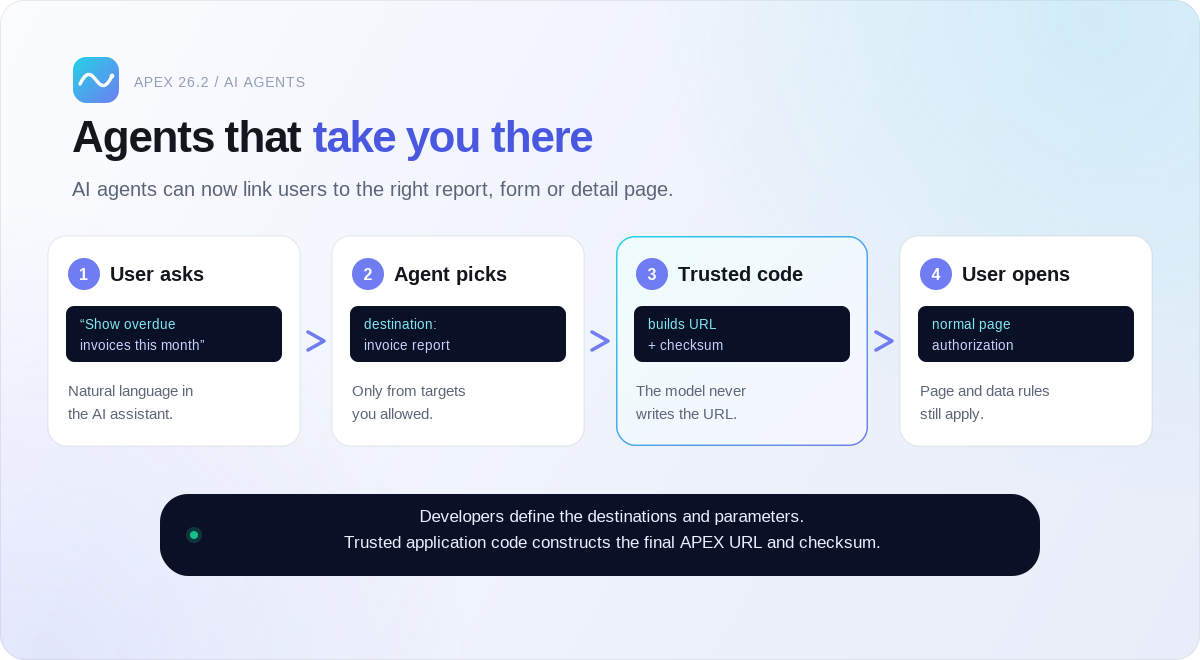
That split matters more than it might seem:
- The model never invents a URL. It can only choose among destinations you defined, with the parameters you allowed. That removes a whole class of problems, from broken links to prompt-injected links pointing somewhere you did not intend.
- Checksums stay meaningful. APEX uses URL checksums with Session State Protection to stop users from tampering with page and item values in links. Because APEX builds the URL in trusted code, the checksum is generated the normal way instead of being something the model could guess or forge.
- The target page still decides. Navigation is a link, not a permission. The page’s authorization scheme, Session State Protection and the data rules behind its queries all apply exactly as they would if the user had clicked through the menu.
Oracle’s announcement describes the capability and the security model. Check the APEX 26.2 documentation for the exact configuration steps in your release before you design around specific attributes.
Good first destinations
Start narrow. Navigation works best for pages users already search for every day:
- A filtered report, for example open orders for a customer
- A detail page for a specific record the agent just found
- A form to start a common task, such as a new request
Avoid exposing administrative pages or anything destructive as a destination, even though the page’s own authorization would still protect it. A smaller list of destinations is easier to test and easier for the model to use correctly.
Agent SQL runs as the user
26.2 also states clearly how data access works for agents: SQL executed by supported APEX AI Agent tools runs under the requesting user’s security context. Asking an agent for more data does not grant more access.
With the new Oracle Deep Data Security integration, APEX can pass verified user and application identities to Oracle AI Database, which enforces row, column and value-level rules through Data Roles and Data Grants. APEX authorization still controls what a user can see and do in the application; the database controls which data comes back.
Together with developer-defined navigation, that gives a clear model: the agent can help users find things faster, but it cannot see or open anything they could not reach themselves.
Reasoning Effort: decide how hard the model thinks
Reasoning models can spend more or less effort before answering or choosing their next tool call. More effort can help on complex, multi-step tasks. It also costs time and tokens. APEX 26.2 exposes this as Reasoning Effort.
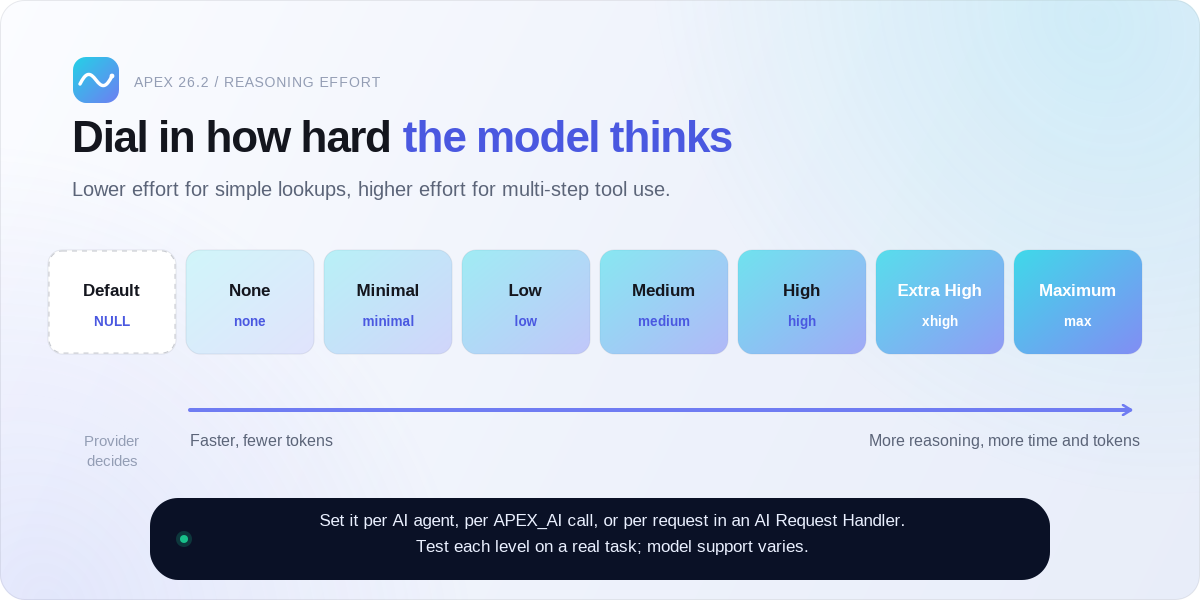
| Level | APEX value |
|---|---|
| Default | NULL |
| None | none |
| Minimal | minimal |
| Low | low |
| Medium | medium |
| High | high |
| Extra High | xhigh |
| Maximum | max |
Default leaves the choice to the provider and model. It does not turn reasoning off, and existing agents keep this setting after upgrading. The full list is shown for every provider and is not filtered by model, so confirm that your model supports the level you pick.
You can set it in three places:
- On the AI agent, under Advanced. Different agents using the same service can use different levels.
- In PL/SQL, with the
p_reasoning_effortparameter ofAPEX_AI.GENERATEorAPEX_AI.CHAT, using constants prefixedapex_ai.c_reasoning_effort_. - Per request, in an AI Request Handler procedure, by setting
p_result.request.reasoning_effort. This changes only the outgoing request, not the saved agent or service.
A minimal PL/SQL example, assuming a Generative AI Service with the static ID my-ai-service and a model that supports High:
DECLARE
    l_response CLOB;
BEGIN
    l_response := apex_ai.generate(
                      p_prompt            => 'Summarize the main risks in this week''s open support tickets.'
                    , p_service_static_id => 'my-ai-service'
                    , p_reasoning_effort  => apex_ai.c_reasoning_effort_high );

    sys.dbms_output.put_line( dbms_lob.substr( l_response, 4000, 1 ) );
END;
Support depends on the provider: OpenAI through Responses, OCI Generative AI through Responses for OpenAI models or the Generic API’s reasoning control for compatible models, Gemini through thinking levels on compatible models, and Anthropic Claude and Mistral AI through their existing integrations. Native Cohere is not supported by this setting, and Ollama or other OpenAI-compatible endpoints must implement the API and reasoning control themselves.
Our rule of thumb: start low for routing, lookups and short answers, and raise the level only for agents that plan several tool calls or reason over messy data. Oracle’s own advice is the right one: test a representative task at each level and compare both answer quality and response time.
New provider APIs
Generative AI Services in 26.2 let you choose the provider API. APEX handles the endpoints and the request and response formats.
| Provider | API choices | Default for new services |
|---|---|---|
| OpenAI | Responses, Chat Completions | Responses |
| Generic OpenAI Compatible | Responses, Chat Completions | Responses |
| Ollama | Responses, Chat Completions | Responses |
| OCI Generative AI | Generic, Responses | Generic |
| Google Gemini | Interactions, legacy generateContent | Interactions |
Chat Completions and generateContent remain available but are marked deprecated. A few practical notes from Oracle’s technical post:
- Do not add
/responsesto the base URL. APEX appends the path itself. - Confirm the endpoint really supports Responses before switching Generic OpenAI Compatible or Ollama services.
- OCI Generative AI now has Compartment ID, AI Model and Serving Mode as proper service properties. Responses on OCI requires a Project ID.
- Upgrades are conservative. Eligible OpenAI and Gemini services switch to the new APIs automatically, but services with custom Additional Attributes or HTTP headers keep their legacy API. Review those before switching them yourself.
What to check before production
AI agents touch data, prompts and external services at the same time. Before enabling navigation for real users, we would work through this list:
- Keep destinations few and obvious. Everyday reports, detail pages and forms first; no admin pages.
- Verify page security independently. Authorization schemes and Session State Protection on every destination page, tested without the agent.
- Use tool controls. Authorization schemes and conditions on tools, and confirmation for any tool that changes data.
- Pick a reasoning level per agent. Measure latency and token use at two or three levels on real prompts.
- Review AI services after the upgrade. Especially services with custom attributes that stayed on a legacy API.
- Know what leaves the database. Prompts, tool results and context go to the AI provider. Choose provider, region and contract terms with your security team.
- Monitor cost and failures. Treat the AI service like any other external dependency, with usage tracking and alerting.
Platform readiness matters as much as configuration: outbound access to AI providers, credentials, network rules and observability. Our article on AI-ready infrastructure for Oracle APEX covers that layer, and AI Interactive Reports in APEX 26.2 shows the same “settings, not free-form output” design applied to reports.
APEX 26.2 is available now for on-premises installations, with Oracle Autonomous AI Database following shortly and OCI and multicloud rollouts over the coming weeks. If you want an APEX environment that is upgraded, monitored and ready for AI integrations without running it yourself, see Cloud Hosting and the plans page.
Bottom line
APEX 26.2 moves AI agents from answering questions to getting users where they need to be, without handing the model control over URLs, permissions or data access. Reasoning Effort and the new provider APIs give you the knobs to make that fast and affordable.
For business applications, that is the right shape for AI: helpful, constrained and auditable.
FAQ
Can an AI agent send users to any page in my application?
No. Developers define the destinations and parameters an agent may use, and trusted application code builds the final URL and checksum.
Does agent navigation bypass page authorization?
No. Navigation produces a normal link. The target page’s authorization scheme, Session State Protection and data access rules still apply.
Can an agent return data the user is not allowed to see?
SQL executed by supported agent tools runs under the requesting user’s security context, so asking the agent does not grant extra access. Deep Data Security can enforce row, column and value-level rules in the database.
What does the Default Reasoning Effort do?
It leaves the choice to the provider and model. It does not disable reasoning, and existing agents keep this setting after upgrading to 26.2.
Where can I set Reasoning Effort?
On the AI agent under Advanced, with p_reasoning_effort in APEX_AI.GENERATE or APEX_AI.CHAT, or per request in an AI Request Handler.
Will my existing Generative AI Services break after upgrading?
Oracle’s upgrade is conservative: eligible OpenAI and Gemini services switch to Responses and Interactions, while services with custom Additional Attributes or HTTP headers keep their legacy API until you review them.