The short version
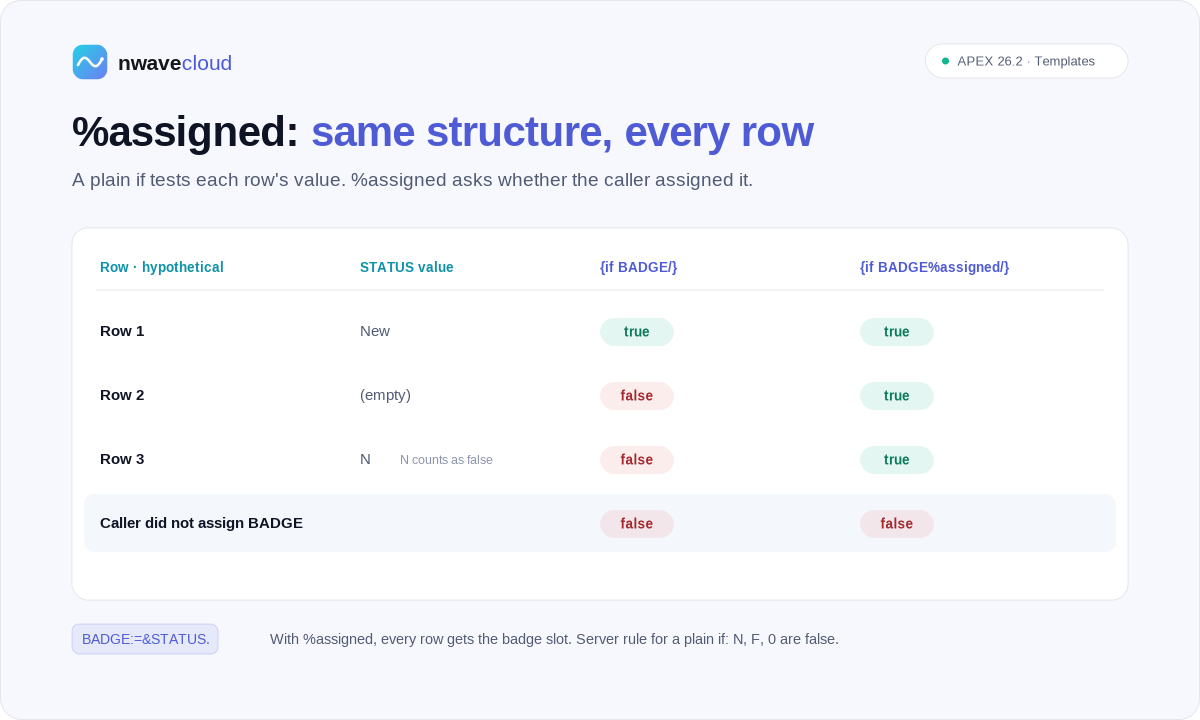
Template components render the same markup for many rows. Sometimes you want every row to have the same structure, even when a value is empty on some of them. That is what %assigned is for:
- Plain
{if BADGE/}tests the value after substitution, row by row. {if BADGE%assigned/}is true for every row onceBADGEhas been assigned, empty or not.- Server side already documents it in Template Directives.
- New in 26.2: “apex.util.applyTemplate
{if/}directive adds%assignedpostfix operator to be consistent with server.” - Scope: only for templates applied with
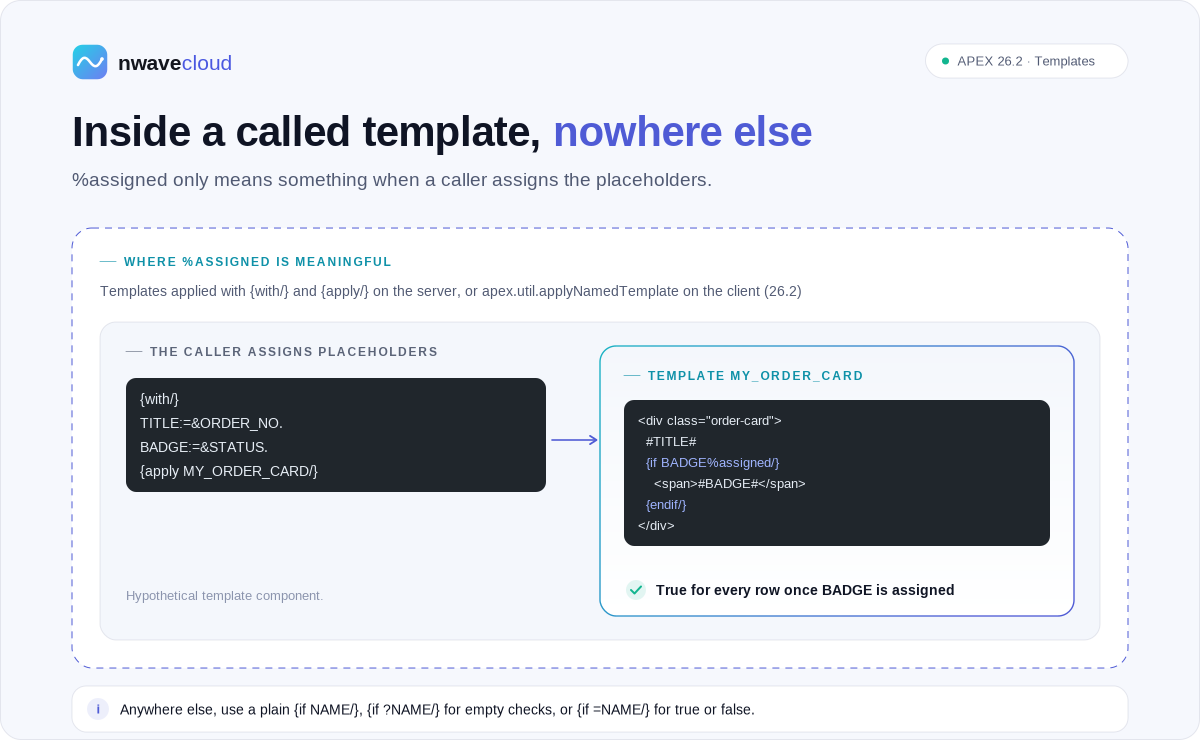
{with/}and{apply/}, orapex.util.applyNamedTemplate.
How a plain if decides
The 26.2 JavaScript API Reference defines the syntax:
{if [!][?|=]NAME[%assigned]/} ... {elseif [!][?|=]NAME2[%assigned]/} ... {else/} ... {endif/}For a plain {if NAME/}, “A value is false if after trimming leading and trailing spaces it is an empty string, or for a page item the item isEmpty method returns true, or if the value is equal to any of the values in the falseValues option.” Everything else is true. Two prefixes refine that: ? explicitly tests whether the value is empty, and = explicitly tests true or false. A leading ! negates the test.
On the server, the App Builder guide maps {if MYITEM/} to :MYITEM is not null and upper( :MYITEM ) not in ( 'F', 'N', '0' ).
What %assigned changes
Oracle’s description, from the JavaScript API Reference: “The optional ‘%assigned’ postfix operator is useful when consistent output is required for multiple rows of data. When a value like &COLUMN_NAME. is assigned to NAME, it might be empty for some rows after applying substitutions. The ‘%assigned’ postfix operator evaluates to true for all rows in this case.”
So the question changes from “is this row’s value empty?” to “did the caller assign this placeholder at all?” Two rules come with it:
- “It should only be used when the template is applied using the apex.util.applyNamedTemplate API or using the with and apply directives.”
- “The ‘?’ and ‘=’ prefix operators do not apply and are ignored when the ‘%assigned’ postfix operator is used.”
An example on the server
The {with/} and {apply/} directives call a template component and assign its placeholders. The App Builder guide’s syntax:
{with/}
FORMAL_ARG1:=ARGUMENT_TEXT
FORMAL_ARG2:=ARGUMENT_TEXT
{apply TEMPLATE_NAME/}
A hypothetical card template component, MY_ORDER_CARD, with an optional status badge. Its template text:
<div class="order-card">
  <span class="order-card-title">#TITLE#</span>
  {if BADGE%assigned/}
    <span class="order-card-badge">#BADGE#</span>
  {endif/}
</div>
Called for each row of a report, with the badge mapped to a column:
{with/}
TITLE:=&ORDER_NO.
BADGE:=&STATUS.
{apply MY_ORDER_CARD/}
Every card gets a badge slot, so the grid lines up even where STATUS is empty. A caller that does not assign BADGE at all gets cards without the slot. With a plain {if BADGE/}, the slot would come and go row by row.
The same on the client
Before 26.2, apex.util.applyTemplate on the client did not support %assigned. Now it does, so templates rendered in the browser can follow the same rule. The JavaScript entry point for named templates is apex.util.applyNamedTemplate, which applies a template defined with apex.util.defineTemplates. Oracle’s own example renders the Universal Theme avatar:
const output = apex.util.applyNamedTemplate( "THEME$AVATAR", {
    args: {
        "TYPE": "INITIALS",
        "INITIALS": "{if P1_INITIALS/}&P1_INITIALS.{else/}N/A{endif/}"
    }
} );
When to use which
- Plain
{if NAME/}when the row’s value decides what to show. Remember thatN,Fand0count as false. {if ?NAME/}when you only care whether the value is empty.{if NAME%assigned/}when the caller decides the structure and every row should look the same.
Bottom line
%assigned is a small operator for a real layout problem: rows that jump because one value is empty. It has worked on the server for template directives, and APEX 26.2 brings it to apex.util.applyTemplate, so the same template behaves the same way wherever it renders.
FAQ
What does %assigned do in an APEX template directive?
It makes {if NAME%assigned/} true for all rows when NAME has been assigned a value, such as a column substitution, even if the substituted value is empty for some rows.
Is %assigned new in APEX 26.2?
For the client. The 26.2 release notes say apex.util.applyTemplate adds the %assigned postfix operator to be consistent with the server, where Template Directives already document it.
Where can I use %assigned?
Only in templates applied with the {with/} and {apply/} directives or apex.util.applyNamedTemplate.
Can I combine %assigned with the ? or = prefix?
No. The ? and = prefix operators are ignored when %assigned is used.
Why does {if STATUS/} hide my badge when STATUS is N?
Because the if directive treats values like N, F and 0 as false. Use {if ?STATUS/} to test only for empty.