The short version
The social version of this article fits in one line: p_reasoning_effort => apex_ai.c_reasoning_effort_low. Low for lookups and routing, high for multi-step agent work, set per agent, per call or per request.
The longer version has a few details that matter in production:
- Default is not off. It sends no value, so the provider and model decide how much to reason.
- Agent calls and service calls differ.
p_reasoning_effortexists only on the service-basedAPEX_AI.GENERATEandAPEX_AI.CHAToverloads. Agents take their level from the agent definition or from a request handler. - The level list is not filtered. APEX offers every level for every provider and model, so a valid-looking choice can still be one your model does not support.
- Measure before you raise it. Compare answer quality, response time and tokens at two or three levels on a real task.
Our broader article on AI agents, page navigation and Reasoning Effort in APEX 26.2 covers the release as a whole. This one stays on Reasoning Effort: where to set it, how to pick a level and how to check the result.
What reasoning effort controls
Oracle describes Reasoning Effort, which some providers call a thinking level, as how much reasoning a model uses before it produces a response or requests a tool call. The trade-off is simple. More effort can improve results on complex tasks but can increase latency and token usage. Less effort can reduce both for simple requests.
| Level | Value APEX sends | PL/SQL constant | Release notes label |
|---|---|---|---|
| Default | nothing (NULL) |
leave the parameter NULL |
|
| None | none |
apex_ai.c_reasoning_effort_none |
Provider specific |
| Minimal | minimal |
apex_ai.c_reasoning_effort_minimal |
Provider specific |
| Low | low |
apex_ai.c_reasoning_effort_low |
|
| Medium | medium |
apex_ai.c_reasoning_effort_medium |
|
| High | high |
apex_ai.c_reasoning_effort_high |
|
| Extra High | xhigh |
apex_ai.c_reasoning_effort_xhigh |
Provider specific |
| Maximum | max |
apex_ai.c_reasoning_effort_max |
Provider specific |
In the API reference, these constants belong to the subtype t_reasoning_effort, declared as VARCHAR2(7). The missing label on Low, Medium and High does not mean they work everywhere: Oracle states that support varies by provider, model and Provider API.
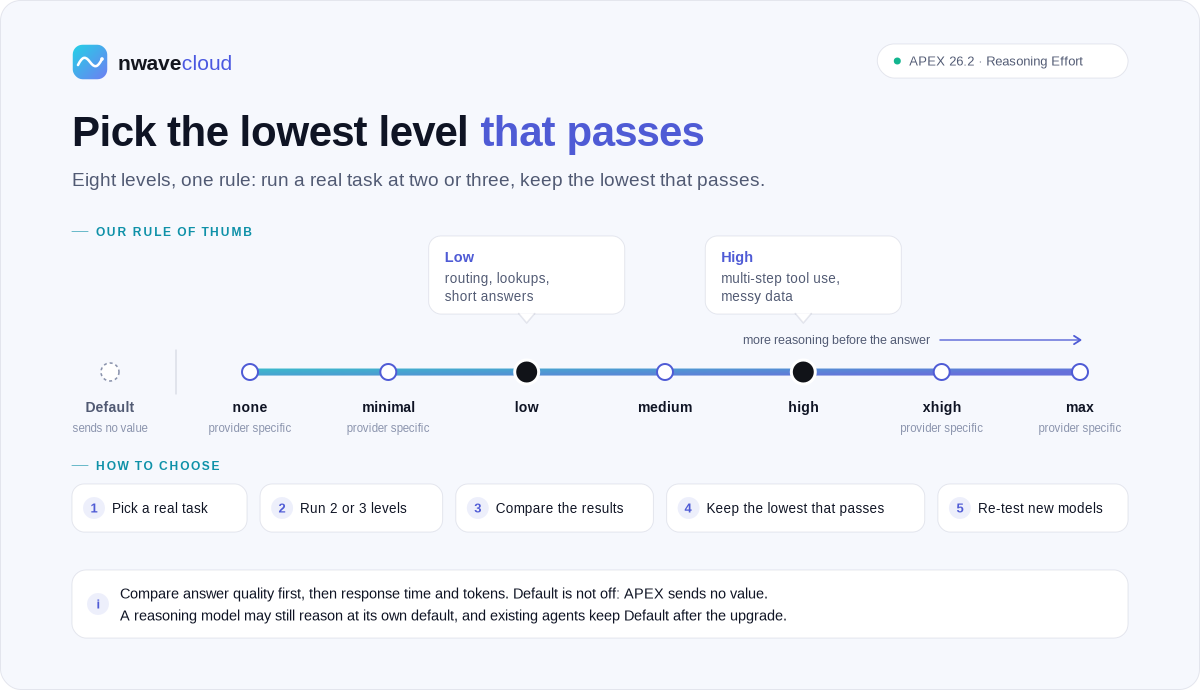
Two facts about Default deserve emphasis. It does not disable reasoning; it leaves the decision to the provider, so a reasoning model may still reason at its own default. And existing agents keep Default after upgrading to 26.2, so nothing changes until you pick a level.
Three places to set it
1. On the AI agent
Open the agent under Shared Components > AI Agents, choose a level in Reasoning Effort under Advanced and click Apply Changes. Each agent stores its own level, so two agents on the same Generative AI Service can behave differently. For OpenAI, Oracle’s post adds a check: confirm the service’s Provider API is Responses.
This is where we set it first. The level is visible in App Builder, travels with the application and needs no code.
2. In PL/SQL with p_reasoning_effort
In the 26.2 API reference, p_reasoning_effort (type t_reasoning_effort, default NULL) appears on the overloads that take p_service_static_id, listed as GENERATE and CHAT Signature 2. When it is NULL, APEX sends no value. The agent-based overloads, which take p_agent_static_id, have no such parameter. They accept p_request_handler_procedure instead, which leads to option 3.
Based on Oracle’s example, which requested High, here is a routing call at Low:
DECLARE
    l_response CLOB;
BEGIN
    l_response := apex_ai.generate(
                      p_prompt            => 'Route this ticket to Billing, Technical or Sales: "I was charged twice this month."'
                    , p_service_static_id => 'my-ai-service'
                    , p_reasoning_effort  => apex_ai.c_reasoning_effort_low );

    sys.dbms_output.put_line( dbms_lob.substr( l_response, 4000, 1 ) );
END;
/
APEX_AI requires a valid APEX session. Oracle ran its example from SQL Workshop; from a plain SQL client, create a session first with APEX_SESSION.CREATE_SESSION.
3. Per request with an AI Request Handler
An AI Request Handler is an application-level PL/SQL procedure. APEX calls it before each request is sent to the AI service, after component-specific request handling. Setting p_result.request.reasoning_effort there changes only the outgoing request; the saved agent and service settings stay as they are.
Register the procedure under Edit Application Definition > AI > Request Handler Procedure. Because it runs for every AI request in the application, always put a condition in it. A hypothetical handler for an agent with the static ID support-assistant, reading a page item:
CREATE OR REPLACE PROCEDURE ai_request_handler (
      p_param  IN            apex_ai.t_chat_request_handler_param
    , p_result IN OUT NOCOPY apex_ai.t_chat_request_handler_result )
AS
BEGIN
    IF p_param.agent.static_id = 'support-assistant' THEN
        p_result.request.reasoning_effort :=
            CASE v( 'P100_REASONING_EFFORT' )
                WHEN 'high' THEN apex_ai.c_reasoning_effort_high
                ELSE apex_ai.c_reasoning_effort_low
            END;
    END IF;
END ai_request_handler;
/
Three notes on this handler:
- Submit the item. Add
P100_REASONING_EFFORTto the Show AI Assistant action’s Generative AI, Items to Submit, so its value is in session state when the handler reads it. - Map, do not pass through. Oracle’s example assigns the item value directly. We prefer mapping to known constants, so only levels you have tested ever leave the database.
- Condition on the agent. Oracle’s blog example checks
p_param.component.static_id. The 26.2 API reference lists onlyagentandinvocationint_chat_request_handler_param, and the documentation’s own navigation example checksp_param.agent.static_id, so that is what we use. Compile against your release to confirm.
Should end users choose the level? Usually not, in our view. Derive it from context (which agent, which page, which task) and keep a selector like this for internal testing.
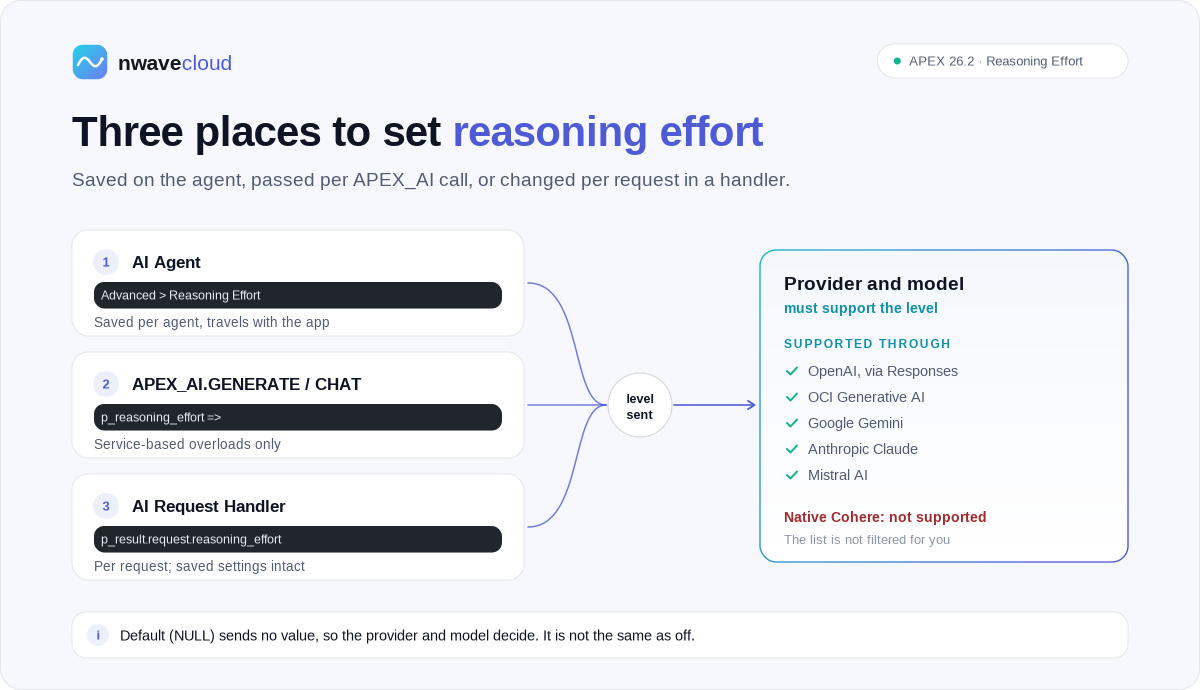
Provider support
Support depends on the provider and the Provider API selected on the Generative AI Service:
| Provider | How the level is applied |
|---|---|
| OpenAI | Through the Responses Provider API |
| OCI Generative AI | Responses for OpenAI models; the Generic API’s reasoning control for compatible non-OpenAI models |
| Google Gemini | Thinking levels on compatible models, through the Interactions integration; levels vary by model |
| Anthropic Claude | Effort, through the existing integration; no Responses selection needed |
| Mistral AI | reasoning_effort through the existing integration; Oracle notes Mistral documents none and high |
| Ollama, Generic OpenAI Compatible | Only if the endpoint and model implement the selected API and reasoning control |
| Native Cohere | Not supported by this setting |
Oracle does not publish a table mapping each APEX level to each provider’s values. Check your provider’s documentation for the exact model you use.
How we choose a level
Oracle’s guidance is short and correct: test a representative task, run the same task on the same model at two levels such as Low and High, and review the answer, response time and token usage before raising the level. We add some structure around it:
- Pick one real task per agent. Use production-like inputs and include at least one hard case.
- Fix everything except the level. Same service, model, prompt and data.
- Run two or three levels. For a routing agent, Low plus None or Minimal if your model supports them. For a multi-step agent, Low, Medium and High.
- Score quality first. Does the answer pass your checks? Only then compare latency and tokens.
- Choose the lowest level that passes. Save it on the agent. Use per-request changes only when one agent serves both light and heavy work.
- Re-test after changes. A new model or Provider API can change what each level means.
Our rule of thumb: Low for routing, lookups and short answers; higher only for agents that plan several tool calls or reason over messy data. Extra High and Maximum are rarely our starting point. They are provider specific and sit at the expensive end of the scale.
Measuring tokens and latency
For service-based calls, APEX documents a hook you can use: a response handler procedure passed in p_response_handler_procedure. Oracle’s ad-hoc agents post explains that APEX calls it once per model response, and in 26.2 its result record carries the normalized t_chat_response with input_tokens, output_tokens and total_tokens. A minimal logger looks like this (our sketch, built from the documented record fields; compile it on a development instance first):
CREATE OR REPLACE PROCEDURE log_ai_usage (
      p_param  IN            apex_ai.t_chat_response_handler_param
    , p_result IN OUT NOCOPY apex_ai.t_chat_response_handler_result )
AS
BEGIN
    sys.dbms_output.put_line(
           'input: '   || p_result.response.input_tokens
        || ' output: ' || p_result.response.output_tokens
        || ' total: '  || p_result.response.total_tokens );
END log_ai_usage;
/
Add p_response_handler_procedure => 'log_ai_usage' to the call from option 2, run it once per level, note which level each run used, and record the elapsed time of each call, for example with SYSTIMESTAMP before and after.
Two limits. Oracle does not describe how each provider fills the token fields, including whether reasoning tokens are counted, so cross-check against your provider’s usage reporting. And for agents behind Show AI Assistant, the agent-based overloads take a request handler but no response handler, and we found no documented APEX report of per-request tokens. There, use your provider’s usage reporting.
Pitfalls
- Choosing a level the model does not support. The list is not filtered by provider, API or model. Oracle does not say whether an unsupported value raises an error or is ignored, so test your chosen level on your model before release.
- Treating Default as off. Default sends nothing and the provider decides. If you want minimal reasoning, choose it explicitly, where supported.
- A legacy Provider API after upgrade. OpenAI support runs through Responses and Gemini through Interactions. On upgrade, services with custom Additional Attributes or HTTP Headers keep their legacy API, so check the Provider API setting before expecting a level to apply.
- Passing the level to an agent call.
p_reasoning_effortis not on the agent-based overloads. Set it on the agent or in a request handler. - An unconditional request handler. It runs before every AI request in the application. Scope it by agent.
- Forgetting Items to Submit. Oracle’s post says a page item the handler reads must be in the AI component’s Items to Submit; otherwise the handler cannot rely on its current value.
APEX 26.2 is available now for on-premises installations, with Oracle Autonomous AI Database following shortly and OCI and multicloud rollouts over the coming weeks. Reasoning Effort is only as useful as the platform around it: outbound access to AI providers, credentials and monitoring, which our article on AI-ready infrastructure for Oracle APEX covers. If you want an upgraded, monitored APEX environment for this kind of testing without running it yourself, see Cloud Hosting and the plans page.
Bottom line
Reasoning Effort is a small setting with a direct effect on speed, cost and answer quality. Start every agent at a deliberate level, usually Low, and raise it only where a measured task shows a real gain.
Set it on the agent by default, per call for service-based PL/SQL, and per request only when one agent genuinely serves two kinds of work.
FAQ
Does Default turn reasoning off?
No. Default means APEX sends no reasoning-effort value, so the provider and model decide. Existing agents keep Default after upgrading to 26.2.
Can I pass p_reasoning_effort when calling an agent from PL/SQL?
Not in the agent-based APEX_AI.GENERATE and APEX_AI.CHAT overloads. They accept p_request_handler_procedure, and that handler can set p_result.request.reasoning_effort. The agent’s own Advanced setting also applies.
Which level should I start with?
Our rule of thumb is Low for routing, lookups and short answers, and higher levels for multi-step tool use. Confirm it by testing a representative task at two or three levels.
What happens if I choose a level my model does not support?
Oracle does not document the behavior. The list is not filtered by provider, API or model, so test the level against your model and check the provider’s documentation.
How do I see token usage per level?
For service-based calls, a response handler procedure receives the response record with input_tokens, output_tokens and total_tokens. For agents and anything not covered there, use your provider’s usage reporting.
Does the AI Request Handler change the agent’s saved setting?
No. It updates only the outgoing request. The saved AI agent and Generative AI Service settings stay unchanged.
Sources
- Announcing Oracle APEX 26.2 General Availability
- Oracle APEX 26.2: Working with Generative AI Provider APIs and Reasoning Effort
- Oracle APEX 26.2 Release Notes: New Features
- APEX_AI (26.2)
- APEX_AI Constants and Data Types (26.2)
- APEX_AI.GENERATE Function Signature 1 (26.2)
- APEX_AI.GENERATE Function Signature 2 (26.2)
- APEX_AI.CHAT Function Signature 1 (26.2)
- APEX_AI.CHAT Function Signature 2 (26.2)
- Managing AI Agents and AI Tools (26.2)
- About Using AI-Generated Navigation in Show AI Assistant (26.2)
- Creating a Dynamic Action to Display AI Assistant (26.2)
- Oracle APEX 26.1: Build Ad-hoc AI Agents Entirely in PL/SQL