The short version
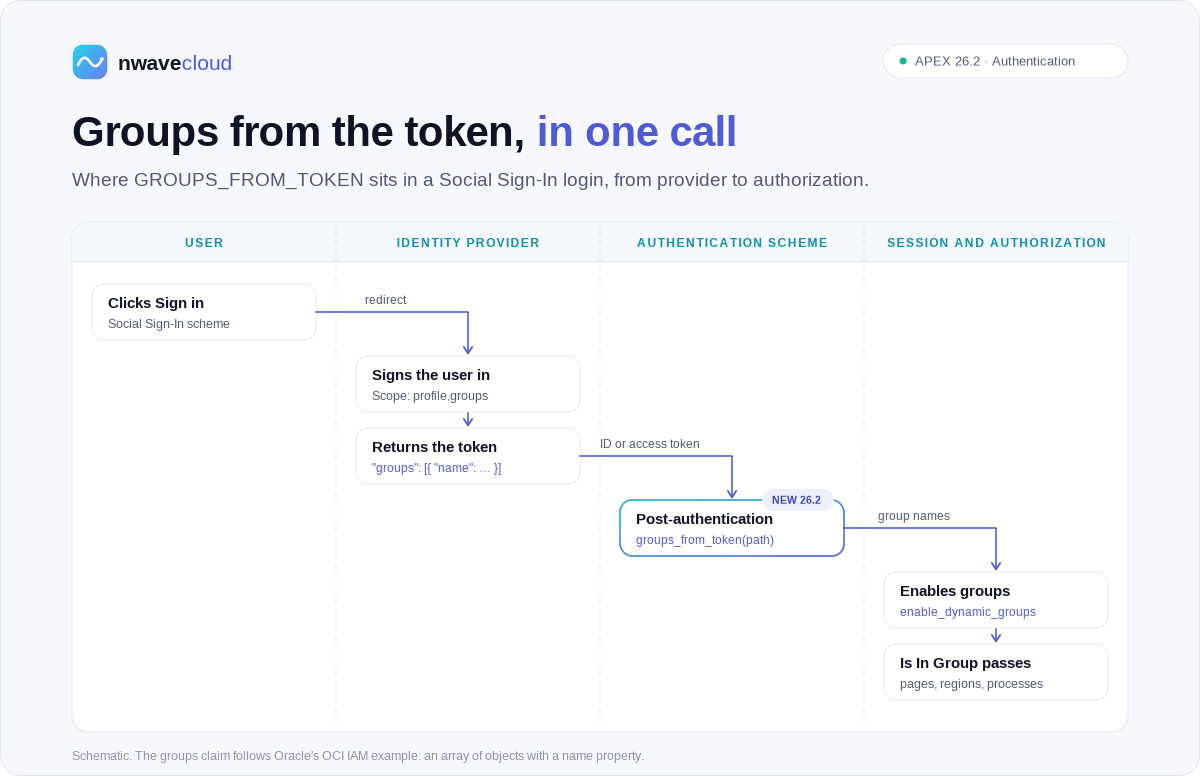
Mapping identity provider groups to APEX authorization used to mean a post-authentication procedure that walked the sign-in JSON by hand. APEX 26.2 adds a helper for the extraction step:
- The function.
APEX_AUTHENTICATION.GROUPS_FROM_TOKENreturns the group names from the current social sign-in ID or access token asAPEX_T_VARCHAR2. - The path. Its one parameter,
p_group_names_path_expr, is a JSON path to each group’s name. Oracle documents$.groups[*].nameas the default. - The handoff. Pass the list to
APEX_AUTHORIZATION.ENABLE_DYNAMIC_GROUPSin post-authentication logic. - The check. Authorization schemes of type Is In Group pass when the group is enabled for the session.
The identity provider still has to send the groups. The Scope and Additional User Attributes of your Social Sign-In scheme decide that.
What changed in 26.2
The release notes list it with the new PL/SQL APIs as a helper “to make the enablement of dynamic groups from the ID token simpler”. The API reference documents it as a function:
FUNCTION apex_authentication.groups_from_token (
    p_group_names_path_expr IN VARCHAR2 )
    RETURN APEX_T_VARCHAR2;
It reads from the “current social sign in ID or access token”, and Oracle says to call it “in the post-authentication logic of an authentication scheme”. The parameter is a “JSON Path expression pointing to the “name” attribute for each group. May contain array steps.“
Two documentation quirks are worth knowing. The release notes call it a procedure, while the API reference documents a function, which is how you call it. And the syntax block shows no DEFAULT clause, although the parameter text says it defaults to $.groups[*].name. Both of Oracle’s examples pass the path explicitly, and so do we.
Before and after
Oracle’s Developer’s Companion still shows the earlier approach for an OCI IAM identity domain: a post-authentication procedure that reads the sign-in response with APEX_JSON, loops over the groups array, collects each name and then calls enable_dynamic_groups. In Oracle’s sample response, user susan belongs to two groups, Employee and HR Rep, each an object with id, name and $ref properties.
In 26.2 the extraction becomes one call. Based on Oracle’s Example 1:
procedure post_authentication
is
    l_group_names apex_t_varchar2;
begin
    l_group_names := apex_authentication.groups_from_token(
                         p_group_names_path_expr => '$.groups[*].name' );

    apex_debug.info( 'Dynamic Groups: %s',
                     apex_string.join( l_group_names, ',' ) );

    apex_authorization.enable_dynamic_groups(
        p_group_names => l_group_names );
end post_authentication;
Reference it in the Post-Authentication Procedure Name attribute on the scheme’s Login Processing tab, which can point to a procedure in a package. If you copy the API reference example directly, note that its apex_debug.info line is missing a closing parenthesis and will not compile as printed. The version above closes it.
Filtering groups with the path
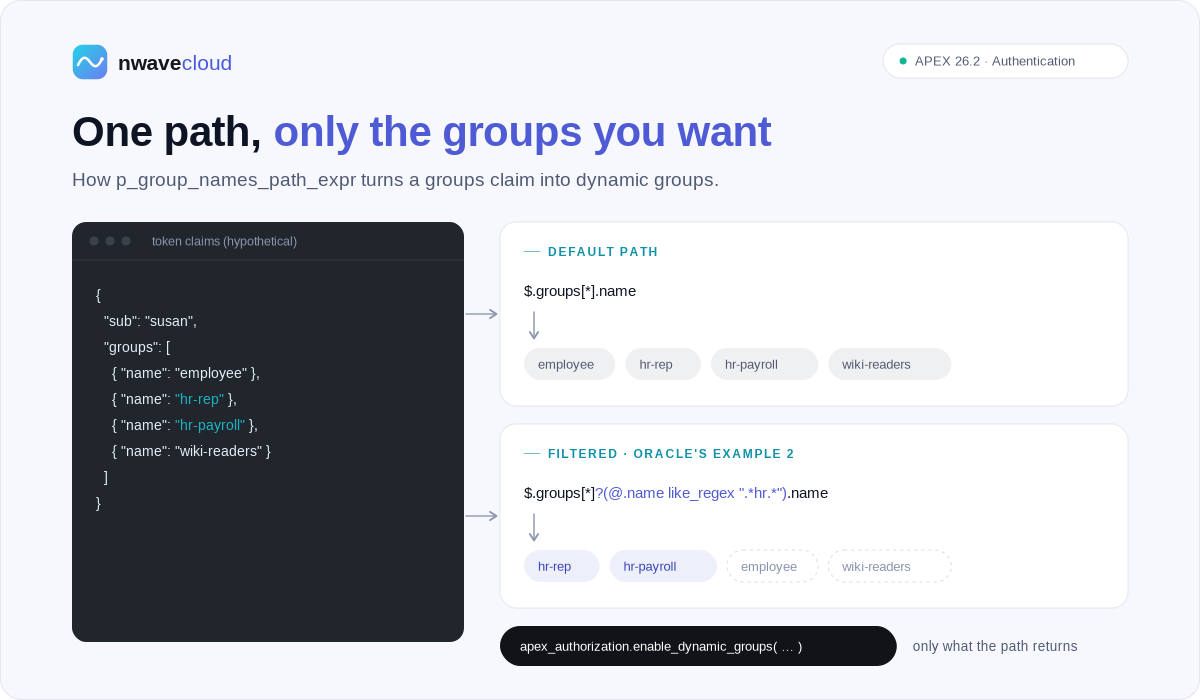
Because the parameter is a JSON path, you can filter before anything reaches the session. Oracle’s Example 2 enables only groups whose name contains hr:
l_group_names := apex_authentication.groups_from_token(
    p_group_names_path_expr => '$.groups[*]?(@.name like_regex ".*hr.*").name' );
Filtering at the source keeps the session’s group list short and stops unrelated directory groups from showing up in authorization decisions. A pattern we like: agree on a naming convention in the identity provider, for example a hypothetical apex- prefix for groups that applications use, and filter on it.
Test every path against a real sign-in. Oracle’s examples log the result with apex_debug.info, so enable debug for a test login and read what came back before you rely on it.
Making the provider send groups
GROUPS_FROM_TOKEN can only read what the provider put in the token. On the Social Sign-In scheme:
- Scope. A comma separated list of permissions. For OpenID Connect and Google, APEX adds the
openidscope automatically. Oracle’s OCI IAM example usesprofile,groups. - Additional User Attributes. Oracle’s example adds
groups. The docs warn that without the required Scope, “the authentication provider will not send all attributes”. - The claim shape. The default path expects an array of objects with a
nameproperty, as in Oracle’s OCI IAM sample. If your provider names the claim differently or shapes it differently, point the path at the group name values and test it.
The API reference does not say how the function chooses between the ID token and the access token, or what it returns when there is no groups claim. Test both cases in development: a user with groups and a user with none.
Using the groups in the app
ENABLE_DYNAMIC_GROUPS “enables groups in the current session”, and those groups “do not have to be created in the Oracle APEX workspace repository”. It must be called during or immediately after authentication, for example in a post-authentication procedure.
Then authorize declaratively. An authorization scheme of type Is In Group “succeeds if the group is enabled as a dynamic group for the session”. One scheme per role is usually enough, for example hypothetical HR_REP and EMPLOYEE schemes on pages, regions, buttons and processes.
Two more documented details. Enabling a group that exists in the workspace repository and has other groups granted to it also enables the granted groups. And with Real Application Security enabled for the authentication scheme, dynamic groups are enabled as RAS dynamic or external groups.
A short checklist
- Scope and Additional User Attributes request groups from the provider
- Post-Authentication Procedure Name points at your procedure
- The path passed explicitly and checked in debug output after a real sign-in
- A filter when the directory sends more groups than the app needs
- An Is In Group scheme per role, applied to pages and processes, not only buttons
- A test user with no groups, to confirm what the app shows them
Social sign-in depends on the database reaching your identity provider over HTTPS. For managed development, test and production APEX environments with outbound access, TLS and upgrades handled for you, see Cloud Hosting and the plans page.
Bottom line
GROUPS_FROM_TOKEN removes the most tedious part of group-based authorization with external identity: parsing the sign-in JSON. One call with a JSON path, one call to enable the groups, and Is In Group schemes do the rest.
The work that remains is configuration and testing. Make sure the provider sends the groups, pass the path explicitly, filter what you do not need, and check the debug output before go-live.
FAQ
What does GROUPS_FROM_TOKEN return?
A list of group names as APEX_T_VARCHAR2, read from the current social sign-in ID or access token using the JSON path you pass in p_group_names_path_expr.
Where should I call it?
In the post-authentication logic of the authentication scheme, then pass the result to APEX_AUTHORIZATION.ENABLE_DYNAMIC_GROUPS, as both of Oracle’s examples do.
Is it a procedure or a function?
A function. The release notes call it a helper procedure, but the API reference documents a function that returns APEX_T_VARCHAR2.
Can I enable only some of the groups?
Yes. The parameter is a JSON path, so it can filter. Oracle’s example uses $.groups[*]?(@.name like_regex ".*hr.*").name to keep groups whose name contains hr.
Do the groups have to exist in the APEX workspace?
No. Dynamic groups do not have to be created in the workspace repository. If one does exist there with other groups granted to it, those are enabled too.
Why does a user end up with no groups?
Usually the provider did not send them, or the path does not match the claim. Check the scheme’s Scope and Additional User Attributes, then log the function’s result with apex_debug.info during a test sign-in.
Sources
- Oracle APEX 26.2 Release Notes: New Features
- APEX_AUTHENTICATION.GROUPS_FROM_TOKEN Function (APEX 26.2)
- APEX_AUTHORIZATION.ENABLE_DYNAMIC_GROUPS Procedure (APEX 26.2)
- Social Sign-In (APEX 26.2 App Builder User’s Guide)
- About Authorization Scheme Types (APEX 26.2)
- Authenticating with an External Provider (APEX 26.2 Developer’s Companion)
- Enabling Groups in Post-Auth Procedure (APEX 26.2 Developer’s Companion)