The short version
If an APEX app still signs users in through Oracle Application Server Single Sign-On, 26.2 starts the clock:
- The change. “The Oracle Application Server Single Sign-On authentication scheme is deprecated, and will be removed in a future release.”
- Oracle’s path. “Anyone using this scheme should switch to Social Sign-In or SAML authentication.”
- The two classic SAML blockers. The identity provider must sign both the Assertion and the Response, and ORDS must trust the identity provider’s origin.
- The quiet risk. Usernames. If the new scheme produces different usernames, authorization schemes and audit columns break without any login error.
What the old scheme depended on
The App Builder User’s Guide describes it this way: the scheme “delegates authentication to the Oracle AS Single Sign-On (SSO) Server”, your site “must have been registered as a partner application with the SSO server”, and the scheme “only appears if Oracle 9iAS SSO Software Developer Kit (SDK) is installed in your database”. Its settings are a Partner Application Name and a Logout URL of the SSO Server.
The same page already says what to do next: “Oracle recommends using a modern Single Sign-On authentication scheme such as SAML Sign-In or Social Sign-In.” Deprecated features keep working for now, but an authentication change is not something to do the week a future release removes it.
SAML or Social Sign-In?
- SAML Sign-In fits when your identity provider speaks SAML 2.0, which most enterprise SSO products do. Oracle’s own example issuer,
https://login.example.com/oam/fed, is an Oracle Access Manager federation URL. - Social Sign-In supports “Google, Facebook, and other social networks and enterprise identity providers that support OpenID Connect or OAuth2 standards”. You choose a credential store with the client ID and secret, an authentication provider such as OpenID Connect with its discovery URL, and the scopes to request.
If your provider supports both, pick the one your identity team already runs for other applications. Fewer special cases, fewer surprises.
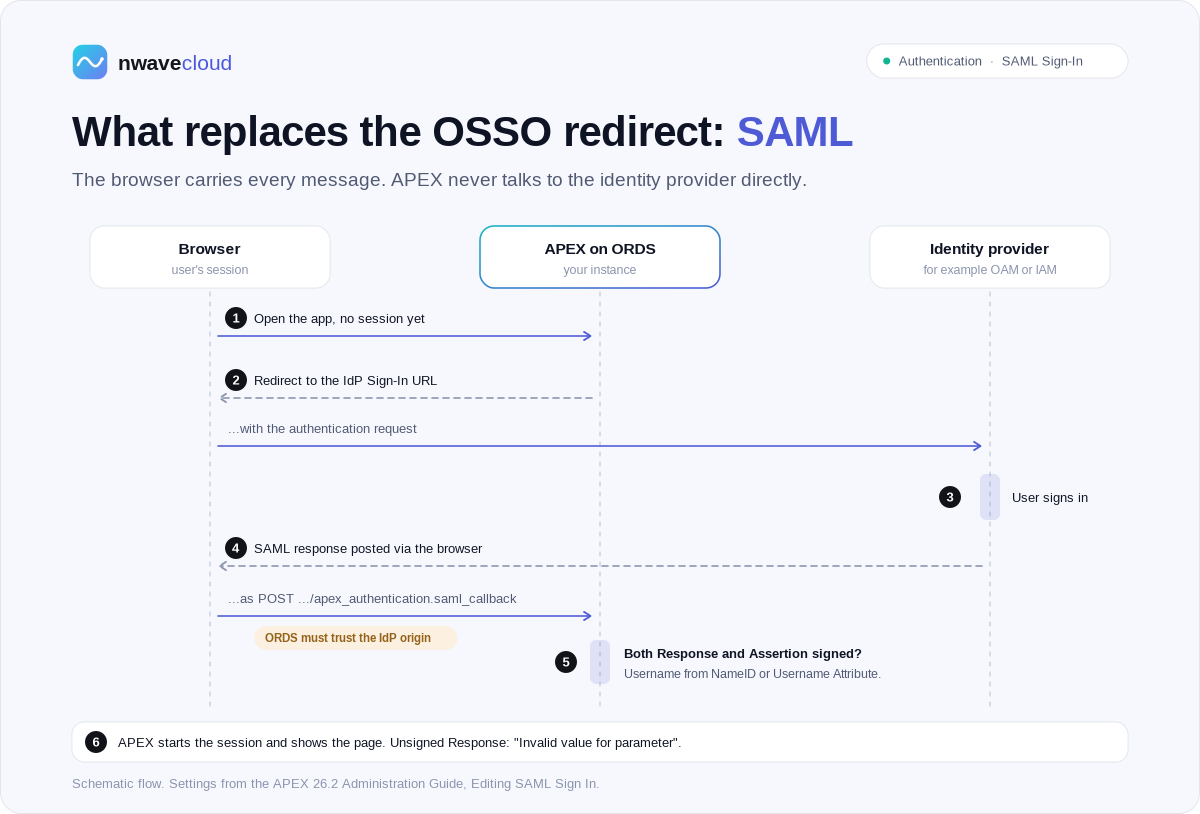
How SAML Sign-In flows
Configuring it, layer by layer
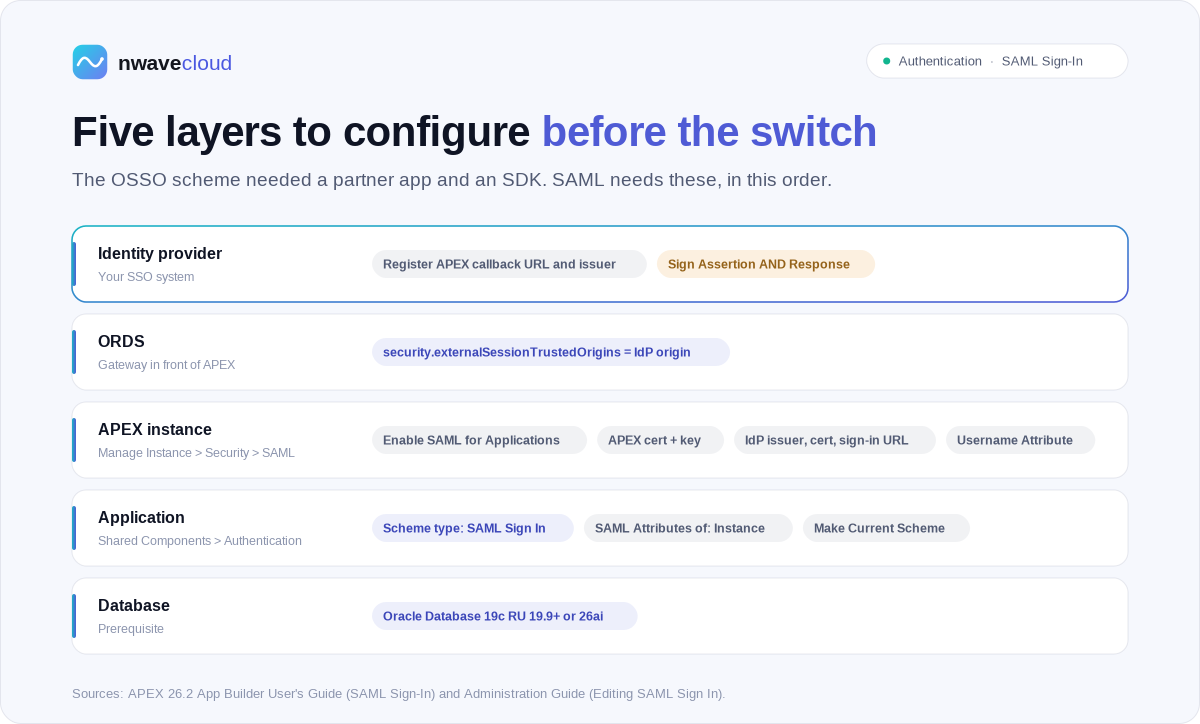
SAML in APEX is configured at the instance first, then used by applications.
Prerequisite. “SAML support requires Oracle Database 19c (Database Release Update 19.9.0.0.0 or newer) or Oracle AI Database 26ai.” Otherwise the scheme type does not display.
Instance. In Administration Services, Manage Instance > Security, under Development Environment Authentication Schemes, edit SAML:
- Enable SAML for Applications, so workspace applications can use it.
- APEX attributes: Username Attribute (by default APEX uses the assertion subject’s NameID), NameID Format (default
urn:oasis:names:tc:SAML:2.0:nameid-format:persistent), Issuer (defaults to the callback URL, for examplehttps://apex.example.com/ords/apex_authentication.saml_callback), certificate and private key, with alternatives for rotation. - Identity provider attributes: Issuer, Signing Certificate, Sign-In URL and Sign-Out URL from the provider’s metadata.
ORDS. “The SAML authentication end user flow requires Oracle REST Data Services (ORDS) to permit cross-origin requests from your Identity Provider.” Set security.externalSessionTrustedOrigins to include it.
Identity provider. “Oracle APEX requires the Identity Provider to digitally sign both the SAML Assertion and SAML Response. It is common for Identity Providers to only sign the SAML Assertion by default.” If only the assertion is signed, APEX rejects the payload with the “Invalid value for parameter” error.
Application. In Shared Components > Authentication Schemes, create a scheme from the gallery with type SAML Sign In, set Use SAML Attributes of to Instance, and decide on Convert Username To Upper Case.
A safe switch-over plan
- Find every app on the old scheme. Check Shared Components > Authentication Schemes in each application, and note which scheme is current.
- Write down today’s usernames. Look at what
APP_USERcontains now, its case included. Authorization schemes, ACL assignments and audit columns depend on it. - Set up SAML once per instance, with the identity team, in a non-production instance first.
- Map the username deliberately. Pick the Username Attribute or NameID that reproduces today’s usernames, and set the upper case option to match.
- Add the new scheme next to the old one and make it current in a test copy. Test login, logout, session timeout and every authorization scheme.
- Switch production in a planned window, with the old scheme still defined until the new one has run cleanly for a while.
Authentication changes on hosted instances are something we plan with customers on nwavecloud Cloud Hosting. See the plans page.
A short checklist
- Apps on the Oracle AS Single Sign-On scheme listed
- Current usernames, including case, documented
- Database version meets the SAML prerequisite
- Instance SAML configured and enabled for applications
- Identity provider signs both Assertion and Response
- ORDS
security.externalSessionTrustedOriginsincludes the identity provider - New scheme tested in a copy before Make Current in production
Bottom line
The old scheme needed a partner registration and a 9iAS-era SDK. SAML needs five layers configured once and a careful username mapping. Do it while the old scheme still works, not after it is gone.
FAQ
Is the Oracle AS Single Sign-On scheme removed in APEX 26.2?
No. It is deprecated in 26.2 and will be removed in a future release. Existing apps keep working for now.
What does Oracle recommend instead?
SAML Sign-In or Social Sign-In.
Why does APEX reject my SAML login with “Invalid value for parameter”?
The usual cause is an identity provider that signs only the SAML Assertion. APEX requires both the Assertion and the Response to be signed.
Where is SAML configured?
At the instance, in Administration Services under Manage Instance > Security, then in each application with a SAML Sign In authentication scheme.
What database version does SAML need?
Oracle Database 19c with Release Update 19.9 or newer, or Oracle AI Database 26ai.
Sources
- Oracle APEX 26.2 Release Notes: Deprecated Features
- Oracle Application Server Single Sign-On Server (APEX 26.2 App Builder User’s Guide)
- SAML Sign-In (APEX 26.2 App Builder User’s Guide)
- Editing SAML Sign In (APEX 26.2 Administration Guide)
- Social Sign-In (APEX 26.2 App Builder User’s Guide)
- Understanding Preconfigured Authentication Schemes (APEX 26.2)