The short version
Pixel-perfect documents usually need nested data: an invoice with lines, a department with employees, an order with shipments. APEX 26.2 makes that easier in report queries:
- The change. Report queries support hierarchical JSON and JSON columns “as raw JSON”, passed directly to Document Generator.
- The switch. Prefix the column alias with
{}, for exampleas "{}employees", and the value is not encoded as a string. - The method. Build the JSON with SQL/JSON functions such as
JSON_OBJECTandJSON_ARRAYAGG, not string concatenation. - The rules. Report queries must be SQL statements, and with Document Generator or APEX Office Print the Data Loop Name must match the report query source.
What changed in 26.2
The release notes list it under Changed Behavior: “Report Queries in APEX now support complex JSON structures, including hierarchical JSON and JSON columns, as raw JSON. This JSON is now passed directly to Document Generator, simplifying advanced document generation and reducing the need for PL/SQL workarounds.”
The App Builder guide documents the mechanism. When the report query returns JSON and one or more columns are in a JSON format, “these columns can be aliased to indicate that the JSON value must not be encoded as a string in the resulting document. The alias needs to be prefixed with” {}.
The {} alias in practice
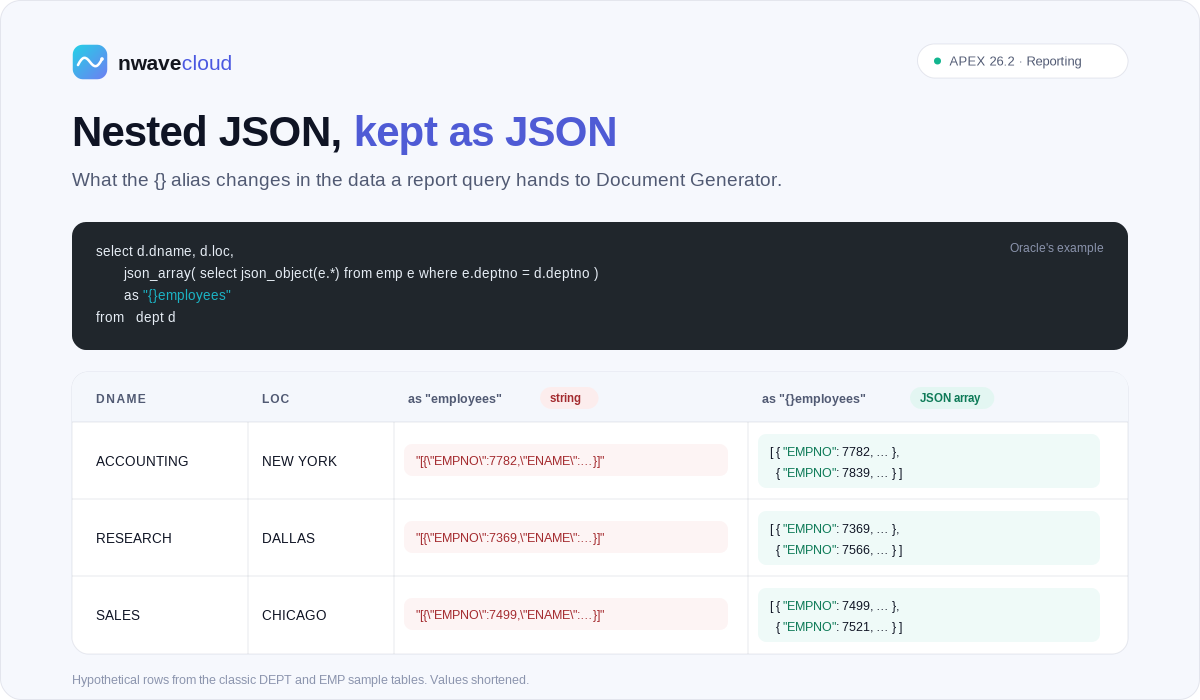
Oracle’s example nests each department’s employees inside the department row:
select
    d.dname, d.loc, json_array (
        select json_object(e.*) from emp e where e.deptno = d.deptno )
    as "{}employees"
from dept d
Without the prefix, the documentation’s wording implies the employees value reaches the document as a JSON string, which a template cannot loop over. With it, the value arrives as a real array, so the template can repeat a block for each employee. That is the nested shape document templates want, and it no longer needs PL/SQL to assemble.
Oracle adds a tip with the example: use SQL/JSON functions “to construct the JSON being added to the report output. These functions make sure that content is always properly encoded and that the resulting JSON structure is always as expected. Avoid manual string concatenations.” We agree. Hand-built JSON breaks on the first customer name with a quote in it.
Where Document Generator fits
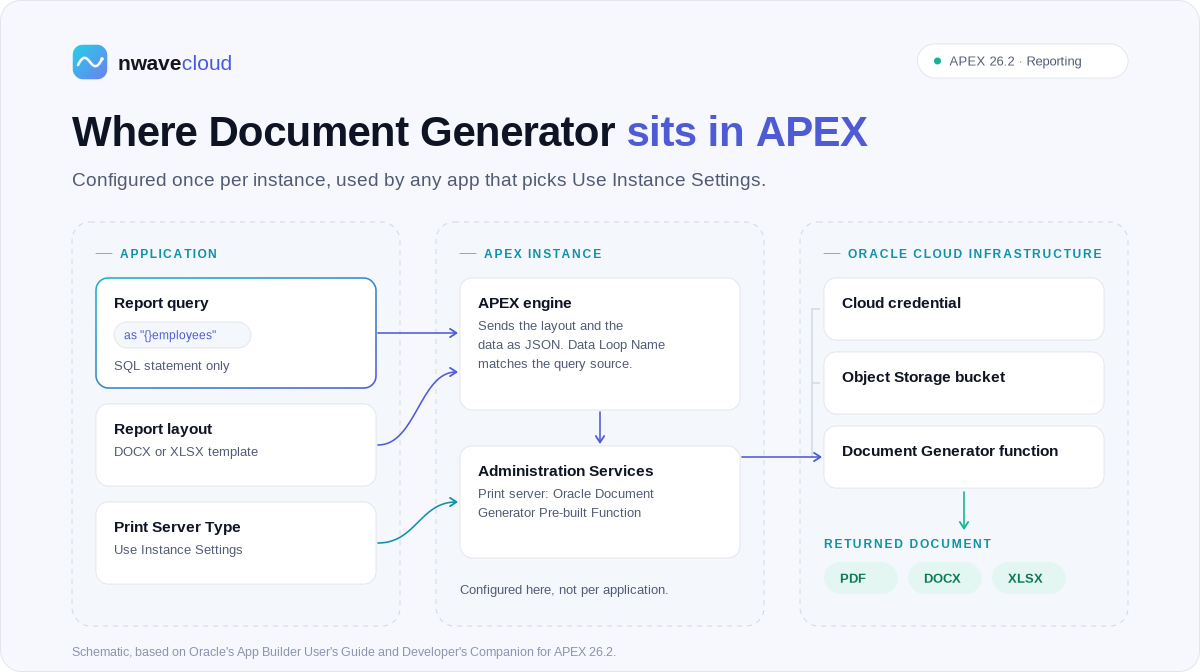
In APEX, Document Generator is the Oracle Document Generator Pre-built Function print server type. Oracle’s description: it lets you “take report query results and convert them from JSON to PDF/Microsoft Office format”, using your own Microsoft Office templates.
A few documented facts shape the setup:
- Instance level. “Document Generator cannot be selected or added as a print server at the application level. It must be configured in Administration Services.” Applications use it by setting Print Server Type to Use Instance Settings.
- OCI pieces. The configuration includes a database cloud credential for an OCI user with access to an object storage bucket and the Oracle Document Generator Function.
- Layouts and output. Layouts are Word or Excel files, and output can be PDF, Word or Excel. The report query download supports PDF, DOCX and XLSX.
- Data flow. “The APEX engine sends the layout file and the data in JSON format to a remote printing service”, which merges them and returns the document.
- No generic layouts. The Document Generator print server type and APEX Office Print do not support generic report layouts, so attach a real layout.
Rules that save debugging time
- SQL only. “Report queries must be SQL statements. Functions returning SQL statements are not supported.”
- Data Loop Name. With Document Generator or APEX Office Print, edit the report query to set the Data Loop Name: “The data loop name and the report query source must match.” It is the name APEX gives the array when it prepares the JSON data.
- Sources. Report query sources include Local Database, REST Enabled SQL, REST Source, Duality View and JSON Source, which covers tables with JSON columns and JSON Collection Tables.
- One JSON builder. Pick SQL/JSON functions for every nested column, so all of them encode the same way.
When PL/SQL is still the right tool
APEX_PRINT.GENERATE_DOCUMENT stays available when you assemble data in code. Its p_data parameter takes the data for the document, “Currently JSON format only”, and it “can only be used when Oracle Document Generator Pre-built Function is configured as print server in the instance”. For documents driven by one query, the {} alias now covers what used to need that code path.
A short checklist
- Document Generator configured once in Administration Services
- Applications set to Use Instance Settings for printing
- Nested columns built with SQL/JSON functions and aliased with
{} - Data Loop Name matching the report query source
- A DOCX or XLSX layout attached, not the generic layout
- A test document for the largest realistic record, not just one row
Document generation runs across APEX, OCI credentials and storage, so it is a good place for a managed platform. For managed APEX environments with upgrades and support, see Cloud Hosting and the plans page.
Bottom line
Two characters, {}, remove a common reason for PL/SQL glue in document generation. Build nested data with SQL/JSON functions, alias it with the prefix, and let the template loop over a real array.
The rest is setup you do once: Document Generator at instance level, a matching Data Loop Name and a real layout.
FAQ
What does the {} alias prefix do?
It tells APEX that a JSON column’s value must not be encoded as a string in the resulting document, so nested arrays and objects reach the template as JSON.
Which sources can feed a report query?
Report queries can use Local Database, REST Enabled SQL, REST Source, Duality View and JSON Source, including tables with JSON columns and JSON Collection Tables. The query itself must be a SQL statement.
Can I configure Document Generator for a single application?
No. Oracle says it must be configured in Administration Services. Applications use it by setting Print Server Type to Use Instance Settings.
Which formats does Document Generator produce?
PDF, Word and Excel, from Word or Excel layouts.
Why does my document come out empty?
Check the Data Loop Name first. With Document Generator or APEX Office Print, it must match the report query source.
Do I still need APEX_PRINT.GENERATE_DOCUMENT?
Only when you assemble the data in PL/SQL. For a document driven by one report query, the {} alias handles nested JSON directly.
Sources
- Oracle APEX 26.2 Release Notes: Changed Behavior
- Printing a Report Region by Defining a Report Query (APEX 26.2)
- Printing Report Regions (APEX 26.2)
- Formatting Using Report Layouts (APEX 26.2)
- Producing Pixel-Perfect Reports (APEX 26.2 Developer’s Companion)
- Setting Your App’s Remote Print Server (APEX 26.2 Developer’s Companion)
- APEX_PRINT.GENERATE_DOCUMENT Function (APEX 26.2)
- Seamless PDF Generation with Oracle APEX and OCI Document Generator (Oracle blog)