The short version
Multilingual APEX apps have long had one awkward corner: the saved default reports of Interactive Reports and Interactive Grids. A German user could get a German page and an English report name. APEX 26.2 closes more of that gap:
- What is covered. Primary and Alternative default reports saved by developers, in both Interactive Reports and Interactive Grids.
- What is new. Text-message based translation for saved report metadata, next to the application-based XLIFF method.
- How it is stored. Convert Text Messages creates text messages, and APEX stores the setting with a substitution token, for example
&{MESSAGE_NAME}. - What is not covered. Reports that users save themselves, public or private, are not translatable.
What changed in 26.2
The release notes put it in one line: “Saved report metadata for Interactive Reports and Interactive Grids now supports text-message based translations.” The Changed Behavior page lists the report settings that support substitution:
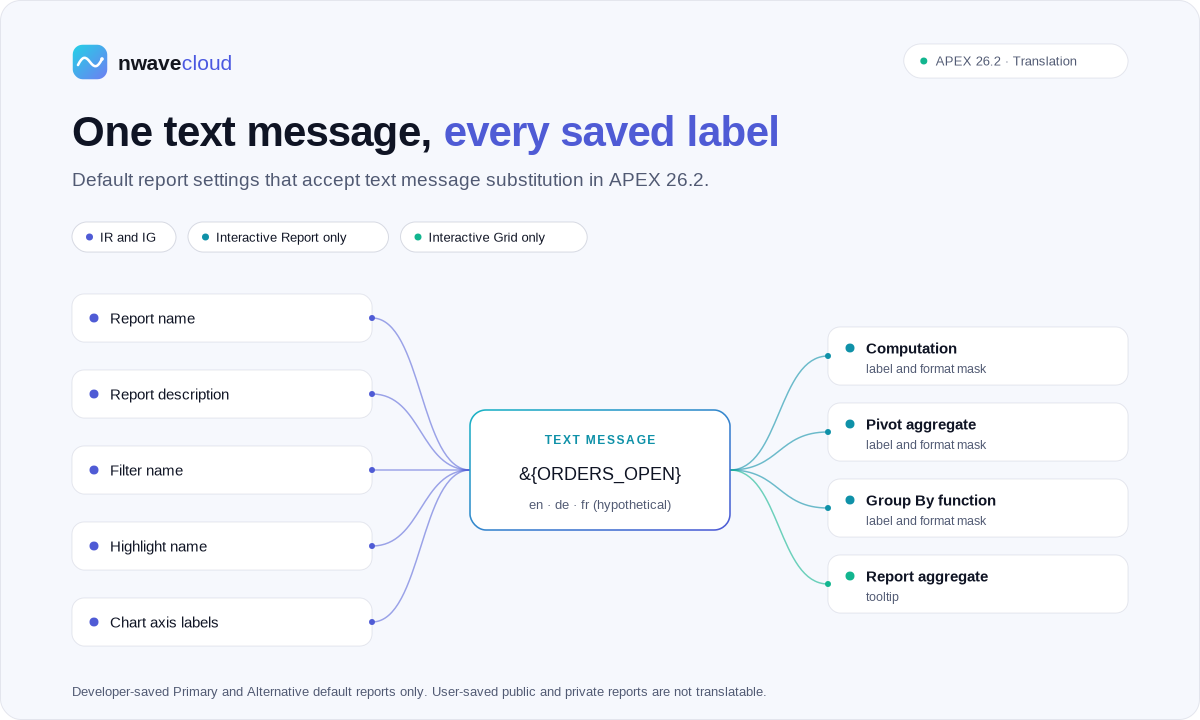
- Interactive Reports and Interactive Grids: report name and description, filter name, highlight name, chart axis labels
- Interactive Reports only: computation label and format mask, pivot aggregate label and format mask, group by function label and format mask
- Interactive Grids only: report aggregate tooltip
That list is the whole scope. Column headings and region titles are translated the usual way; this change is about what a developer saved inside the report.
Two ways to translate
Oracle’s 26.2 guide describes two methods for default reports.
Application-based. You create a separate application for each language. The XLIFF file now includes default report text such as the report name, computation label, chart label, group by aggregate label and pivot aggregate label. The steps are the familiar ones: define application languages, seed and download, translate the XLIFF, upload and apply, publish. A default report without a translation displays in the application’s primary language.
Text-message based. Translatable text across components is stored in Shared Components, Text Messages, and “a single application” can “support multiple languages”. In the Translate Method attribute, you select Text Message-Based. For default reports, Oracle describes it like this: “use Convert to Text to create text messages for supported default report text”, and “APEX stores the default report setting with the text message substitution token.”
If your app already uses text messages, the second path fits naturally: one application, one set of messages, and report labels that follow the same process as everything else.
The text-message path, step by step
Based on Oracle’s documentation:
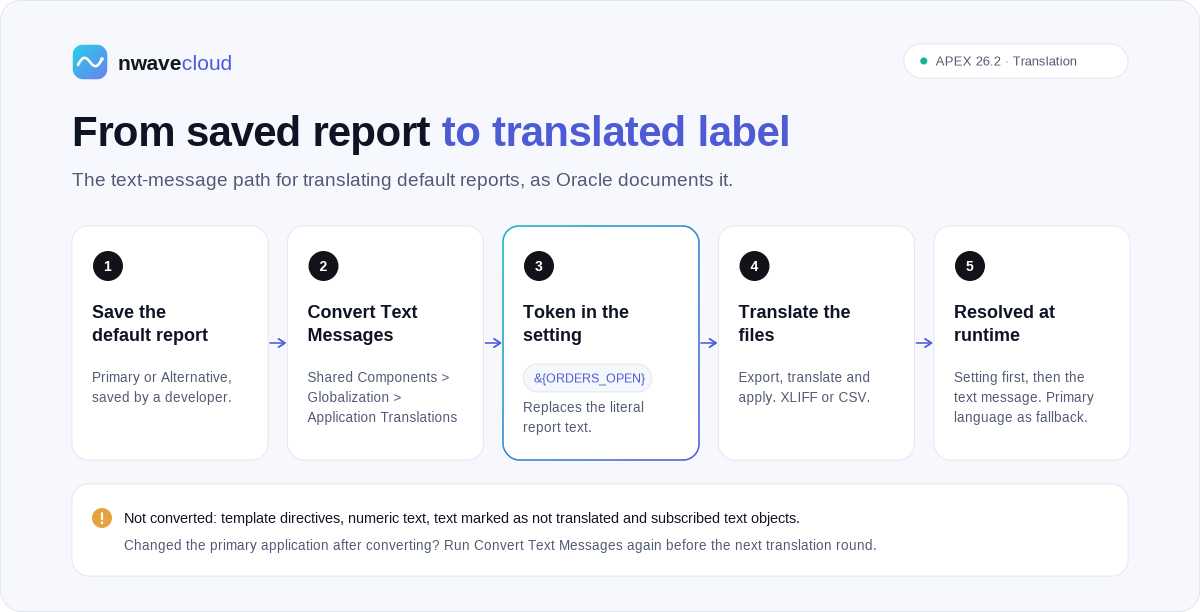
- Save the default report. As a developer, save the Primary report and any Alternative reports with the names, filters, highlights and labels you want.
- Convert to text messages. In Shared Components, Globalization, Application Translations, click Convert Text Messages. The process “converts and updates text throughout your application into Text Messages”.
- Check the token. The saved setting now holds a substitution token such as
&{MESSAGE_NAME}instead of literal text. - Translate. Use the standard process: export the language files, translate them, apply them. Oracle mentions XLIFF or CSV export and import.
- Run it. At runtime, APEX “resolves the translated default report setting and then resolves the text message substitution”. If a text message does not exist for a language, APEX uses the primary language message.
Syntax details
The curly brace form is documented on the substitution strings page: “For applications with a Compatibility Mode of 24.2 or later, you can reference text messages by enclosing the message name in curly braces.” The general example is &{TEXT.MSG}. with a trailing period. Message names can contain special characters, but not white space or a closing curly brace.
Oracle’s default report page shows the token as &{MESSAGE_NAME}. Let Convert Text Messages write the tokens rather than typing them by hand, and check one converted report in each region before you translate everything.
What stays untranslated
- User-saved reports. “User saved reports (including public or private reports) are not translatable.” If users publish public reports for a team, their names stay as typed.
- Skipped text. The conversion “does not convert template directives, numeric text, component text marked as not translated, or subscribed text objects”.
- Later changes. Oracle’s tip: after changes to the primary application, run the conversion again.
- Missing translations. They fall back to the primary language, which is safe but easy to miss in testing.
A short checklist
- Compatibility Mode at 24.2 or later before relying on
&{...}tokens - Translate Method set to Text Message-Based if you choose that path
- Developer-saved Primary and Alternative reports reviewed for names and labels worth translating
- Convert Text Messages run, and a few converted settings checked
- Language files exported, translated and applied
- Each language tested with saved reports, filters, highlights and charts
- Users told that their own saved reports keep the names they typed
Translation work is easiest on a platform where test and production stay in step. For managed APEX environments with upgrades and support, see Cloud Hosting and the plans page.
Bottom line
APEX 26.2 brings the last visible English labels in many multilingual apps, the ones inside saved default reports, into the normal translation process. With text messages, one application can serve every language, report names included.
Run the conversion, translate, and then test like a user would: switch languages and open every saved report.
FAQ
Which reports can be translated?
Primary and Alternative default reports that developers save in Interactive Reports and Interactive Grids. Reports that users save, public or private, are not translatable.
Which report settings support text messages?
Report name and description, filter name, highlight name and chart axis labels for both region types; computation, pivot aggregate and group by labels and format masks for Interactive Reports; and the report aggregate tooltip for Interactive Grids.
How does a setting reference a text message?
APEX stores it with a substitution token such as &{MESSAGE_NAME}. Convert Text Messages creates the messages and the tokens for you.
Do I still need XLIFF?
Not for the text-message method, which can export and import XLIFF or CSV. The application-based method uses XLIFF, and it now includes default report text too.
What happens when a translation is missing?
APEX displays the text message from the primary language.
Sources
- Oracle APEX 26.2 Release Notes: New Features
- Oracle APEX 26.2 Release Notes: Changed Behavior
- Translating Default Reports for Interactive Reports and Interactive Grids (APEX 26.2)
- Creating a Text Message-Based Translation (APEX 26.2)
- Before You Begin: Configure Globalization Attributes (APEX 26.2)
- About Using Substitution Strings (APEX 26.2)
- Understanding Application Translation and Globalization Support (APEX 26.2)