The short version
APEXlang made the application definition a set of readable files. APEX 26.2 separates the part that changes per environment:
- The files. JSON deployment files in the app’s
deploymentsdirectory.default.jsonholds the defaults; add files such astest-env.jsonandprod-env.json. - The values. Application ID, name, alias, parsing schema, session state protection, runtime logging and debugging, proxy, static file paths, build status, workspace, subscription mapping and theme file prefix.
- The switch. SQLcl picks a non-default file with
apex import -deployment. - The order. An explicit SQLcl option beats an
APEX_APPLICATION_INSTALL.SET_*value, which beats the deployment file, which beats the.apxsource.
The payoff: the same .apx files go to every environment, and only a small JSON file differs.
What changed in 26.2
From the release notes: “Use an APEXlang JSON deployment file to configure important deployment-related values related to application, workspace, subscription, and theme. This separates deployment details from the core app definition .apx files.”
The Developer’s Companion adds the working model. “The deployment file is environment-specific.” You can keep several, each “in its own deployment JSON file with a meaningful name”, and they all go in the same ./deployments subdirectory. Oracle’s own examples are test-env.json and prod-env.json.
Where the files live
A deployment file sits beside the application source, inside the app alias directory:
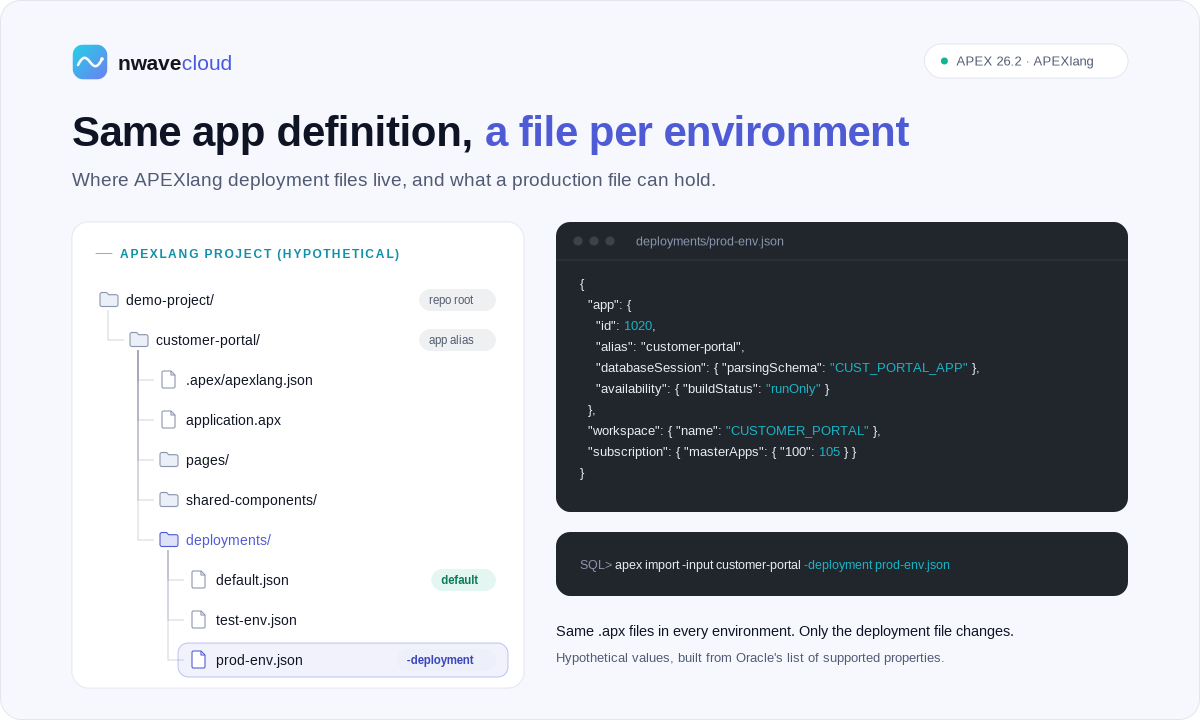
When you create a new application and export it in APEXlang format, the default file contains only the minimum required settings: the application ID and the checksum salt. Oracle’s documentation of supported properties includes a fuller example. Here is a trimmed, hypothetical production file built from those properties:
{
  "app": {
    "id": 1020,
    "alias": "customer-portal",
    "databaseSession": { "parsingSchema": "CUST_PORTAL_APP" },
    "availability": { "buildStatus": "runOnly" }
  },
  "workspace": { "name": "CUSTOMER_PORTAL" },
  "subscription": { "masterApps": { "100": 105 } }
}
What a deployment file can hold
The supported properties, grouped as Oracle groups them:
- Application.
id,name,alias. - Database session.
parsingSchema, the schema that parses and runs the app’s SQL and PL/SQL. When you export from a workspace with only one schema, APEX omits it unless you supply an owner override. - Session state protection.
checksumSaltandallowUrlsCreatedAfter. - Runtime.
logginganddebugging. Debugging defaults to false and controls whether debug mode can be enabled from a browser. - Proxy.
proxyServerandnoProxyDomainsfor outbound requests. - Static files.
appFilesPathandapexFilesPath. - Availability.
buildStatus:runAndBuild, the default, orrunOnlyfor a runtime-only deployment. - Workspace.
name, useful “when the current schema is linked with multiple workspaces”. - Subscription.
masterAppsmaps the application IDs of subscription sources in the export to replacement IDs in the target workspace. - Theme.
advanced.filePrefixoverrides the theme file prefix. It is not normally in a generateddefault.json.
Two cautions from Oracle. Do not copy the example checksum salt: generate 32 cryptographically secure random bytes and encode them as exactly 64 hexadecimal characters. And “changing this value invalidates URLs containing checksums generated with the previous salt”, so pick a salt per environment and keep it. We treat the production salt as sensitive and keep it out of shared or public repositories.
Importing with a deployment file
SQLcl uses deployments/default.json from the input directory unless you choose another file: “When importing with SQLcl and when a non-default configuration is required, specify a deployment file using the -deployment option.” A hypothetical production import:
SQL> apex import -input customer-portal -deployment prod-env.jsonThe SQLcl reference says a bare file name is looked up in the deployments/ directory of the application, while a full or relative path is used as given.
Which value wins
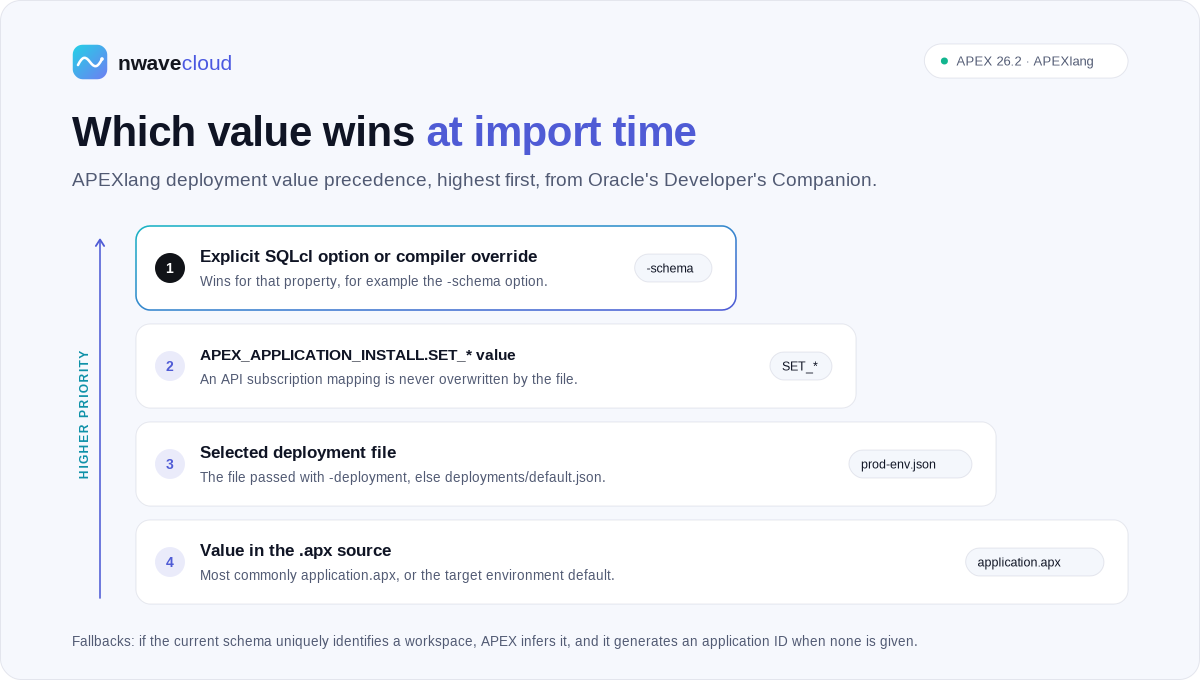
Oracle documents the order for each property, highest first:
- An explicit SQLcl import option or compiler override, for example
-schema - A value already set through an
APEX_APPLICATION_INSTALL.SET_*API - The selected deployment file, or
deployments/default.jsonwhen none was selected - The value in an
.apxsource file, most commonlyapplication.apx, or the target environment default
There is also a fallback for two values: “If the current schema uniquely identifies a workspace, APEX infers it”, and APEX generates an application ID when none is provided.
Subscriptions across workspaces
Subscribed components break easily when an app moves between workspaces with different parent application IDs. 26.2 handles it in two places:
- In the deployment file.
subscription.masterAppsmaps source IDs to target IDs. Oracle notes that “an explicitly set API mapping is not overwritten by a deployment-file mapping”. - In App Builder. The import wizard, which handles SQL and APEXlang exports, shows a Subscriptions step when the application contains subscribed components, plug-ins or themes. You choose a Subscription Mode (Strict, Ignore Errors, Remove or Legacy) and review each Master Application ID against the To Application ID in the target workspace.
App Builder imports of APEXlang need ORDS 26.3.0 or later and at least one REST enabled schema in the workspace.
A short checklist
- One deployment file per environment, all in
deployments/ - A unique checksum salt per environment, generated as Oracle describes
runOnlyfor production apps that should not be edited in place- Subscription mappings in the file, or in the pipeline’s
SET_*calls, but not both - Pipelines that pass
-deploymentexplicitly instead of relying ondefault.json - A test import into a fresh workspace to prove the mapping
Deployment files make promotion repeatable, and promotion is only as good as the environments behind it. For managed development, test and production APEX environments, see Cloud Hosting and the plans page.
Bottom line
Deployment files finish an idea APEXlang started: the app definition belongs in Git once, and environments differ by a small, reviewable JSON file. Keep one per environment, select it explicitly, and know the precedence so a pipeline override never surprises you.
FAQ
Where do APEXlang deployment files go?
In the deployments subdirectory of the application’s source directory. deployments/default.json holds the defaults, and additional files such as prod-env.json go in the same folder.
How do I import with a non-default deployment file?
With SQLcl: apex import -input <app-directory> -deployment <file>. A bare file name is looked up in the app’s deployments/ directory.
What can a deployment file set?
Application ID, name and alias, parsing schema, session state protection, runtime logging and debugging, proxy, static file paths, build status, workspace name, subscription mappings and the theme file prefix.
Which value wins if the file and SQLcl disagree?
The explicit SQLcl option. After that come APEX_APPLICATION_INSTALL.SET_* values, then the deployment file, then the .apx source or target default.
Can I share one checksum salt across environments?
Oracle tells you not to copy its example salt and documents how to generate one. Changing a salt invalidates checksummed URLs created with the old one, so we keep a separate, stable salt per environment.
How do subscriptions survive a move to another workspace?
Map the master application IDs, either with subscription.masterApps in the deployment file or in App Builder’s import wizard, which shows a Subscriptions step for apps with subscribed components.
Sources
- Oracle APEX 26.2 Release Notes: New Features
- Understanding APEXlang Deployment Files (APEX 26.2 Developer’s Companion)
- Upgrading APEXlang Source with a New APEX Release (APEX 26.2 Developer’s Companion)
- Importing Export Files (APEX 26.2 App Builder User’s Guide)
- APEXlang Commands (SQLcl User’s Guide)
- APEXlang Project Structure (SQLcl User’s Guide)