The short version
Can an Oracle APEX application use a locally hosted open-source model and still feel useful?
We tested that with an APEX assistant connected to Ollama and Qwen. The assistant answered questions about invoices, customers, suppliers, expenses, and monthly or yearly totals. It could also prepare actions such as copying an invoice or creating a recurring invoice, with data-changing actions requiring explicit user confirmation.
The result was encouraging, but the interesting lesson is not “local AI is always faster.” The real lesson is more practical: local AI can work well for focused APEX workflows when the model, prompt, tool calls and infrastructure are tuned around the job.
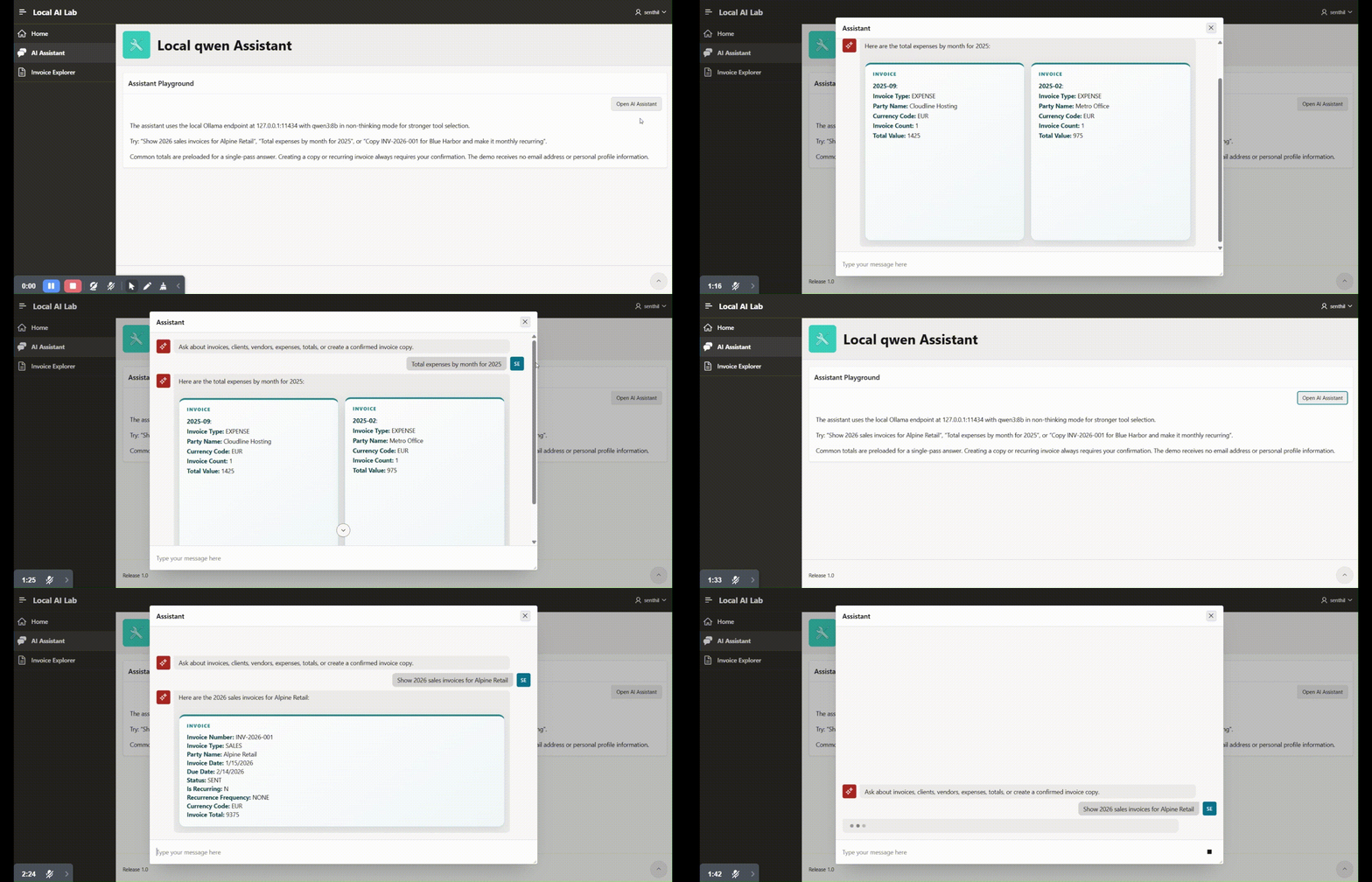
What we tested
The test environment was deliberately modest: an 8-core server with 16 GB RAM and no GPU acceleration. Ollama reported size_vram: 0, so the measured inference path was CPU-only.
| Component | Tested configuration |
|---|---|
| Application | Oracle APEX AI assistant |
| Model runtime | Ollama |
| Models tested | Qwen3 8B and Qwen3 1.7B |
| CPU / memory | 8 cores / 16 GB RAM |
| GPU used | None |
| Quantized model | 1.88 GB, Q4_K_M |
| Context window used | 4,096 tokens |
| Example task | Monthly expense totals for 2025 |
Oracle APEX 26.1 supports Generative AI service definitions for providers including OCI Generative AI, OpenAI, Cohere, Gemini, Claude, Mistral AI, Ollama and OpenAI-compatible APIs. That makes this pattern straightforward to test without treating the model endpoint as a one-off integration.
Where the delay actually was
The first version used Qwen3 8B with thinking enabled. A simple reporting request took roughly 30 seconds in the browser.
Timing each stage showed that Oracle SQL was not the main bottleneck. The database aggregation was already fast; model inference and tool orchestration dominated the response time.
| Measured test | Time | Observation |
|---|---|---|
| Oracle invoice aggregation SQL | 0.69 s | Database processing was already fast |
| Qwen3 8B, thinking enabled | 21.14 s | Model reasoning dominated latency |
| Qwen3 8B, thinking disabled | 2.61 s | Removing unnecessary reasoning produced a major gain |
| Qwen3 1.7B, cold start | 3.34 s | Loading the model added startup delay |
| Qwen3 1.7B, warm | 0.91 s | Keeping the model loaded removed most startup cost |
| Complete request through APEX AI | 0.92-1.06 s | The optimized path delivered an interactive response |
For this controlled prompt, model time fell from 21.14 seconds to about 0.92 seconds. That is roughly 23 times faster, or about a 96% reduction in latency.
That number should be read carefully. It is a measured result for one test path, not a guarantee that every AI question, agent workflow or production workload will respond in one second.
What changed
The biggest gains came from making the AI path smaller and more predictable.
| Optimization | Technical reason | Observed effect |
|---|---|---|
| Qwen3 8B replaced with Qwen3 1.7B | Fewer parameters require less computation | Faster CPU inference |
| Thinking disabled for routine reporting | The task did not need extended reasoning tokens | Model time fell sharply before other changes |
| Model kept warm | Avoided reloading model weights for each request | Cold start delay mostly disappeared |
| Known totals added to context | Avoided unnecessary tool and database round trips | Faster answers to common summary questions |
| Tool calls limited to tasks that need them | Every tool call adds model, network and database work | Shorter end-to-end execution |
| Prompt shortened | Smaller input and concise output reduce token processing | More predictable responses |
| OpenAI-compatible Ollama endpoint used | Matches the integration style APEX can work with | Cleaner request and response handling |
The pattern is boring in the best way: measure the slow part, remove unnecessary reasoning, reduce context, keep the model warm, and make tool calls intentional.
Evidence and limits
This is where local AI projects need discipline. A demo can prove a path works, but it does not prove every production claim.
| Statement | Status | Evidence or limitation |
|---|---|---|
| A local open-source model can serve an APEX assistant | Proven in this test | Invoice and expense questions completed through the APEX interface |
| Sub-second warm CPU model execution is possible | Proven in this test | Qwen3 1.7B completed in 0.91 s when warm |
| Oracle was the primary bottleneck | Not supported | Aggregation SQL completed in 0.69 s |
| A GPU can improve model inference | Technically expected | Ollama supports GPU acceleration on supported hardware |
| A GPU makes SQL faster | False | SQL performance depends on database design, resources and workload |
| Every AI workflow will complete in one second | Not proven | Tool chains, long answers, larger models and concurrency add latency |
| Production capacity can be predicted from one-user testing | Not proven | Concurrency, model size and request length require load testing |
| Local AI is automatically better than a cloud API | Not proven | Local deployment adds hardware, tuning, security and operations work |
APEX is not limited to local AI
Local Ollama is one option, not the only option.
APEX can be configured with several managed and local AI providers, and the right choice depends on accuracy, latency, governance, cost, availability and operating effort.
| Option | Main advantage | Main trade-off | Suitable use |
|---|---|---|---|
| OCI Generative AI | Managed Oracle-cloud service and enterprise controls | Cloud dependency and consumption cost | OCI-centered environments |
| OpenAI API | Capable managed models and mature API surface | External processing and usage cost | General-purpose and agent workloads |
| Anthropic Claude | Strong managed models for reasoning and long-context work | External API cost and governance review | Document-heavy or complex tasks |
| Gemini, Cohere or Mistral AI | More model, regional and price choices | Capabilities vary by provider | Diversification or specialized needs |
| Local Ollama | Infrastructure control; data can remain in the chosen environment | Hardware, scaling, security and model quality become your responsibility | Private, focused, predictable workloads |
| OpenAI-compatible endpoint | Reduces coupling to one provider | Compatibility may not cover provider-specific features | Hybrid or replaceable-provider architecture |
Cloud APIs will often be simpler when high model quality, elastic capacity and managed availability matter most. Local AI becomes attractive when data location, infrastructure control, predictable workloads or reduced reliance on an external API matter more.
Expected performance by workload
The CPU figures below include results observed during this test. The GPU figures are planning estimates, not benchmarks or service commitments. They assume a quantized Qwen3 8B model remains loaded in GPU memory, and actual results will depend on the exact GPU, VRAM, quantization, prompt length, response length, context size, software stack, concurrency and tool calls.
| Response type | Smaller Qwen, CPU | Qwen3 8B, tested CPU | Qwen3 8B, A4000 16 GB* | Qwen3 8B, RTX 4090 24 GB* |
|---|---|---|---|---|
| Simple conversational answer | 5-15 s | 15-30 s | 1-2 s | 0.5-1.2 s |
| Expenses grouped by month | 20-30 s; sometimes failed | 45-60 s observed | 2-5 s | 1-3 s |
| Invoice search using APEX tools | 20-35 s; inconsistent | 80-93 s observed | 4-8 s | 2-5 s |
| Copy or recurring-invoice workflow | 25-40 s | 60-90 s estimated | 5-10 s | 3-7 s |
| Tool-selection quality | Basic | More consistent | Same 8B model capability | Same 8B model capability |
| Overall experience | Faster but less dependable | Functional but slow | Potentially responsive | Potentially fastest |
*GPU values are indicative estimates only and require benchmarking on the final server.
A GPU mainly accelerates model inference: interpreting the request, selecting tools and generating an answer. It does not directly accelerate Oracle SQL, APEX page processing, network requests or external business logic. That is why the real production target should be based on end-to-end workflow timing, not only model token speed.
A practical first target for a focused GPU-backed APEX assistant is often a few seconds for common requests, with multi-step workflows taking longer. The exact number should be proven with the final model, prompts, tool definitions and user concurrency.
How to design a realistic local AI test
For an APEX team, the safest path is to benchmark representative workflows instead of abstract prompts.
- Pick three to five real business questions.
- Include at least one tool-based action that needs confirmation.
- Measure SQL time separately from model time.
- Test cold start and warm model behavior.
- Test short and long answers.
- Measure with the final context size, not a tiny demo prompt.
- Test failed tool calls and invalid user requests.
- Add authorization, audit logging and user confirmation before data-changing actions.
The goal is not to win a benchmark. The goal is to know whether the assistant is useful, safe and predictable for the application it serves.
Hosting local AI for Oracle APEX
Production sizing should be based on the chosen model, quantization, context length, expected concurrency, response-time target and security requirements.
A CPU-only server can be enough for a focused internal assistant with modest traffic. Larger models, longer responses, agent tool use or multiple simultaneous users can quickly expose its limits.
A supported GPU can accelerate model inference, but it does not accelerate Oracle SQL, APEX processing, external tool calls or network latency. Database design, prompt size, tool efficiency and observability still matter.
For teams planning an Oracle APEX deployment with private or hybrid AI, the practical move is to benchmark the actual workflow before choosing the server shape. See the Cloud Hosting overview or hosting plans for the platform side of that conversation.
FAQ
Does Oracle APEX support Ollama directly?
Oracle APEX 26.1 documents Ollama as one of the supported Generative AI service providers, alongside managed providers and OpenAI-compatible APIs.
Is local AI always faster than a cloud model?
No. Local AI can be fast for focused, well-tuned workloads, but managed APIs may be faster or more capable for complex reasoning, higher concurrency or larger models.
Did the test prove every APEX assistant can respond in one second?
No. The one-second result was measured for a controlled warm-model path. Long answers, larger models, tool chains, cold starts and concurrent users can all change the result.
Should thinking mode be disabled?
Only when the task does not need it. Routine reporting and structured lookup tasks may benefit from non-thinking mode, while complex reasoning may still need a larger or reasoning-focused model.
Does a GPU help?
A supported GPU can help with model inference. It does not directly improve Oracle SQL, APEX rendering, network latency or external tool execution.