Before moving an Oracle APEX application to a new host, prove that a user can sign in, submit a record, and download an existing attachment on the destination. A successful application import is only one step. You also need the Oracle Database schema and data, workspace files, and the configuration that connects the app to the outside world.
This guide assumes a new APEX instance with a separate target database and a planned maintenance window. The same checks apply when moving from on-premises infrastructure or from another managed host.
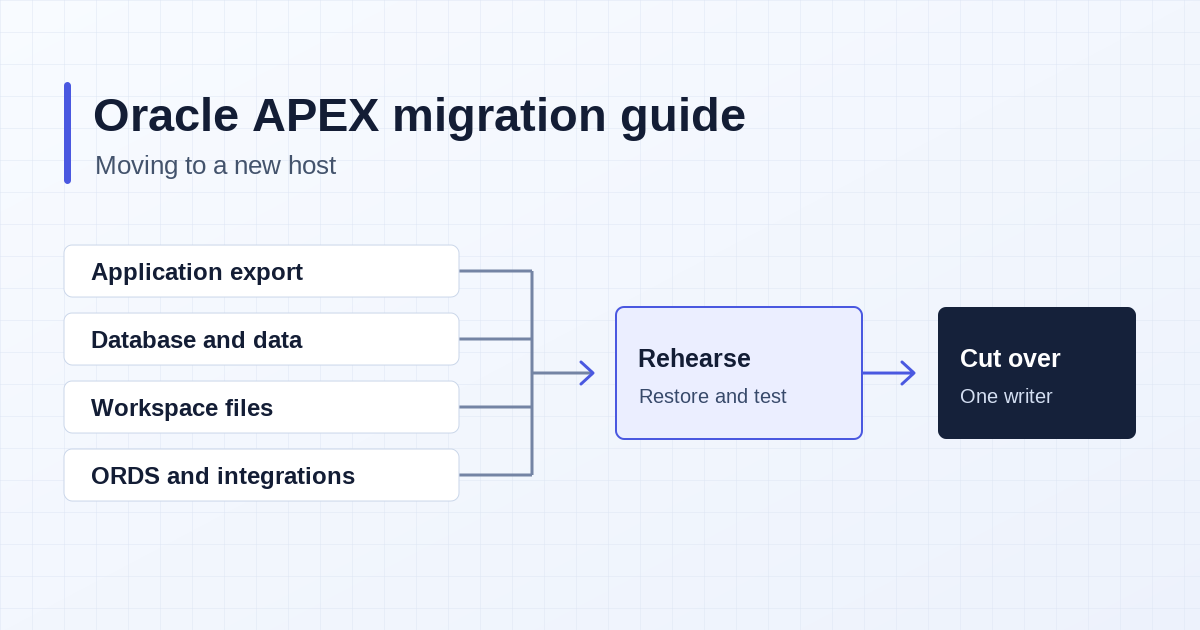
1. Inventory the source and check the destination
Record the APEX, Oracle REST Data Services (ORDS), and Oracle Database versions at both ends. The target APEX release must be the same as or newer than the release that produced the export. Check the target release’s database and ORDS requirements, then review changed and desupported features if the move also upgrades APEX. Confirm the source host can give you a complete schema export and that the new host can import it. Oracle’s import compatibility notes · APEX installation requirements
| What to move | What to record or export |
|---|---|
| APEX applications | Workspace, app IDs and aliases, parsing schemas, authentication schemes, plug-ins, and shared component subscriptions |
| Database | Schema objects, production rows, attachments, cross-schema grants, database links, object storage references, and scheduled jobs |
| Workspace | Users and groups where applicable, workspace static files, and saved reports or workflow state that users need to keep |
| Runtime settings | ORDS modules and access rules, public URLs, single sign-on (SSO) callback URLs, Web Credentials, SMTP, and external integrations |
Agree who can perform each export and import. Estimate the maintenance window using a timed rehearsal that includes the data transfer, validation, and time to roll back. Decide how queued work, inbound webhooks, and background jobs will behave while writes are paused.
2. Export the app and database separately
Export the APEX application and workspace files
In App Builder, open the application and choose Export/Import → Export. Save a complete SQL export. SQLcl can produce the same kind of export from a database connection to the application’s parsing schema. For an app with ID 12345, the command below writes f12345.sql to the current directory by default. Oracle’s export instructions
apex export -applicationid 12345If preserving saved reports or in-progress tasks and workflows matters, review the export options for your APEX release and verify the required state in the destination during rehearsal. Standard exports omit several kinds of runtime data. Use a separate workspace export if you need to migrate workspace users and groups, and export workspace static files separately if your app references them. Inspect any Supporting Objects scripts and decide whether they or the schema migration will create each object. Running both against the same objects can cause duplicate DDL or seed data. Application export options · Workspace export · SQLcl export and import
Export the schema and business data
For a move between Oracle databases, ask the DBA or hosting provider for a schema-mode Data Pump export if the destination supports it. Confirm whether the target needs remapped schema names or tablespaces, and identify grants, cross-schema dependencies, and external files to restore separately. A schema export can carry attachments stored in BLOB columns. Files stored on disk or in object storage need their own transfer and access checks. Encrypt exports containing customer data and use controlled transfer and storage. Oracle Data Pump Export
If you can only use SQL Workshop at the source, inventory exactly what you can export before selecting a target or promising a date. For a small app, object DDL plus separately exported data may be feasible. Confirm packages, constraints, binary attachments, and any required runtime data before committing to that route.
3. Restore and test in a staging workspace
- Restore the schema. Review the import log, reapply required grants, and resolve invalid objects used by the app. Compare row counts at the same data cutoff, check business totals, and open representative attachments. Row counts alone miss incorrect values and broken file references. Keep side-effecting jobs and integrations paused or pointed at sandboxes.
- Import the APEX application. Use the intended workspace and select the correct target parsing schema. Check for application ID collisions before choosing to reuse an ID. Verify workspace and app aliases, shared component subscriptions, and any code or bookmarks that reference an app ID or hostname. Restore related static files and test that they load. Oracle’s App Builder import procedure
- Rebuild the runtime configuration. Where you use custom ORDS APIs, restore their definitions and validate routes, roles, and privileges. Re-enter APEX Web Credential secrets at the destination. Configure SSO callback URLs, SMTP, wallets or network access where applicable, and credentials for external services. Test from the app’s runtime because a working admin connection only proves the admin path. ORDS metadata export · APEX Web Credentials
Ask an app owner to run a normal-user test under the intended hostname or a staging equivalent. Include a restricted user who should be denied access. At minimum, test a sign-in, a write and read-back, a file upload and download, an ordinary email, an authenticated API call if used, and one background process. Check which side executes each job or webhook so the same transaction cannot run twice.
4. Cut over and keep one side writable
- Prepare traffic routing. Verify HTTPS on the destination and confirm the public hostname and callback URLs. If DNS will change, lower the TTL ahead of the move and give records cached under the old TTL time to expire. If you control a shared reverse proxy, a routing change there can avoid waiting for DNS caches.
- Freeze source writes. Put the old app in maintenance or read-only mode and pause jobs, API writes, and inbound integrations as needed. Take the final consistent export or apply the rehearsed incremental sync. Record the cutoff and verify the target matches it. A point-in-time export is a snapshot and will miss later commits unless you transfer them separately.
- Route traffic and validate. Keep general writes closed while you verify TLS, authentication, key pages, operator-only test transactions, and monitoring. Reopen writes on the destination when the app owner signs off. Resume jobs, email, and webhook processing in a controlled order. Keep the source read-only while older DNS answers may still be cached, then retain it according to your rollback plan.
When to roll back
Agree on the decision deadline and rollback triggers before starting. Examples include failed SSO for normal users, an unexplained data discrepancy, or a business-critical write that fails. Before the destination accepts production writes, rollback can be as simple as pointing traffic back to the preserved source and resuming jobs there. Once the destination accepts writes, pause it and reconcile the new transactions before rerouting, including any external actions already taken. Changing DNS alone at that point can lose updates or cause duplicate processing.
Go-live checklist
- APEX, ORDS, and database compatibility checked, with a timed rehearsal completed.
- App exports, workspace files, and schema backups verified by restoring them.
- Critical data checked at the final cutoff, including attachments and business totals.
- Normal and restricted users tested, along with email, APIs, and required jobs.
- One writable production environment, with a named cutover owner and rollback deadline.
If you’re evaluating a new host, use the inventory above to compare who owns the database import, ORDS setup, and backup restores. See Next Wave Cloud’s Oracle APEX hosting for shared, dedicated and OCI hosting options available to customers worldwide.
FAQ
Does an APEX application export include my tables and data?
Treat it as the app definition. Supporting Objects can include scripted database objects and seed data when configured. Plan a separate schema and data transfer for production, and review the export options for required APEX runtime state.
Can I keep the same application ID, alias, and URL?
You can usually keep the ID on a separate instance if it’s available. To preserve a friendly URL, also verify the hostname, ORDS path, workspace path prefix, app alias, and any page aliases in use. Existing browser sessions may need a fresh sign-in. Test saved deep links and identity provider callbacks before cutover.
Can I move an Oracle APEX application without downtime?
A rehearsed incremental sync and a controlled routing switch can shorten the write freeze. The achievable window depends on data size, change rate, and which integrations can pause or queue. Measure the final sync and validation during rehearsal before committing to a downtime estimate.