The short version
AI agents in Oracle APEX answer questions by running tools, and many of those tools run SQL. That raises the question every security review will ask: whose data can the agent see?
APEX 26.2, generally available since October 6, 2026, answers it at the database level. It adds declarative support for Oracle Deep Data Security, a capability of Oracle AI Database 26ai:
- Identity reaches the database. When an application enables Deep Data Security, APEX passes verified end-user and application identities to Oracle AI Database.
- The database enforces the rules. Data Roles and Data Grants decide which rows, columns and individual values SQL can read or change.
- Agents get no extra reach. SQL executed by supported APEX AI Agent tools runs under the requesting user’s security context, so a cleverer prompt does not unlock more data.
- APEX authorization stays. Authorization schemes still control what users can do in the application.
Below: what Deep Data Security is, how APEX is configured, what it requires, and the checklist we would use before pointing an agent at business data.
Why agents change the data access question
In the conventional model Oracle describes, an application connects through a shared, privileged database account and enforces access rules in its own code. Many APEX applications look like that: authorization schemes decide which pages a user gets, and WHERE clauses decide which rows appear.
That works when developers write every query. Oracle’s Deep Data Security FAQ points out that agents can dynamically generate and execute SQL, and even with fixed tools, a language model shapes part of every request. Every application-layer filter then has to be right on every path the agent can take.
A rule in the database holds whichever client issues the query. Oracle’s What’s New page says as much: the same policies protect APEX components, MCP, AI agents and other database clients.
What Oracle Deep Data Security is
Oracle documents Deep Data Security (Deep Sec for short) as a database-enforced data authorization framework: application-level security requirements are defined in the database and enforced there for every access path. The building blocks:
- End users. Application users who own no schemas or objects. Their identities live in an identity provider such as Microsoft Entra ID or OCI IAM, or are created locally in the database.
- Data roles. Roles for fine-grained data access. A data role can map to an application role in your identity provider and is enabled automatically when the user’s token carries that role claim.
- Data grants. Declarative policies granting privileges on a table or view, optionally limited by a SQL predicate, at row, column and cell level.
- Application identities. Database identities for an application or AI agent. Data roles granted to one are enabled for every end user connecting through it.
- End-user security context. A session-level object with the user’s identity, data roles and attributes. It replaces the session’s normal security domain, so SQL is authorized for the end user instead of the application account’s broad privileges.
Behaviors that matter for developers:
- Deny by default. Nothing is visible unless a policy grants it. Unauthorized rows are left out and unauthorized cells come back as NULL;
ORA_IS_COLUMN_AUTHORIZEDtells a real NULL from a masked one. - Grants add up. The effective privilege is the union of all applicable grants.
- DML is checked too. An insert that violates a grant fails. Some unauthorized updates and deletes are silently skipped instead of raising an error.
- Activity is auditable. Deep Sec commands and privileges are covered by unified auditing, with end-user attribution.
Policies are written in SQL. This example, adapted from Oracle’s Autonomous AI Database documentation, lets a data role read five columns of Northeast orders, then makes data grants the only route for Deep Sec users to reach that view:
CREATE OR REPLACE DATA GRANT sales_sec.dg_ne_sales
    AS SELECT ( order_id
              , customer_name
              , region
              , order_total
              , order_status )
    ON sales_sec.ai_sales_orders_v
    WHERE region = 'NORTHEAST'
    TO sales_reader_role;

SET USE DATA GRANTS ONLY ON sales_sec.ai_sales_orders_v ENABLED;
Note that Oracle’s example grants on a view that omits a card token column entirely. Not exposing a column at all is still the strongest control.
How the APEX 26.2 integration works
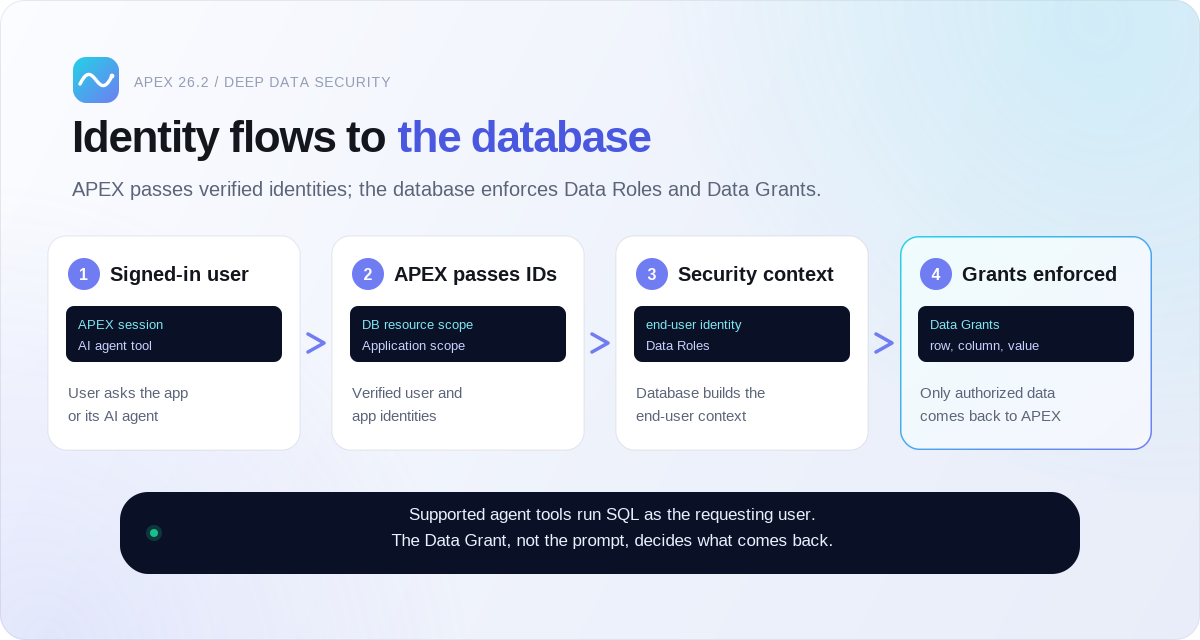
Deep Data Security is enabled per application. According to the APEX 26.2 release notes, the authenticated end-user identity is then passed to the database, whose kernel enforces Data Roles and Data Grants for all SQL execution. Oracle’s announcement adds that APEX passes both the verified end-user and application identities, from which the database establishes the end-user security context.
Configuration
Enabling the integration takes two OAuth scopes from your identity provider:
- Database resource scope: the OAuth scope of the Oracle AI Database registration.
- Application scope: the OAuth scope of the application registration.
APEX_APPLICATION_ADMIN.SET_DEEP_SEC switches the feature on or off for an application. Enabling it requires both scopes; disabling it requires both to be NULL. DEEP_SEC_IS_ENABLED, GET_DEEP_SEC_DB_RESOURCE_SCOPE and GET_DEEP_SEC_APPLICATION_SCOPE report the current setting.
The configuration travels with the application export, and APEX_APPLICATION_INSTALL.SET_DEEP_SEC overrides it at install time, which is the hook you want when test and production use different identity provider registrations:
BEGIN
    apex_application_install.clear_all;
    apex_application_install.set_workspace( 'TARGET_WORKSPACE' );

    apex_application_install.set_deep_sec(
          p_enabled           => TRUE
        , p_db_resource_scope => 'OracleDBAudience_DBScope'
        , p_application_scope => 'APEXAppAudience_AppScope' );
END;
Passing NULL for p_enabled keeps whatever the export file contains.
Temporary privilege elevation
Deep Sec lets trusted application code enable extra data roles for one operation without granting them to the user permanently. In APEX, APEX_SESSION.ENABLE_DEEP_SEC_DATA_ROLES enables data roles granted to the application but not enabled by default. By default they apply only to the current request: a page view, an AJAX call or page processing.
BEGIN
    apex_session.enable_deep_sec_data_roles(
          p_data_roles           => apex_t_varchar2( 'sales_role' )
        , p_current_request_only => TRUE );
END;
Keep that default. Session-long elevation is much harder to reason about, and we would not let an on-demand agent tool trigger elevation without user confirmation.
What this means for AI agents
Oracle’s announcement is explicit: SQL executed by supported APEX AI Agent tools runs under the requesting user’s security context. Asking an agent for more data grants no extra access, because the Data Grant still decides what the request can retrieve.
Two caveats. First, the announcement does not list which tool types count as “supported.” Retrieve Data tools can run a SQL query or a PL/SQL function body, and Execute Server-side Code tools exist too, so test each type you use with a low-privilege user. Second, tool controls still apply: authorization schemes, server-side conditions and user confirmation, covered in our article on AI agents in APEX 26.2.
Prerequisites and limitations
Check these before you design around the feature:
- Database release. Oracle states that Deep Data Security is supported only with Oracle AI Database 26ai. The New Features guide lists it under Release Update 23.26.2, Oracle’s FAQ ties it to the April 2026 Release Update, and Autonomous AI Database has offered it since June 30, 2026.
- An identity provider for APEX. Deep Sec itself supports local database end users as well as OCI IAM and Microsoft Entra ID. The APEX integration requires both OAuth scopes whenever it is enabled, so plan for database and application registrations in an identity provider. The APEX documentation we reviewed does not name supported identity providers or authentication scheme types; confirm yours.
- A first release. Oracle’s APEX roadmap still lists deeper Deep Data Security integration, “including full identity propagation,” as a future item without saying what it adds. Treat 26.2 as the foundation.
- Policies are SQL. Oracle’s FAQ says policies are authored in SQL, and the APEX 26.2 material we read covers enabling the integration, not a policy editor. Keep grants in Git like any other DDL.
- Masked values and skipped DML. NULL cells and silently skipped updates change how forms behave. Test editable pages with users who cannot see some columns.
- Data Pump. The FAQ notes that on the April 2026 Release Update, a full Data Pump export does not include Deep Sec objects; a one-off patch is available from Oracle Support.
- Standard database users are not constrained. USE DATA GRANTS ONLY applies to Deep Sec users, not to standard database users with table privileges. Review who else connects to the schema.
- Platform rollout. APEX 26.2 is available now on premises, with Autonomous AI Database following shortly and OCI and multicloud over the coming weeks.
Where APEX authorization, VPD and RAS fit
Deep Data Security complements APEX authorization; it does not replace it. Oracle draws the line cleanly: APEX authorization governs what a user can do in the application, and Deep Data Security governs what data SQL may read or change.
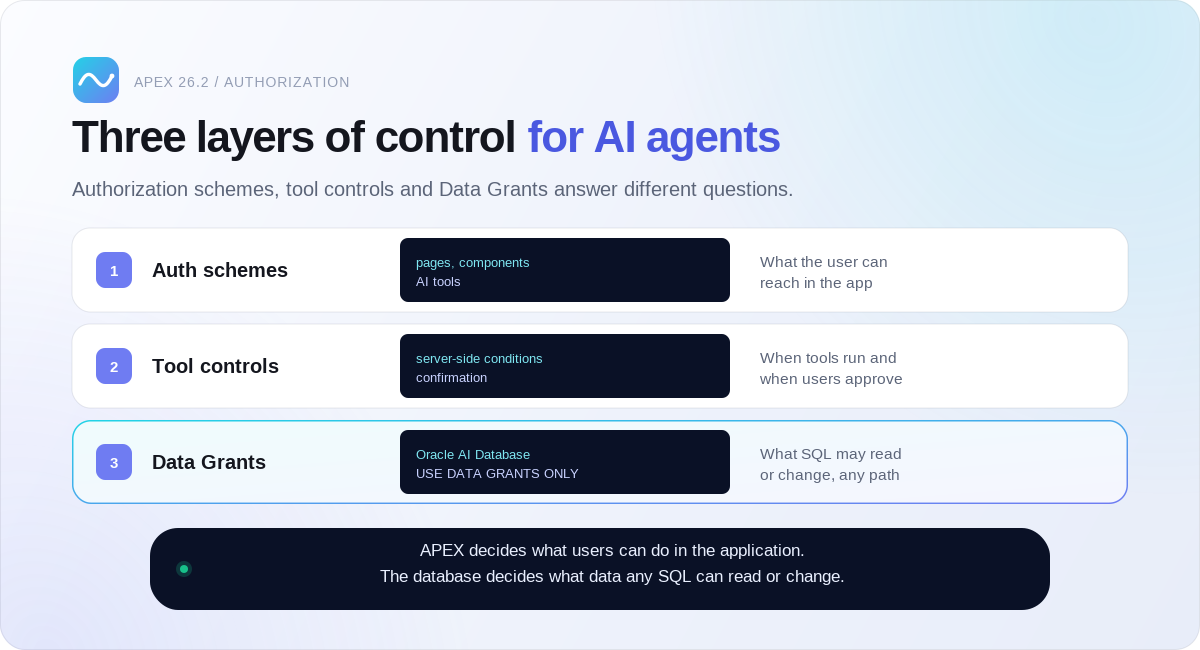
In an agent-enabled application you want all three layers:
- Authorization schemes on pages, components and AI tools decide what a user can reach and which tools the agent may use.
- Tool controls (server-side conditions and confirmation) decide when tools run and when the user must approve.
- Data Grants decide which rows, columns and values come back, whatever path the SQL took.
On Virtual Private Database and Real Application Security, the Security Guide describes Deep Data Security as extending and modernizing both, replacing procedural PL/SQL and API-driven controls with declarative SQL policies, and recommends it for identity propagation, database-enforced authorization and audit compliance. The FAQ adds that VPD and RAS remain fully supported, migration from VPD is not automatic, and Deep Sec adds cell-level control beyond RAS. Label Security and Database Vault are described as complementary.
Our view: if VPD protects a mature application today, leave it alone until you have a reason to move. Start with Deep Data Security for new, agent-facing data access, where declarative grants in Git are easier to review than policy functions.
A checklist for AI agents on business data
- Define the boundary first. Write down which data each role may see and have the data owner sign it off before anyone writes a grant.
- Expose views, not tables. Give agents purpose-built views without the columns they never need.
- Enable USE DATA GRANTS ONLY on every protected object, and prove that a user with no grant gets nothing.
- Test with real personas. Run every agent tool as two low-privilege users and one high-privilege user, and compare the answers.
- Test forms against masked columns. Check what an edit does when the user cannot see or change some values.
- Keep elevation narrow. Call ENABLE_DEEP_SEC_DATA_ROLES per request, from trusted code only.
- Script it per environment. Set scopes with APEX_APPLICATION_INSTALL.SET_DEEP_SEC, check DEEP_SEC_IS_ENABLED after every install, and deploy roles and grants from Git with the application.
- Read the audit trail. Confirm that agent activity is attributed to the end user.
- Remember what leaves the database. Deep Sec limits what the agent reads, but whatever it reads can still travel to your AI provider in prompts and tool results.
Deep Data Security ties the database release, the identity provider and the APEX version together, so plan and upgrade them as a set. Our articles on AI-ready infrastructure for Oracle APEX and choosing Oracle APEX hosting cover the platform side. If you want an APEX environment that is upgraded, monitored and ready for AI integrations without running it yourself, see Cloud Hosting and the plans page.
Bottom line
AI agents make application-layer filtering fragile, because the model shapes part of every request. APEX 26.2 with Deep Data Security moves the decision into the database: APEX says who the user is, and Data Grants decide what comes back on every path, the agent included.
It is a first release with real prerequisites: Oracle AI Database 26ai, an identity provider and policies written in SQL. It is still the right shape for agents on business data: APEX decides what users can do, the database decides what they can see.
FAQ
What is Oracle Deep Data Security?
A database-enforced authorization framework in Oracle AI Database 26ai. Data Roles and Data Grants define which rows, columns and values each end user can read or change, on every access path.
Can an APEX AI agent return data the user is not allowed to see?
With Deep Data Security enabled, SQL from supported agent tools runs under the requesting user’s security context, so that user’s Data Grants limit the result. Oracle does not list which tool types count as supported, so test each one.
Does Deep Data Security replace APEX authorization schemes?
No. Authorization schemes still control what users can do in the application. Deep Data Security controls what data SQL can read or change.
What do I need to enable it in APEX 26.2?
Oracle AI Database 26ai and two OAuth scopes from your identity provider: one for the database registration and one for the application registration. You can set them with APEX_APPLICATION_ADMIN.SET_DEEP_SEC, or override them at install time with APEX_APPLICATION_INSTALL.SET_DEEP_SEC.
Should I migrate from VPD or Real Application Security?
Not necessarily. Oracle recommends Deep Data Security as the declarative path forward, but VPD and RAS remain fully supported and VPD migration is not automatic.
What happens to values a user is not allowed to see?
By default they come back as NULL, and unauthorized rows are left out. The ORA_IS_COLUMN_AUTHORIZED function distinguishes a masked value from a real NULL.
Sources
- Announcing Oracle APEX 26.2 General Availability
- What’s New in Oracle APEX 26.2
- Oracle APEX 26.2 Release Notes: New Features
- APEX_APPLICATION_ADMIN.SET_DEEP_SEC Procedure
- APEX_APPLICATION_INSTALL.SET_DEEP_SEC Procedure
- APEX_SESSION.ENABLE_DEEP_SEC_DATA_ROLES Procedure
- Managing AI Agents and AI Tools
- What Is Oracle Deep Data Security
- Oracle Deep Data Security Guide: Key Terminology
- Oracle Deep Data Security Guide: End-User Security Context
- Oracle Deep Data Security Guide: Application Registrations, Users, and Roles
- Oracle Deep Data Security Guide: Data Grants
- Changes in This Release for Oracle AI Database Security Guide
- Oracle AI Database New Features: Release Update 23.26.2
- Oracle Deep Data Security in Autonomous AI Database
- Use Deep Data Security in Autonomous AI Database (release note)
- Oracle Deep Data Security FAQ (PDF)
- Oracle Deep Data Security Technical Brief (PDF)