The short version
When a user says “the approval email never arrived”, APEX 26.2 gives instance administrators a proper first place to look. The Mail Queue page gains operational metrics that, in the release notes’ words, provide “real-time visibility into delivery health, performance, failures, and workspace usage”.
- Where. Administration Services, Manage Instance, then Mail Queue under Manage Meta Data.
- What. A live queue report with send errors and retry times, a metrics dashboard, triage by workspace, Top 10 workspace trends and a sent summary.
- How mail moves.
APEX_MAILqueues messages; a database job orAPEX_MAIL.PUSH_QUEUEhands them to your SMTP server. Failures are retried up to 14 times, then logged. - How to troubleshoot. Queue, then mail log, then SMTP configuration, then code path and limits.
If SMTP is not configured yet, start with our guide to configuring SMTP email sending in APEX. Here we assume mail mostly works and one message did not arrive.
How APEX sends mail: queue first, SMTP later
The moving parts, as Oracle documents them:
APEX_MAIL.SENDcreates an outbound message. It exists as a procedure and as a function that returns “the unique numeric identifier associated with the mail message”.- The mail queue holds messages waiting for delivery, exposed as the
APEX_MAIL_QUEUEdictionary view. - The job
ORACLE_APEX_MAIL_QUEUEperiodically sends everything queued. The 26.2 pages we read do not state its interval. - The manual push.
APEX_MAIL.PUSH_QUEUEdelivers the queue to the SMTP gateway on demand. Its host and port parameters are ignored; those values come only from Instance Settings or theAPEX_INSTANCE_ADMINAPI. - The mail log. Successfully submitted messages are recorded in the
APEX_MAIL_LOGdictionary view, timestamped in the server’s local time.
So a SEND call that returns cleanly means APEX accepted the message, not that it left the building. Oracle’s note on network access shows the gap: without the required privileges, “Users can call methods from the APEX_MAIL package, but issues arise when sending outbound email.”
Retries, and where they end
A failed send, for example to an unresolvable address or an unavailable mail server, stays in the queue with its last error. APEX retries up to 14 times, with gaps that grow exponentially: 2, 4, 8, 16 minutes and so on. Then the message is removed from the queue and the final error is recorded in APEX_MAIL_LOG.
By our arithmetic, if the doubling continues, the tenth gap alone is about 17 hours. A message behind a broken SMTP setting can wait quietly for a long time unless someone looks.
Throughput is capped too. Maximum Emails Processed per Workspace limits how many messages per workspace each run of the mail job takes from the queue, so a burst from one workspace can need several runs to drain.
What 26.2 adds to the Mail Queue
The 26.1 Administration Guide’s Mail Queue section covered sending and deleting messages. The 26.2 guide adds an overview and four reporting sections, and Oracle’s new features deck lists the result as the Manage Instance Enhanced Mail Queue report. To open it, sign in to Administration Services, select Manage Instance, then select Mail Queue under Manage Meta Data.
Mail Queue Overview
Oracle calls it a live queue health report. For each queued message it shows recipient, sender, subject, cc and bcc, creation time, queue age in minutes, last update, send error, send attempt count, next retry time and workspace. Saved report views cover messages already attempted but still queued, messages awaiting delivery by workspace, messages taking more than 5 minutes by workspace, and messages with delivery errors.
Dashboard, triage, trends and summary
- Metrics dashboard: four counts, namely emails delivered in the last 10 minutes, emails awaiting delivery, emails in the retry queue because of delivery errors, and emails waiting more than 5 minutes.
- Operational and Triage: messages taking longer than 5 minutes, grouped by workspace, and whether the delivery limit was reached in a rolling 24-hour period.
- Trending: Top 10 workspace charts of recent high-volume email activity.
- Monitoring: the Emails Sent Summary, comparing created, queued, sent and failed messages with the previous equivalent period, as counts or percentages, with a chart of daily sending trends.
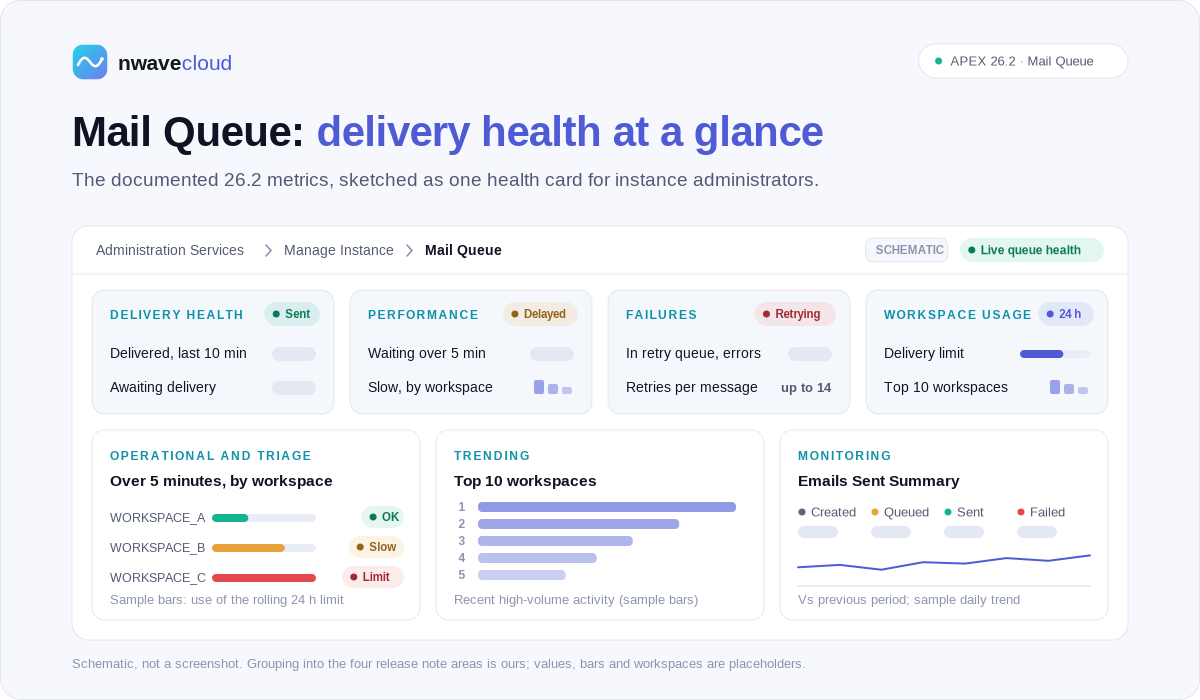
Not documented: the exact on-screen labels, which periods you can select, or any alerting. In our view this is a page you look at, not one that wakes you up.
The three buttons
Delete removes selected messages. Send All Mail pushes the queue and observes the retry delay for failed messages; Force Send All Mail ignores that delay. Our rule: fix the cause, then force once. Forcing against a configuration that is still broken only repeats the failure.
Why didn’t the email arrive? A troubleshooting path
Take a hypothetical approval email, sent with APEX_MAIL.SEND from a page process, that the approver says never arrived. Work through four questions in order.
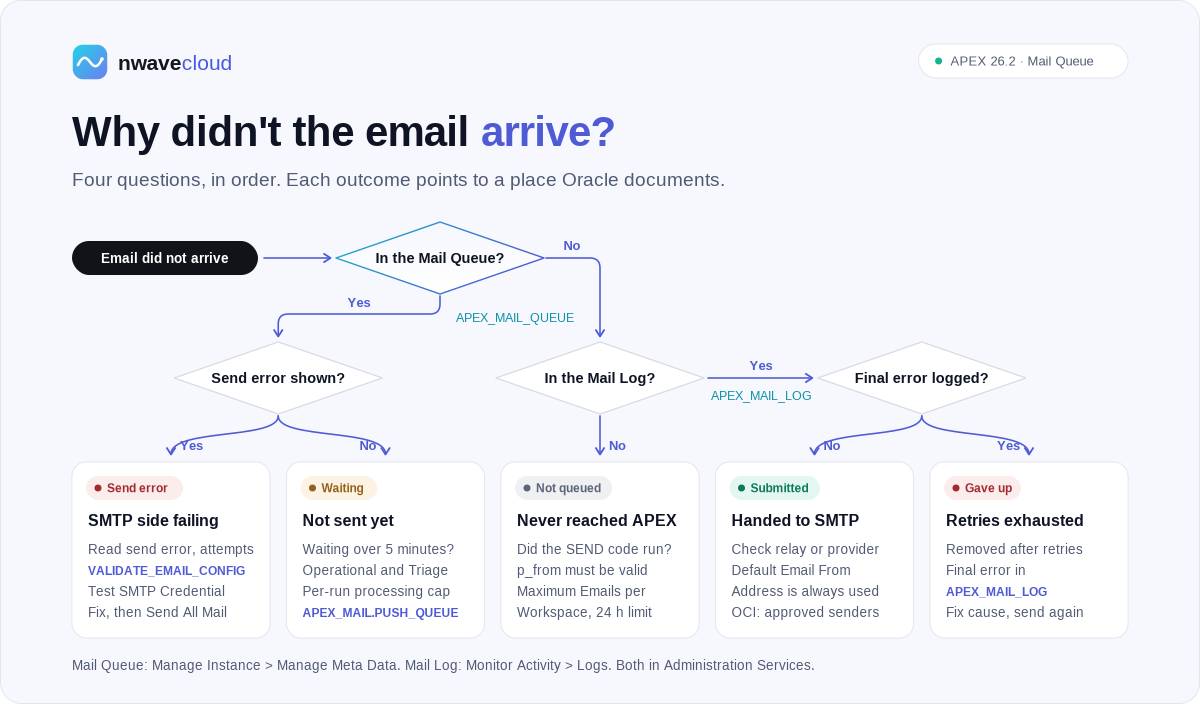
1. Is it still in the queue?
Find the recipient and subject in the Mail Queue Overview.
- Send error filled in, attempts rising. APEX is reaching for the SMTP server and failing. Fix the cause (step 3), then push.
- No error, just waiting. Check the over-5-minutes count and the triage view for that workspace, keeping the per-run cap in mind. Send All Mail or
APEX_MAIL.PUSH_QUEUEdelivers without waiting for the next job run.
2. If not, is it in the mail log?
A message that has left the queue either went out or ran out of retries. The Monitor Activity page in Administration Services lists the Mail Log under Logs. The view is APEX_MAIL_LOG, which Oracle’s Autonomous AI Database guide suggests querying from a SQL client.
- Logged as submitted. APEX handed the message to the SMTP server; the rest belongs to your relay or provider. One documented rule to check first: if an instance administrator set a Default Email From Address,
APEX_MAIL.SENDalways uses it as the from address. - Logged with a final error. Retries ran out. Fix the cause (step 3), then send again from the application, because the message is no longer queued.
3. Is the SMTP configuration sound?
Under Manage Instance, Instance Settings, the email attributes include SMTP Host Address (localhost by default), SMTP Host Port (25 by default), the authentication username and password, and Use SSL/TLS (Yes, After connection is established, or No). A workspace can override the credentials with Use Workspace SMTP Credentials and a Web Credential, and its preferences page offers a Test SMTP Credential button.
Then run the single most useful check:
BEGIN
    APEX_INSTANCE_ADMIN.VALIDATE_EMAIL_CONFIG;
END;
/
It tries to connect to the configured mail server and raises an error if it cannot. Oracle names the usual causes: incorrect SMTP instance parameters, a missing network ACL, a missing SSL certificate in the Oracle Wallet, or a problem on the mail server. On Oracle Database 11g Release 2 and later, network access is disabled by default, and the APEX_260200 user needs connect privileges granted with DBMS_NETWORK_ACL_ADMIN.
On Autonomous AI Database, Oracle’s example failure is ORA-29279: SMTP permanent error: 535 Authentication credentials invalid. With OCI Email Delivery, every possible from address needs an approved sender, or the mail is rejected.
4. Was it ever queued?
Not in the queue and not in the log: the message most likely never reached APEX. Check:
- The code path. Did the process that calls
APEX_MAIL.SENDrun? A condition or an earlier error can skip it. The pages we read do not describe how a rollback affects queued mail, so test that case in development. - The from address. Oracle states that
p_frommust be a valid address, or the message is not sent. - The workspace limit. Maximum Emails per Workspace caps what a workspace can send with
APEX_MAILin 24 hours, and the triage section shows whether a workspace reached its delivery limit. On Autonomous AI Database the default is 1,000, adjustable in Administration Services or with theWORKSPACE_EMAIL_MAXIMUMinstance parameter. What a send does at the cap is not described in the pages we read; test it.
A clean test message
To separate application bugs from delivery problems, send a message outside the application. This is Oracle’s Autonomous AI Database example, run from SQL Workshop; with OCI Email Delivery, p_from must be an approved sender:
BEGIN
    APEX_MAIL.SEND(
          p_from => 'alice@example.com'
        , p_to   => 'bob@example.com'
        , p_subj => 'Email from Oracle Autonomous AI Database'
        , p_body => 'Sent using APEX_MAIL' );
END;
/
Watch it move from the queue to the log. If the test arrives and the approval does not, look at the application first.
A routine we recommend
Our habits:
- Glance at the dashboard daily and after any change to SMTP settings, wallets or ACLs. The retry queue and over-5-minutes counts are the early signals.
- Run
VALIDATE_EMAIL_CONFIGafter every APEX upgrade, certificate renewal or provider change. The ACL grant names the release’s APEX schema user, so add the check to your APEX 26.2 upgrade checklist. - Review Trending weekly. A workspace that suddenly enters the Top 10 is either growing or looping.
- Do not make email the only record. If an approval matters, show its status in the application too.
Mail problems are usually platform problems, sitting below the application. Oracle announced APEX 26.2 on October 6, 2026 for on-premises installations, with Oracle Autonomous AI Database following shortly and OCI and multicloud rollouts over the coming weeks. If you would rather have someone else run the instance, mail queue included, see Cloud Hosting and the plans page.
Bottom line
The 26.2 Mail Queue turns “it never arrived” from guesswork into a short walk: queue, log, SMTP, code and limits. It does not deliver mail and it will not page you, but it answers the first question, where the message is, in one place.
Pair it with VALIDATE_EMAIL_CONFIG after every change to your mail setup, and most of these questions never reach your inbox.
FAQ
Where is the Mail Queue in APEX 26.2?
In Administration Services: select Manage Instance, then Mail Queue under Manage Meta Data. It is an instance administration page.
What does the Mail Queue metrics dashboard show?
Four counts: emails delivered in the last 10 minutes, awaiting delivery, in the retry queue because of delivery errors, and waiting more than 5 minutes.
How often does APEX send queued email?
The ORACLE_APEX_MAIL_QUEUE job sends queued messages periodically; the 26.2 pages we read do not state the interval. Use Send All Mail or APEX_MAIL.PUSH_QUEUE to deliver now.
What happens to a message that keeps failing?
APEX retries it up to 14 times with exponentially growing gaps, then removes it from the queue and records the final error in APEX_MAIL_LOG.
Does a successful APEX_MAIL.SEND call mean the email was delivered?
No. It means APEX accepted the message. Delivery happens when the queue is pushed to the SMTP server, and after the mail log shows it as submitted, your relay or provider decides what happens next.
How do I test the SMTP connection?
Run APEX_INSTANCE_ADMIN.VALIDATE_EMAIL_CONFIG. It connects to the configured mail server and raises an error if it cannot.
Sources
- Oracle APEX 26.2 Release Notes: New Features
- Managing Meta Data: Managing the Mail Queue (Administration Guide 26.2)
- Managing Meta Data (Administration Guide 26.1)
- Configuring Email (Administration Guide 26.2)
- Configuring Workspace Preferences: Email Credentials (Administration Guide 26.2)
- Monitoring Activity Across an Instance (Administration Guide 26.2)
- Sending Email from an Application (App Builder User’s Guide 26.2)
- APEX_MAIL (API Reference 26.2)
- SEND Procedure Signature 1 (API Reference 26.2)
- SEND Function Signature 1 (API Reference 26.2)
- PUSH_QUEUE Procedure (API Reference 26.2)
- VALIDATE_EMAIL_CONFIG Procedure (API Reference 26.2)
- Send Email from Oracle APEX (Autonomous AI Database Serverless)
- Oracle APEX 26.2 New Features (deck)
- Announcing Oracle APEX 26.2 General Availability