The short version
If your APEX application calls OCI today, for example to read Object Storage or to reach OCI Generative AI, there is a good chance an API private key sits in a Web Credential. That key belongs to a person in your tenancy, and someone has to look after it.
APEX 26.2, generally available since October 6, 2026, offers a cleaner path. Oracle calls it secure access to OCI services with managed identities:
- Web Credentials can reference a database credential. A Web Credential of type OCI Native Authentication can point to a DBMS_CLOUD credential instead of holding a key.
- Two managed identities are supported. Resource Principal on Autonomous AI Database, and Database Tools Identity.
- IAM stays in charge. Dynamic groups and policies decide what the identity can reach. The database maintains the credential, and APEX never sees the secret.
Below: the old and new models, which identity fits where, Oracle’s documented setup, the limits, and a migration checklist.
The old way: a user’s API key in APEX
Until now, the usual way to sign OCI REST calls from APEX was a Web Credential with OCI Native Authentication. You entered four values: the OCI user OCID, the tenancy OCID, the public key fingerprint and the private key in PEM format. APEX stores the private key encrypted, never returns it in clear text, and signs each request using OCI’s request signature scheme.
That works, and it is not insecure in itself. The problem is operational. The key is tied to an individual IAM user, so the application quietly depends on that person’s account, and Oracle’s technical post notes that the key then has to be managed as part of running the application. In practice that tends to mean rotation reminders, a user account nobody dares to delete, and the same secret pasted into several workspaces.
What changes in 26.2
In 26.2, an OCI Native Authentication Web Credential can switch on Use Database Credential and reference a credential that the database maintains. Oracle’s technical post describes three layers:
- OCI identity and IAM policies decide who is calling and what it may access.
- The database credential makes the managed authentication information available inside the database.
- The APEX Web Credential references that credential, and your code and REST Data Sources reference the Web Credential by its Static ID.
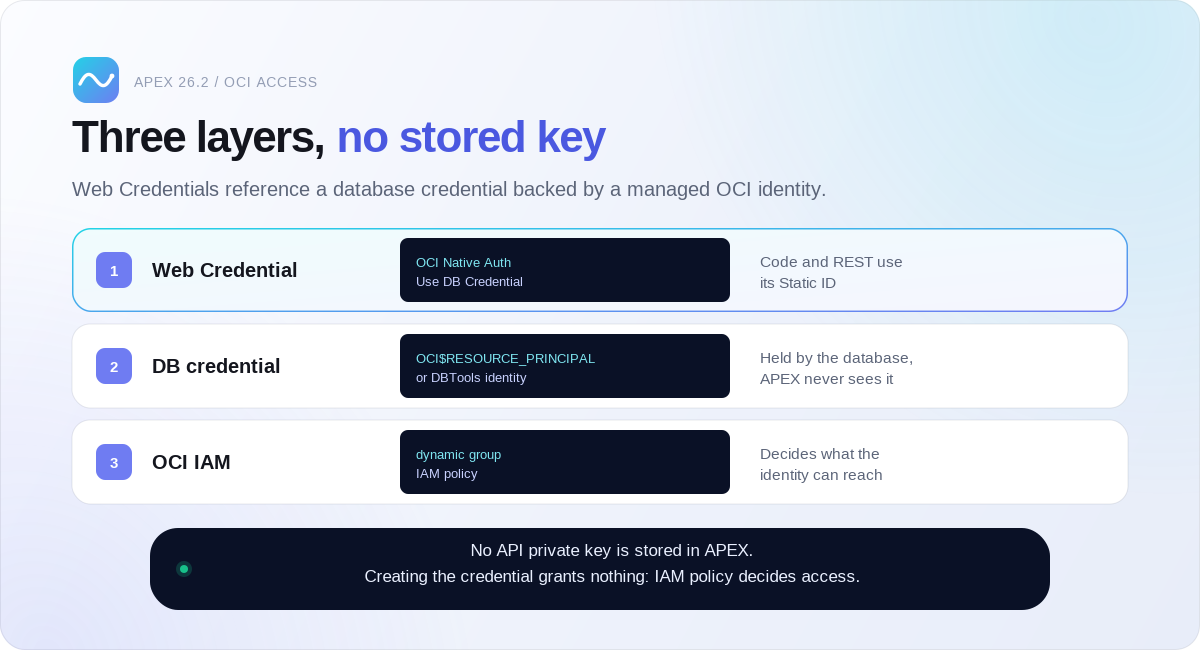
Two consequences shape the design. First, creating the credential grants nothing: access comes entirely from IAM policy. Second, when a database credential is used, HTTP requests run in the context of the application’s parsing schema, not the APEX engine schema. That schema needs PL/SQL network ACLs and HTTPS access to the OCI endpoint.
The 26.2 documentation lists OCI Native Authentication alongside Basic Authentication and OAuth2 Client Credentials as Web Credential types that can use a database credential. The feature requires Oracle Database 26ai, or Autonomous Database 19c or later.
Resource Principal or Database Tools Identity?
| Resource Principal | Database Tools Identity | |
|---|---|---|
| Where it applies | Autonomous AI Database | Oracle database cloud services, with Base Database Service and Autonomous Database as Oracle’s examples |
| OCI principal | The Autonomous database instance | A Database Tools identity resource |
| Database credential | OCI$RESOURCE_PRINCIPAL |
A credential you name, created in the connection’s schema |
| Per-schema identities | One identity for the database, shared by enabled schemas | Different identities for different schemas |
| Rotation | Managed by OCI; token cached for two hours | Refreshed automatically by Database Tools; refresh manually after IAM changes |
| Extra moving parts | IAM plus one ADMIN call | A Database Tools connection, a Vault secret for the password, a second dynamic group |
Oracle’s post does not say when to pick which, so here is our view. On Autonomous AI Database with one application schema, Resource Principal is the shorter path. When several schemas share a database and need different OCI permissions, or the database is not Autonomous, Database Tools Identity fits better.
Setting up Resource Principal on Autonomous AI Database
- Create a dynamic group that matches the database. Oracle’s rule for a single instance is
resource.id = '<autonomous_database_ocid>', and you can also match every Autonomous database in a compartment. Tenancies with identity domains prefix the rule with the domain name. - Write IAM policies for that dynamic group, limited to what the application actually calls.
- Enable the resource principal as ADMIN, then grant it to the parsing schema:
EXEC DBMS_CLOUD_ADMIN.ENABLE_RESOURCE_PRINCIPAL();
EXEC DBMS_CLOUD_ADMIN.ENABLE_RESOURCE_PRINCIPAL(username => 'APP_SCHEMA');
The first call creates the OCI$RESOURCE_PRINCIPAL credential. To confirm it as ADMIN:
SELECT owner
     , credential_name
  FROM dba_credentials
 WHERE credential_name = 'OCI$RESOURCE_PRINCIPAL'
AND owner = 'ADMIN';- Create the Web Credential with OCI Native Authentication, Use Database Credential enabled, Schema scope and the credential name
OCI$RESOURCE_PRINCIPAL. It has to resolve for the parsing schema under the normal credential access rules.
Plan for caching: Autonomous caches the resource principal token for two hours, so a policy or dynamic group change can take up to two hours to apply.
Setting up Database Tools Identity
Database Tools Identity takes more steps, because a Database Tools connection sits between OCI and your schema. Following Oracle’s walkthrough:
- IAM first. One dynamic group for Database Tools connections (resource type
databasetoolsconnection), allowed to read the Vault secret holding the database password. Another for Database Tools identities (resource typedatabasetoolsidentity), allowed to call the services your app needs. - Create the connection under Developer Services, Database Tools, Connections. Use the parsing schema as the user, store its password as a Vault secret, add a wallet secret if mTLS or a private CA requires it, and under Advanced Options enable Runtime Support with Resource Principal as the runtime identity. Validate it.
- Create the identity on the connection’s Identities tab with a credential key such as
APEX_OCI_IDENTITY. Database Tools creates a database credential with that name in the connection’s schema. Wait until it is Active, checkUSER_CREDENTIALS, then refresh and validate. - Create the Web Credential with OCI Native Authentication, Use Database Credential enabled, and that credential name.
The connection’s database user needs CREATE CREDENTIAL and access to DBMS_CLOUD. If DBMS_CLOUD is not configured on the database yet, complete its installation, HTTPS and wallet setup first.
Schema scope or instance scope
A Web Credential backed by a database credential has a scope:
- Schema scope. Enter the credential name without a schema prefix. The parsing schema must own the credential, or have EXECUTE on it plus a local or public synonym. Only workspaces whose parsing schema can reach the credential can use it.
- Instance scope. Set the
INSTANCE_DBMS_CREDENTIAL_ENABLEDinstance parameter toY, grant EXECUTE on the credential to the APEX engine schema and create a synonym there. Oracle’s example usesAPEX_260200; use the engine schema of your installation.
GRANT EXECUTE ON APP_SCHEMA.APEX_OCI_IDENTITY TO APEX_260200;
CREATE SYNONYM APEX_260200.APEX_OCI_IDENTITY FOR APP_SCHEMA.APEX_OCI_IDENTITY;
On Oracle Database 19c, Oracle says to create the instance credential directly in the APEX schema, because a synonym will not work.
We prefer schema scope. One credential per parsing schema keeps OCI permissions aligned with workspaces, while an instance-wide credential tends to become a shared key with a nicer name.
Testing the credential
Oracle’s walkthrough tests the setup from SQL Workshop, with the parsing schema selected, by listing compartments through the OCI Identity API. The identity needs a policy that allows it to inspect compartments, and you pass the Web Credential’s Static ID, not the database credential name:
DECLARE
    l_response CLOB;
BEGIN
    l_response := apex_web_service.make_rest_request(
                      p_url                  => 'https://identity.us-ashburn-1.oci.oraclecloud.com/20160918/compartments/?compartmentId=<tenancy_ocid>'
                    , p_http_method          => 'GET'
                    , p_credential_static_id => 'oci-db-credential' );

    sys.dbms_output.put_line( dbms_lob.substr( l_response, 4000, 1 ) );
END;
Replace the region and tenancy OCID with your own. If it fails, Oracle’s troubleshooting notes are a good map: unresolved credentials usually mean name, scope or grants; OCI rejections mean dynamic group or policy; requests that never arrive mean ACLs, outbound connectivity or TLS.
What you can call
Oracle’s sources name these targets:
- Object Storage, named in the announcement and used as the example in both the Autonomous and Database Tools documentation.
- OCI Generative AI, named in the announcement and the 26.2 release notes.
- Vault keys and secrets, listed as a typical resource principal use on Autonomous.
- The Document Generator pre-built function, which the Database Tools identity overview gives as an example of a call from APEX.
The walkthrough uses the Web Credential in REST Data Sources and APEX_WEB_SERVICE calls. It does not show a Generative AI Service configured this way, so test that path in your own environment before you depend on it.
Limitations to plan around
- Valid for URLs is not enforced. APEX cannot apply it to database credentials, so the attribute is disabled. Endpoint restrictions now come from IAM policy and network ACLs.
- IAM changes are not instant. Resource Principal tokens are cached for up to two hours. Database Tools identities need a manual refresh after policy changes.
- The documentation is still catching up. In 26.2, the Creating Web Credentials page still lists only the key-based OCI fields. Use the Understanding Web Credentials page, field help and the technical post.
- Availability differs by platform. APEX 26.2 is available on-premises now and Autonomous AI Database follows shortly. The Resource Principal path depends on that rollout.
Two related 26.2 changes
Workspace-level network access control. Setting the new WEBSERVICE_USE_SCHEMA_ACL instance parameter to Y makes APEX enforce network ACLs per workspace and schema, instead of sending all supported outbound calls through the APEX engine schema’s ACLs. The default is N, which keeps existing behavior, and legacy SOAP requests are not supported once it is enabled. Because Valid for URLs does not apply to database credentials, per-schema ACLs are the natural boundary to pair with managed identities.
Web Service Limit requests. MAX_WEBSERVICE_REQUESTS caps outbound web service requests per workspace, by default 1,000 in a rolling 24-hour period. In 26.2, workspace administrators can request a higher limit directly from the Manage Service wizard. Managed identities change how requests are signed, not how many you can make, so check the limit before moving batch work to OCI APIs.
Migration checklist
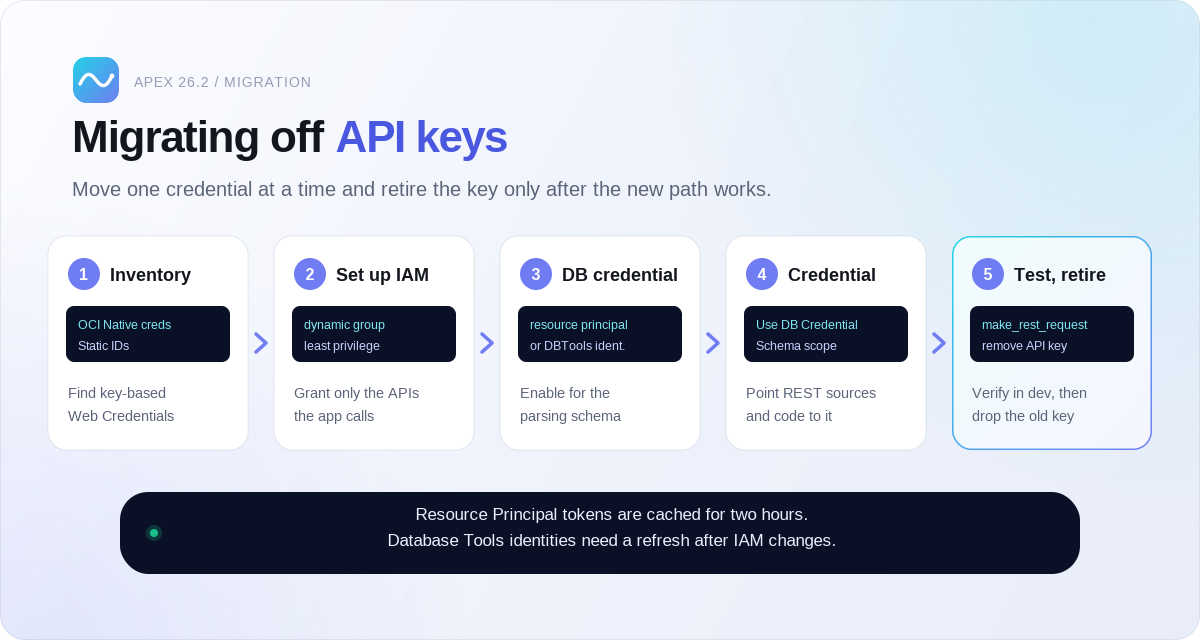
- Inventory. List OCI Native Authentication credentials under Workspace Utilities or Shared Components, and record each Static ID and the OCI APIs it calls.
- Choose the identity. Resource Principal or Database Tools Identity, per database and schema.
- Set up IAM. Dynamic groups and least-privilege policies that cover exactly those APIs.
- Create the database credential. Enable the resource principal for the parsing schema, or create the Database Tools identity.
- Open the network path. Grant ACLs to the parsing schema, and decide whether to enable
WEBSERVICE_USE_SCHEMA_ACL. - Create the new Web Credential and point REST Data Sources and code at its Static ID.
- Test in development, including the IAM delay after a policy change.
- Prepare each environment. On import, APEX reuses a credential with the same Static ID if the target workspace already has one, so create the managed credential there first.
- Retire the key. Remove the old Web Credential, then remove the API key from the OCI user.
Managed identities touch IAM, the database and APEX at once, which is where self-managed environments tend to drift. Our guides on AI-ready infrastructure for Oracle APEX and choosing Oracle APEX hosting cover the platform side, and AI agents in APEX 26.2 covers another 26.2 feature that relies on outbound AI calls. For an APEX environment that is upgraded and monitored for you, see Cloud Hosting and the plans page.
Bottom line
APEX 26.2 removes the most awkward secret in many APEX applications: a personal OCI API key. With Resource Principal or Database Tools Identity, the database holds a managed credential, IAM decides what it can do, and APEX only keeps a reference.
The trade-off is that network ACLs and IAM policies become your real controls, since Valid for URLs no longer applies. Set those up carefully, migrate one credential at a time, and delete the old keys when you are done.
FAQ
Do I still need an OCI API key to call OCI from APEX 26.2?
Not when you use a managed identity. A Web Credential of type OCI Native Authentication can reference a database credential backed by Resource Principal or Database Tools Identity instead of storing a private key.
Which should I use, Resource Principal or Database Tools Identity?
Resource Principal applies to Autonomous AI Database and is the simplest setup. Database Tools Identity works with Oracle database cloud services such as Base Database Service and supports different identities per schema.
Does creating the credential give my app access to OCI?
No. The credential only provides authentication. OCI IAM dynamic groups and policies decide which resources the identity can reach.
Why is Valid for URLs disabled for these credentials?
The database maintains the credential and APEX cannot see its secrets, so APEX cannot enforce Valid for URLs. Use network ACLs on the parsing schema, and consider workspace-level ACLs with WEBSERVICE_USE_SCHEMA_ACL.
Why did my IAM policy change not take effect?
On Autonomous AI Database, the resource principal token is cached for two hours, so changes can take up to that long. For Database Tools Identity, refresh the identity after changing policies.
Can I use this on Autonomous AI Database today?
APEX 26.2 is available on-premises now. Oracle says Autonomous AI Database availability follows shortly, with OCI and multicloud rollouts over the coming weeks.
Sources
- Announcing Oracle APEX 26.2 General Availability
- What’s New in Oracle APEX 26.2
- Oracle APEX 26.2: Using DBMS_CLOUD Credentials with Resource Principal and DBTools Identity
- Oracle APEX 26.2 Release Notes: New Features
- Understanding Web Credentials (APEX 26.2)
- Creating Web Credentials (APEX 26.2)
- APEX_INSTANCE_ADMIN Available Parameter Values
- Use Resource Principal to Access Oracle Cloud Infrastructure Resources
- Enable Resource Principal to Access Oracle Cloud Infrastructure Resources
- Use Web Services with Oracle APEX on Autonomous AI Database
- Using Identities with Database Tools
- Database Tools: Workflow to Use Identity
- Database Tools: Managing Database Tools Identity
- Database Tools: Dynamic Groups for Identities