The short version
APEX Workflow has always treated change conservatively. When you activate a new version of a workflow, running instances stay on the version they started with. That is safe, but a process fix only reaches new work. A long approval chain or an open order keeps following the old rules until it finishes.
APEX 26.2, generally available since October 6, 2026, adds the missing piece plus several smaller improvements:
- In-flight migration.
APEX_WORKFLOW.MIGRATE_INSTANCEmoves a running instance to a newer version of its workflow. - Custom outcomes for Action Tasks. Values such as YES, NO or UNDECIDED that a workflow can branch on.
- Fail events for Human Tasks. A task that moves to the Errored state raises an event you can attach actions to.
- Draft activities. Placeholders that let you save a workflow model before every step is built.
- Diagram export. PNG or SVG, full diagram or visible viewport.
Below: what each feature does, what Oracle documents and what it does not yet, and how we would change a live process with them.
How workflow versions work
A quick recap from the App Builder documentation. A workflow is a shared component whose definition holds parameters, variables, activities, connections and participants. Each workflow has versions, and a version is In Development, Active or Inactive. Only one version can be Active and only one can be In Development at a time; any number can be Inactive.
When you activate a new version, the previous Active version becomes Inactive. Instances already running on it continue until they complete, while new work starts on the new version. Two details are easy to miss:
- Active versions are mostly locked. You can add activity-local variables, change switch branch conditions and add participants. You cannot create activities on an active workflow, so any structural change means duplicating the Active version, editing the copy and activating it.
- Deleting an Inactive version also deletes its workflow instances. Cleanup is not harmless.
People do their part of a process through Human Tasks, created from Task Definitions. An Approval Task ends as APPROVED or REJECTED. An Action Task covers other work, such as completing a form, and until now had no outcome at all. Inside a workflow, the Human Task - Create activity creates the task and can store its outcome in a workflow variable, which a Check Workflow Variable switch then branches on.
Deployment adds one more rule. When you import a new version of an application that contains workflows, APEX suspends running instances automatically, and a workflow administrator decides which to resume and which to terminate, because the new definition may be very different.
In-flight migration with MIGRATE_INSTANCE
What it does
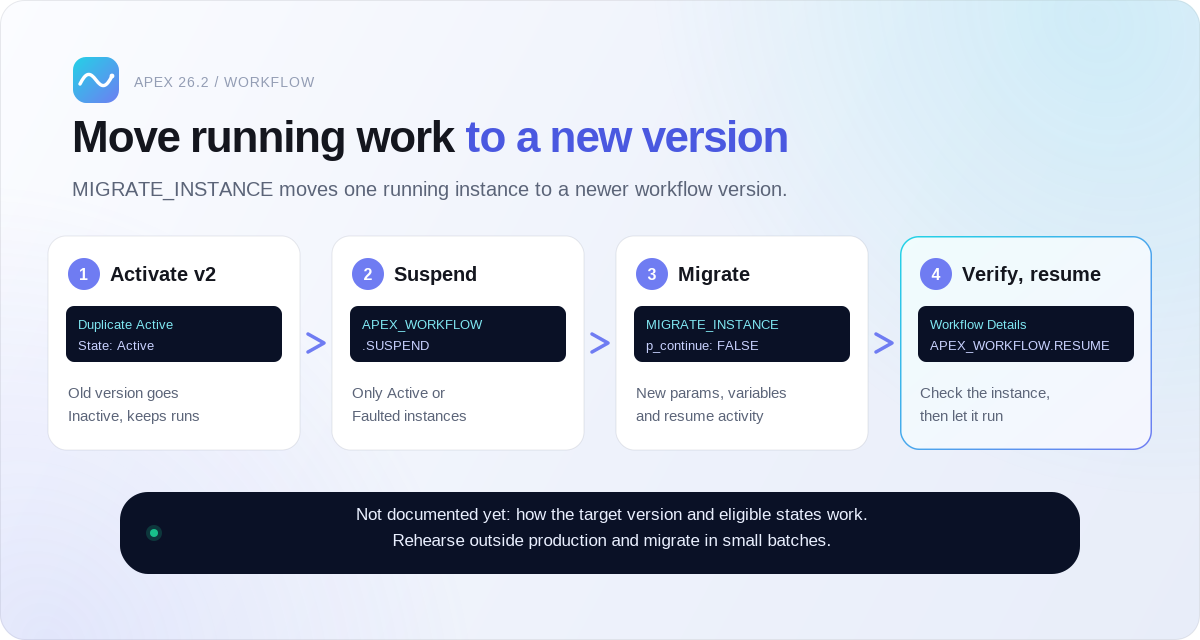
According to the 26.2 API reference, APEX_WORKFLOW.MIGRATE_INSTANCE moves one workflow instance to a newer version of its workflow. In the same call you can:
- update workflow variables (
p_workflow_variables), - supply values for parameters that are new and required in the target version (
p_workflow_parameters, mandatory for every new required parameter), - choose the activity, by static ID, where the instance resumes (
p_resume_activity_static_id), - decide whether it continues right away (
p_continue_workflow).
Both collections use the APEX_WORKFLOW.T_WORKFLOW_PARAMETERS type. p_continue_workflow defaults to FALSE, which leaves the instance suspended after migration. That is the right default for production.
A hypothetical example
Imagine an order processing workflow. Version 2 adds a credit check activity with the static ID CREDIT_CHECK and a new required parameter, SHIPPING_REGION. Workflow instance 1001 is still running on version 1, and you want it to pass the credit check too.
DECLARE
    l_variables  apex_workflow.t_workflow_parameters;
    l_parameters apex_workflow.t_workflow_parameters;
BEGIN
    -- Hypothetical: required parameter added in version 2
    l_parameters(1).static_id    := 'SHIPPING_REGION';
    l_parameters(1).string_value := 'EU';

    -- Hypothetical: variable the new credit check step reads
    l_variables(1).static_id     := 'CREDIT_STATUS';
    l_variables(1).string_value  := 'PENDING';

    apex_workflow.migrate_instance(
          p_instance_id               => 1001
        , p_workflow_variables        => l_variables
        , p_workflow_parameters       => l_parameters
        , p_resume_activity_static_id => 'CREDIT_CHECK'
        , p_continue_workflow         => FALSE );
END;
The instance stays suspended. Review it on the Workflow Details page, which shows activity states, variables, parameters and audit history, then resume it with APEX_WORKFLOW.RESUME, which only accepts suspended instances. The APEX_WORKFLOW package needs a valid APEX session, so a script run from plain SQL must create one first.
What the documentation does not say yet
The reference page is short. Open questions that matter in production:
- Which version is the target? There is no version parameter; the docs only say “a newer version”. Confirm in a test environment which version the instance lands on.
- Which instance states qualify? Not stated. We would suspend first (
APEX_WORKFLOW.SUSPENDaccepts Active or Faulted instances) so nothing advances while you work. - What does a NULL resume activity mean? Not described. Always set it.
- What happens to an open Human Task or Wait on the old version? Not described. Rehearse exactly this case.
In the documentation we read, migration is API only; the Workflow Console and version management pages mention no UI action for it.
Custom outcomes for Action Tasks
Until now, an Action Task simply completed. In 26.2 it can carry an outcome, in Oracle’s words “such as YES, NO, or UNDECIDED”, which a workflow can use for decisions and branching.
Configuration is declarative. On the task definition, the Outcomes attribute (action tasks only) takes a comma-separated list such as YES,NO,UNDECIDED, with no spaces around commas and no quotes. APEX uses the list when an outcome is set and when it generates the outcome list on the task details page. The generated page for an action task offers Set Outcome next to Save and Complete.
In PL/SQL, use APEX_HUMAN_TASK.SET_TASK_OUTCOME:
BEGIN
    apex_human_task.set_task_outcome(
          p_task_id => :P2_TASK_ID
        , p_outcome => 'UNDECIDED' );
END;
P2_TASK_ID is a hypothetical page item. One caution: the example on Oracle’s reference page passes p_priority, which is not in the documented syntax, so follow the syntax block. In APEXlang, the Human Task - Manage process exposes the same operation as the setOutcome action type with an outcomeItem attribute.
Setting an outcome is a separate event from completing the task, so a task definition action can run on Set Outcome. The release notes add that outcomes can be validated at runtime, but we found no description of the rules, so test what happens with a value outside the list.
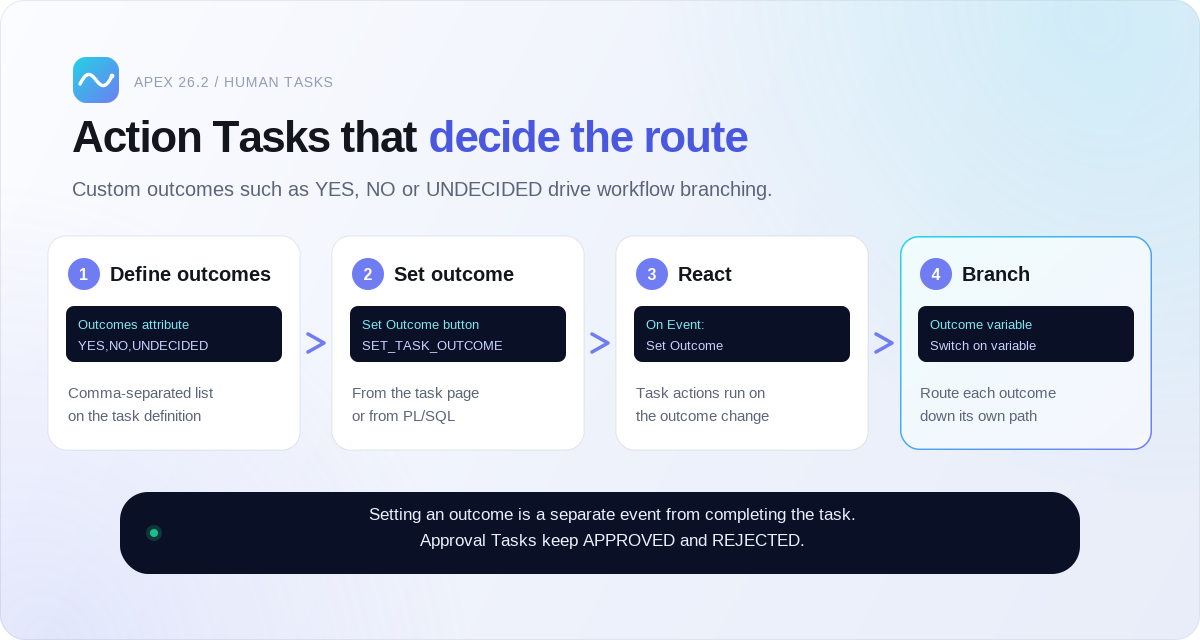
In a workflow, follow the approval pattern: map the Human Task - Create activity’s Outcome attribute to a workflow variable, then branch with a Check Workflow Variable switch. The activity documentation still describes that variable in terms of APPROVED and REJECTED, so verify that your custom value arrives as expected.
A hypothetical onboarding case shows why this matters. An “equipment ready” action task with YES,NO,UNDECIDED can continue on YES, route to procurement on NO and loop back on UNDECIDED. Before, you bent an Approval Task to fit or kept the answer in your own table.
Human Task fail events
Task definition actions run on events such as Create, Complete or Expire, and each action has error handling. If Stop Execution on Error is enabled and the action fails, later actions are skipped and the task goes into the ERRORED state.
In 26.2, a Human Task raises a Fail event when it transitions to Errored, and Fail appears in the list of task action events. You attach actions to it like any other event, for example an email or PL/SQL code. Our guidance:
- Keep fail actions boring. An email to the business administrator or an insert into a log table. A recovery action that can itself fail helps nobody.
- Make the history useful. Put
#SQLERRM#in each action’s Error Message and set Log Messages When to Failure or All. - Know the scope.
APEX_HUMAN_TASKdefines bothFAILEDandERROREDstates; Oracle documents the Fail event for the transition to Errored.
Draft workflow activities
The Workflow Designer’s activity palette now has an Activities tab and a Draft Activities tab. There are three draft types: Draft Generic (a rectangle for any step), Draft Switch (a diamond for a fork) and Draft Wait (a clock for a wait). Drafts appear greyed out with a pencil icon. When a step is ready, you change the draft to the activity type it stands for.
This supports top-down modeling. For a hypothetical approval chain, you can sketch “manager approval, then finance approval above a threshold” with the business owner, save it, and build the task definitions later.
What Oracle does not state is whether a version containing drafts can be activated, or what a draft does at runtime. We treat drafts as design-time only: replace every one and clear Show Messages before activation.
Diagram export to PNG and SVG
In the Workflow Diagram Builder, the Layout Menu now includes Export Diagram. You choose PNG or SVG, the whole diagram or only the visible viewport, and Standard, High or Very High resolution.
Small feature, real value. Export the Active version and the proposed one and attach both to the change request. Reviewers who never open App Builder see exactly what changes, and your audit trail records the process that was approved.
Changing a live workflow: a checklist
Here is the sequence we would follow for any change to a production process.
- Inventory running instances. Use the Workflow Console’s Admin Workflows context or the
APEX_WORKFLOWSview, and group them by current activity. - Duplicate, never patch. Structural changes go into a new In Development version.
- Keep static IDs stable. Migration and resume target activities by static ID.
- Model with drafts, then replace them. No draft survives to activation.
- List new required parameters and variables. Decide the values each migrated instance needs.
- Export both diagrams. Review the change with the process owner first.
- Decide per group: stay, migrate or terminate. Instances near completion can usually finish on the old version.
- Rehearse outside production. Include open Human Tasks and Waits, and confirm the target version.
- Configure Fail actions first. Errors should reach a person before migration starts.
- Activate, then migrate in small batches. Use
p_continue_workflow => FALSE, verify on Workflow Details, then resume. - Keep the old version. Never delete an Inactive version that still has instances.
- Release as a full application. Importing an application suspends running instances.
On that last point, keep production releases as complete, tested application exports, as we argued in APEXlang file-level import in APEX 26.2.
APEX 26.2 is available now for on-premises installations, with Oracle Autonomous AI Database following shortly and OCI and multicloud rollouts over the coming weeks. Workflows depend on the platform too: the parsing schema needs the CREATE JOB privilege, and upgrades and imports affect running instances. Our Oracle APEX hosting guide covers that layer. If you want separate test and production APEX environments with upgrades and monitoring handled for you, see Cloud Hosting and the plans page.
Bottom line
Versioning in APEX Workflow was always safe; it just was not flexible. With MIGRATE_INSTANCE, a process change can finally reach work already in flight, on your terms and one instance at a time.
Custom outcomes, Fail events, drafts and diagram export round that out. Treat migration like a data migration: plan, rehearse, batch and verify.
FAQ
Do running workflow instances move to a new version automatically?
No. Activating a new version leaves running instances on their original version until they complete. In 26.2 you can move individual instances with APEX_WORKFLOW.MIGRATE_INSTANCE.
Is there a UI for migrating workflow instances?
The 26.2 documentation we reviewed describes migration only as the APEX_WORKFLOW.MIGRATE_INSTANCE PL/SQL procedure. The Workflow Console pages do not mention a migrate action.
What happens if the new version adds a required parameter?
You must provide a value for every new required parameter through p_workflow_parameters when you migrate the instance.
Can Approval Tasks use custom outcomes?
No. Custom outcomes are for Action Tasks. Approval Tasks keep APPROVED and REJECTED.
When does a Human Task raise the Fail event?
When it transitions to the Errored state, for example after a task action with Stop Execution on Error enabled fails. You can attach task actions such as an email or PL/SQL to the Fail event.
Can I activate a workflow version that still contains draft activities?
Oracle’s documentation does not say. Drafts are placeholders without an implementation, so we recommend replacing all of them before activation.
Sources
- Announcing Oracle APEX 26.2 General Availability
- What’s New in Oracle APEX 26.2
- Oracle APEX 26.2 Release Notes: New Features
- APEX_WORKFLOW (26.2)
- APEX_WORKFLOW.MIGRATE_INSTANCE Procedure
- APEX_WORKFLOW.SUSPEND Procedure
- APEX_WORKFLOW.RESUME Procedure
- APEX_WORKFLOW Constants and Data Types
- APEX_HUMAN_TASK.SET_TASK_OUTCOME Procedure
- APEX_HUMAN_TASK Constants and Data Types
- About Workflow Versions
- Managing Workflow Versions
- About Workflow Definitions
- About Workflow Designer
- Creating a Workflow Activity
- About the Workflow Console, Workflow Details, and Workflow Dashboard
- Workflow Views
- About Workflows
- Creating a Task Definition
- About Task Definitions
- Managing Task Details
- process humanTaskManage: APEXlang Reference
- APEX Workflow Development Lifecycle and Management
- Using Action Tasks with Oracle APEX 23.2