The short version
An APEXlang application is a folder of .apx text files. SQLcl’s apex validate compiles that folder and tells you, line by line, what is wrong. The part that gets less attention: it does not need a database.
$ sql /nolog
SQL> apex validate -input .
That makes validation the cheapest check you can put in front of an APEX change:
- Offline. No credentials, no network path to a database.
- Precise. Every problem comes with file, line, column, type and message.
- Automatable. Run it on every pull request and after every AI agent edit, before any import.
- Versions. APEX 26.2 requires SQLcl 26.3.0 or later, which also adds CodeScan rules for
.apxfiles.
Our broader article on APEXlang file-level import in APEX 26.2 covers single-file import and compare and pull. This one goes deep on validation: what it checks, what it misses and how to build on it.
What apex validate actually checks
In Oracle’s words, “SQLcl, ORDS, and SQL Developer share a common APEXlang compiler driven by the rules that Page Designer has used for years.” Validating in SQLcl runs the same compiler that checks an import.
The compiler is metadata driven: it knows which components exist, their properties and child components, and when each applies. Oracle’s examples: an interactive report region has nested column definitions and a form region does not; a chart region has a zoomAndScroll property and a classic report does not. Oracle calls this meta-metadata (MMD).
Each application records the MMD version it was exported with in .apex/apexlang.json, so the compiler applies the right rules. Do not modify that file by hand, and do not let an agent do it either.
Running it and reading the output
The input is a path to an application directory or a zip file. If your current directory is the application root, you can omit -input; SQLcl’s cd and pwd commands work at the prompt.
A clean run prints Validation successful. Otherwise you get one block per problem under an APEXLang Compile Errors: header. This one is from Oracle’s documentation, after a deliberate typo in a region reference:
File: pages/p00003-employee.apx
Line: 117
Column: 12
Type: REFERENCE_NOT_FOUND
Error: Reference not found: @employe- File, Line, Column: where the problem is, with paths relative to the application folder in Oracle’s examples.
- Type: a machine-readable category. Oracle’s examples show
REFERENCE_NOT_FOUND,INVALID_PROPERTY,LOV_NOT_FOUNDandDUPLICATED_COMPONENT. We found no published list of all types. - Error: the message. Some carry the fix: for a misspelled data type, Oracle’s example lists the valid values.
In Oracle’s own sample, line 123 is reported before line 117, so do not assume sorted output. In SQL Developer for VS Code, the same errors appear in the Problems panel as you edit.
Spool it to a log
SQLcl’s spool command captures console output in a file, which is what you want in CI:
SQL> spool validate.log
SQL> apex validate -input .
SQL> spool off
Connected versus offline validation
Oracle’s main procedure connects to the workspace parsing schema first, then makes the key point: importing requires that connection, validating does not. Under /nolog, validation still compiles the application and reports errors and warnings. Oracle names two uses: an application downloaded from an APEX instance you cannot reach directly over the network, and an AI coding agent discovering and fixing its own errors.
The documentation does not say whether a connection adds checks, for example against tables or columns in the parsing schema. We found no statement either way, so we treat offline validation as a structural check of the application definition, nothing more.
The connected check you always get is import. In Oracle’s words, “Importing an APEXlang app always validates it first”, with the same errors and warnings as apex validate, and SQLcl proceeds when no errors are detected. Offline validation is the same gate, moved earlier, where it costs almost nothing.
Where validation fits with export and file-level import
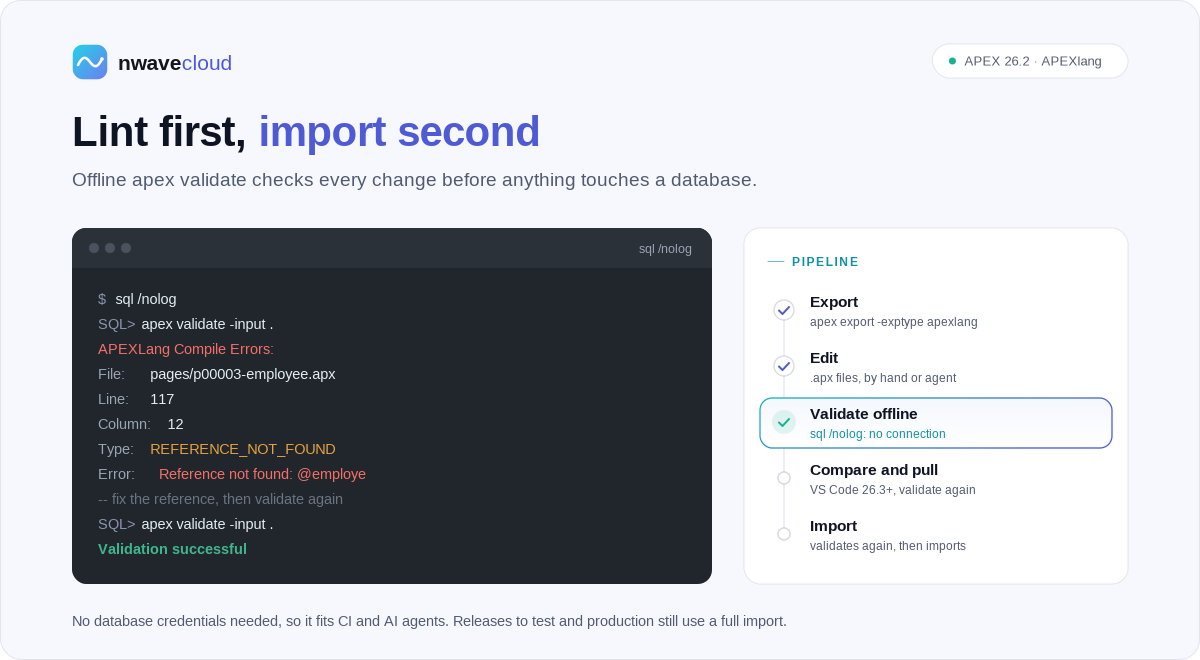
Export. apex export -applicationid 104 -exptype apexlang writes the application folder. After an APEX upgrade, Oracle recommends that Git-first teams re-import every application and re-export it with -force on a dedicated branch, so structural changes land in one commit. -force removes the application alias directory first, so keep the repository root at least one level above it. Validate that commit; it is your new baseline.
File-level import. In 26.2, apex import -files imports only the files you list, and the release notes position it for development environments only. We found -files documented for import, not for validation. Our rule: validate the whole application before a file-level import, so a page that points to a shared component missing from your folder fails with a reference error before it reaches a database.
Compare and pull. SQL Developer for VS Code 26.3 or later can pull App Builder changes into your local .apx files. Oracle’s sequence is review, resolve conflicts, validate, import. Pulled changes are still changes, so validate after every pull.
A CI pipeline, step by step
Oracle says these SQLcl commands let teams integrate APEXlang into automated pipelines and CI/CD workflows, but publishes no reference pipeline. Here is the shape we use, as steps rather than any one CI system’s syntax.
- Pin SQLcl. APEX 26.2 requires SQLcl 26.3.0 or later, and Oracle recommends keeping SQLcl current. Upgrade it in CI whenever you upgrade APEX.
- Check out the branch. No database credentials or network route needed.
- Run a script. SQLcl accepts
/nologplus a start script, as insql /nolog @validate.sql. Our hypotheticalvalidate.sql, built only from documented commands and run from the application root:
spool validate.log
apex validate -input .
spool off
exit- Decide pass or fail from the log. Oracle does not document whether a failed
apex validatechanges SQLcl’s exit status, or how warnings affect the success message. We fail the job unless the log containsValidation successful. Test this on your SQLcl version. - Publish the log. File, Line and Type map easily to pull request annotations.
- Add CodeScan as its own job, advisory at first.
- Only then go connected. Import into a development application or Working Copy and run your tests. APEX 26.2 adds
LOCK_APPLICATION,UNLOCK_APPLICATIONandCREATE_WORKING_COPYtoAPEX_APPLICATION_ADMIN, designed, in Oracle’s description, for trusted CI/CD integrations. - Release as a full application. Test and production get a complete, validated export.
CodeScan for APEXlang in SQLcl 26.3.0
Validation asks whether the application compiles. CodeScan asks whether it follows good practice. The APEX 26.2 release notes deprecate APEX Advisor and point to SQLcl 26.3.0, whose built-in CODESCAN utility gains native code quality and security rules for APEXlang applications. The SQLcl changelog puts it at more than 30 rules for .apx files.
Oracle’s APEX 26.2 new features deck shows the command, with the export directory as the argument:
SQL> codescan -ext .apx export-dirThe deck’s supported checks include authorization requirements, hidden-item value protection, and session limits and security defaults: security-configuration findings to catch before deployment.
Documentation is still thin. The SQLcl 26.3 User’s Guide CODESCAN page documents -path, -format, -ignore, -output and -settings for SQL, PLS and PLB files, with no mention of .apx files, the extension option or APEXlang rule IDs, and Oracle’s roadmap still lists “APEXlang static analysis via SQLcl”. Our advice: run CodeScan as a non-blocking job, review its findings on your applications, then decide which should block a merge.
A safety net for AI coding agents
Oracle’s guidance for agents is simple: treat validation as part of the editing loop, and import only after the source validates cleanly. SQLcl’s skills sync command installs or updates Oracle’s APEXlang skills, and SQLcl 26.3.0 also offers a skills_sync MCP tool.
In our view, offline validation is what makes that loop safe. The agent edits .apx files, runs apex validate, reads file, line, type and message, fixes and repeats, all without database credentials.
How we set agents up:
- No database access in the edit loop. Import is a pipeline or human step.
- Protected files. Never edit
.apex/apexlang.jsonor files ingenerated-artifacts, which Oracle says should not be modified manually. - Whole application. Validation takes an application directory or zip file. Single-file compilation is listed on Oracle’s roadmap.
- Review the diff. A clean validation is where code review starts.
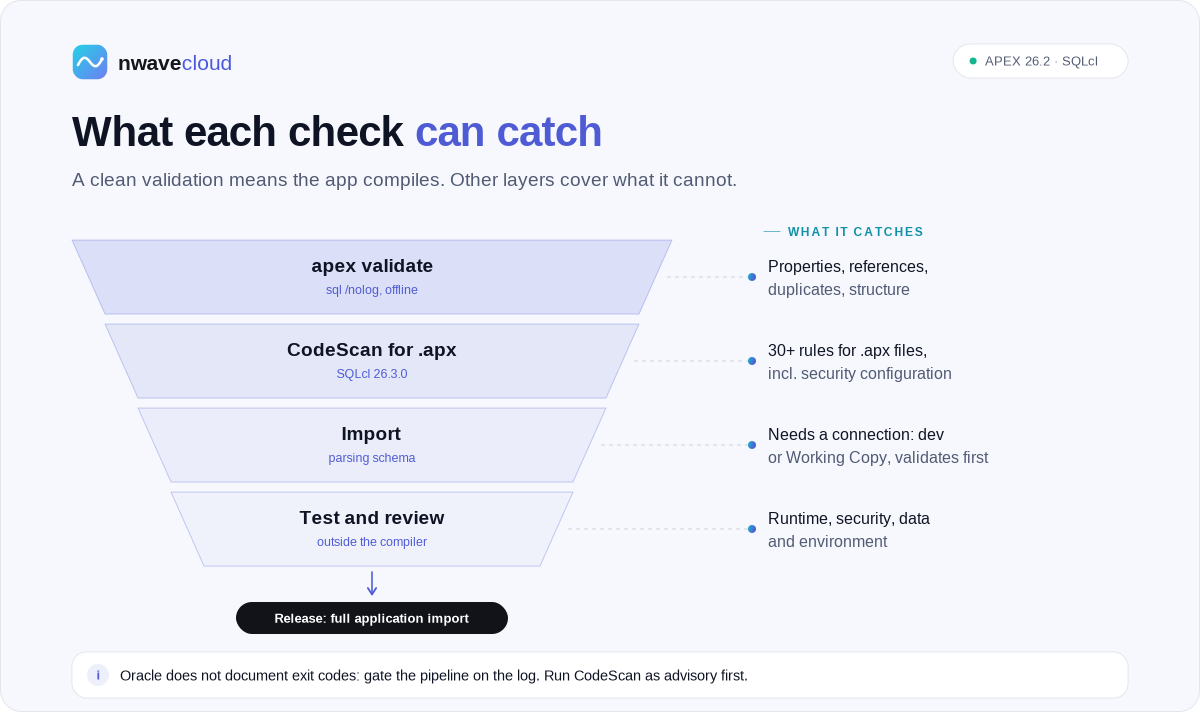
What validation does not catch
A clean result means the application compiles. It does not mean the application works.
- Runtime behavior. SQL in regions, PL/SQL processes and dynamic actions run only at runtime. Oracle does not document checks of SQL or PL/SQL against database objects, and offline there is no database to check against.
- Security. A page missing the authorization scheme it needs can be perfectly valid APEXlang. CodeScan covers some security configuration; testing and review cover the rest.
- Data. Validation never touches data. Oracle also advises against versioning Full exports, which may include application data.
- Environment. Web Credentials and Remote Servers set to Prompt on Install need values per environment, and the 26.2 known issues say imports through clients such as SQLcl need manual preinstallation for them.
- Concurrent edits. Validation checks your files, not App Builder changes made since your export. Compare and pull covers that.
Checklist
- SQLcl 26.3.0 or later wherever you validate or import
apex validate -input .offline on every pull request, spooled to a published log- Pass or fail decided from the log, not an assumed exit code
- Whole application validated before any file-level import and after every compare and pull
.apex/apexlang.jsonandgenerated-artifactsnever edited by hand- Re-export with
-forceon its own branch after each APEX upgrade, then validate - CodeScan on
.apxfiles as an advisory job at first - Agents validate offline; imports stay in the pipeline; production gets full imports
Validation runs anywhere SQLcl runs; imports, tests and releases need environments where APEX, ORDS and SQLcl are upgraded together. APEX 26.2 is available now for on-premises installations, with Oracle Autonomous AI Database following shortly and OCI and multicloud rollouts over the coming weeks. For managed development, test and production APEX environments, see Cloud Hosting and the plans page.
Bottom line
apex validate under /nolog is the smallest useful gate in an APEXlang workflow: no database, no credentials, precise output. Put it in front of every import, every pull request and every agent edit.
Then remember what it is: a compiler check. Lint first, import second, and keep testing, security review and full releases where they belong.
FAQ
Does apex validate need a database connection?
No. Importing needs a connection to the workspace parsing schema; validation does not. Start SQLcl with sql /nolog and run apex validate -input . from the application root.
What does the validation output contain?
Either Validation successful, or one block per problem with file, line, column, type and error message. Capture it with SQLcl’s spool command.
If import validates anyway, why validate separately?
Because it runs earlier and needs no connection, so you get the same compiler feedback on every commit, in CI and inside an agent’s edit loop.
Which SQLcl version do I need for APEX 26.2?
SQLcl 26.3.0 or later, according to the APEX 26.2 release notes.
Does a failed validation return a non-zero exit code?
Oracle does not document this. Decide pass or fail from the spooled log, for example by requiring Validation successful, and test it on your SQLcl version.
Is CodeScan the same as apex validate?
No. apex validate checks that the application compiles against APEX metadata. CodeScan in SQLcl 26.3.0 adds more than 30 code quality rules for .apx files, including security configuration checks.
Sources
- Using SQLcl with APEXlang (APEX 26.2)
- Working with APEXlang (APEX 26.2)
- Using APEXlang with AI Coding Agents (APEX 26.2)
- Upgrading APEXlang Source with a New APEX Release
- Oracle APEX 26.2 Release Notes: About These Release Notes
- Oracle APEX 26.2 Release Notes: New Features
- Oracle APEX 26.2 Release Notes: Changed Behavior
- Oracle APEX 26.2 Release Notes: Deprecated Features
- Oracle APEX 26.2 Release Notes: Open Bugs and Known Issues
- Oracle APEX 26.2 New Features (deck)
- What’s New in Oracle APEX (including roadmap)
- Announcing Oracle APEX 26.2 General Availability
- Introducing File-Level Import with APEXlang in Oracle APEX 26.2
- APEXlang in Practice: Export, Edit, Validate and Import Oracle APEX Applications
- SQLcl Changelog
- CODESCAN, Oracle SQLcl User’s Guide 26.3
- Starting and Leaving SQLcl, Oracle SQLcl User’s Guide