The short version
When an APEX 26.2 application runs on Oracle Deep Data Security (Deep Sec), the database decides what each query returns for the signed-in user. Two documented rules matter:
- Unauthorized rows are left out. Rows that fail the data grant’s predicate are filtered out of the results. No error, no hint that they exist.
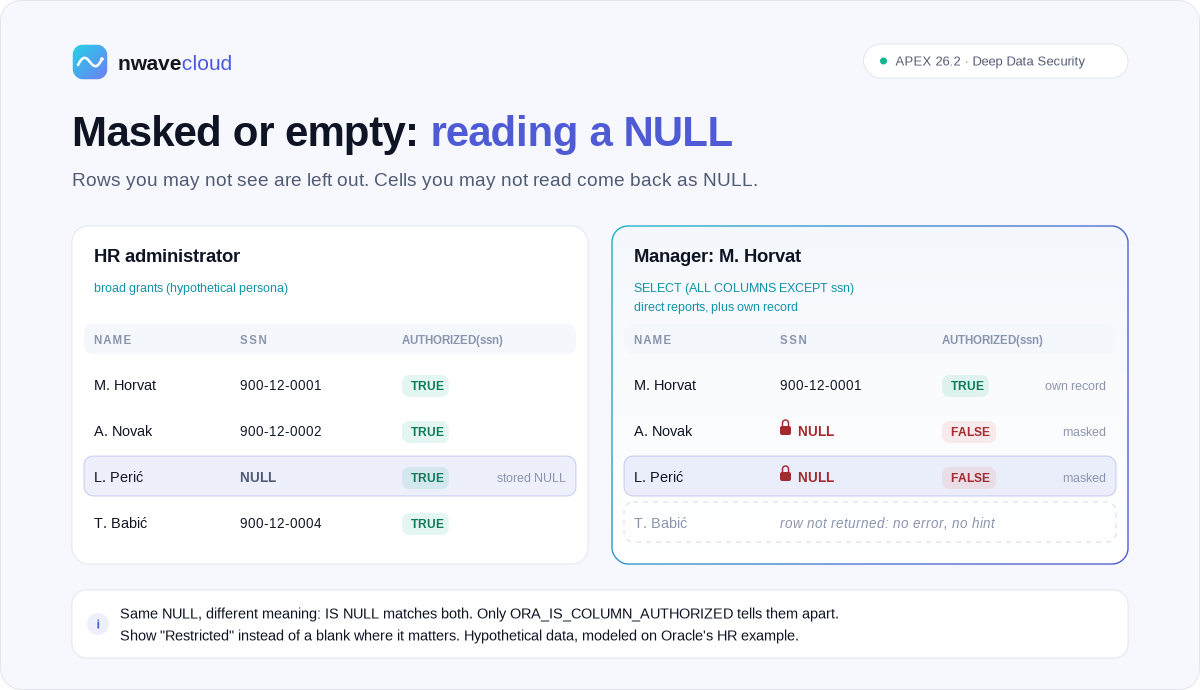
- Unauthorized cells come back as NULL. The row is returned, but values the user may not read are NULL.
The second rule creates the question behind this article: when a user sees a blank, is the value empty or masked? Plain SQL cannot tell. The ORA_IS_COLUMN_AUTHORIZED function can.
Our broader article on APEX 26.2 AI agents and Deep Data Security covers the integration itself. Here we stay at the data level: what masking does to forms, grids, totals, downloads and AI answers, and the patterns we would use.
Where the NULLs come from
Deep Sec is supported only with Oracle AI Database 26ai. Its policies are data grants, written in SQL, that give end users or data roles privileges on rows and columns of a table, view or materialized view. In APEX 26.2, when the integration is enabled, the authenticated end-user identity is passed to the database, which enforces Data Roles and Data Grants for all SQL execution. APEX authorization still decides what a user can do in the application; the grants decide what data SQL may read or change.
Column scope lives in the grant’s privilege list. In Oracle’s HR example, managers receive SELECT (ALL COLUMNS EXCEPT ssn), UPDATE (salary) on their direct reports, so those employees come back with SSN as NULL. Grants are additive, so the same manager still sees his own SSN through an own-record grant. One query, and the same column is visible on one row and masked on the next.
Two more details:
- Copies inherit the NULLs.
INSERT ... AS SELECTandCREATE TABLE AS SELECTalso use NULL for unauthorized values. - NULL is a deliberate default. Oracle’s FAQ notes that redaction used alone may be vulnerable to inference, and the technical brief says returning NULL reduces that risk.
ORA_IS_COLUMN_AUTHORIZED: masked or empty?
The SQL Language Reference describes the function as differentiating an actual NULL cell value from an unauthorized NULL cell value. The Deep Sec guide documents this syntax:
ORA_IS_COLUMN_AUTHORIZED(column_reference [, privilege])
  RETURN BOOLEAN

privilege ::= SELECT | INSERT | UPDATE
What the documentation says:
- Returns TRUE when the current end user may access the column value in the current row, or when no data grant protects the column. Returns FALSE otherwise.
column_referencemust be a column, not an expression. Qualify it asschema.object.columnwhen the name is ambiguous in the query, or ORA-00918 is raised.privilegedefaults to SELECT. INSERT and UPDATE are also accepted. DELETE raises ORA-52540, and passing NULL raises ORA-01760.
Oracle’s examples apply DECODE to the result. Here is that pattern on the guide’s sample hr.employees table, for a hypothetical report that shows a label instead of a blank:
SELECT employee_id
     , first_name
     , last_name
     , DECODE( ORA_IS_COLUMN_AUTHORIZED( salary )
             , FALSE, 'Restricted'
             , TRUE,  TO_CHAR( salary ) ) AS salary_display
  FROM hr.employees
A genuine NULL salary still displays as blank, because the function returns TRUE and TO_CHAR of NULL is NULL. A masked salary displays as “Restricted”. And because the result depends on authorization, not on the stored value, the label says “you may not see this” without revealing whether anything is stored there.
A companion function, ORA_CHECK_DATA_PRIVILEGE, checks a privilege on a row or on a column value in that row. Oracle positions it for decisions such as enabling an Edit button.
DML: some failures are loud, some are silent
Writes follow the same grants. From the guide’s DML semantics:
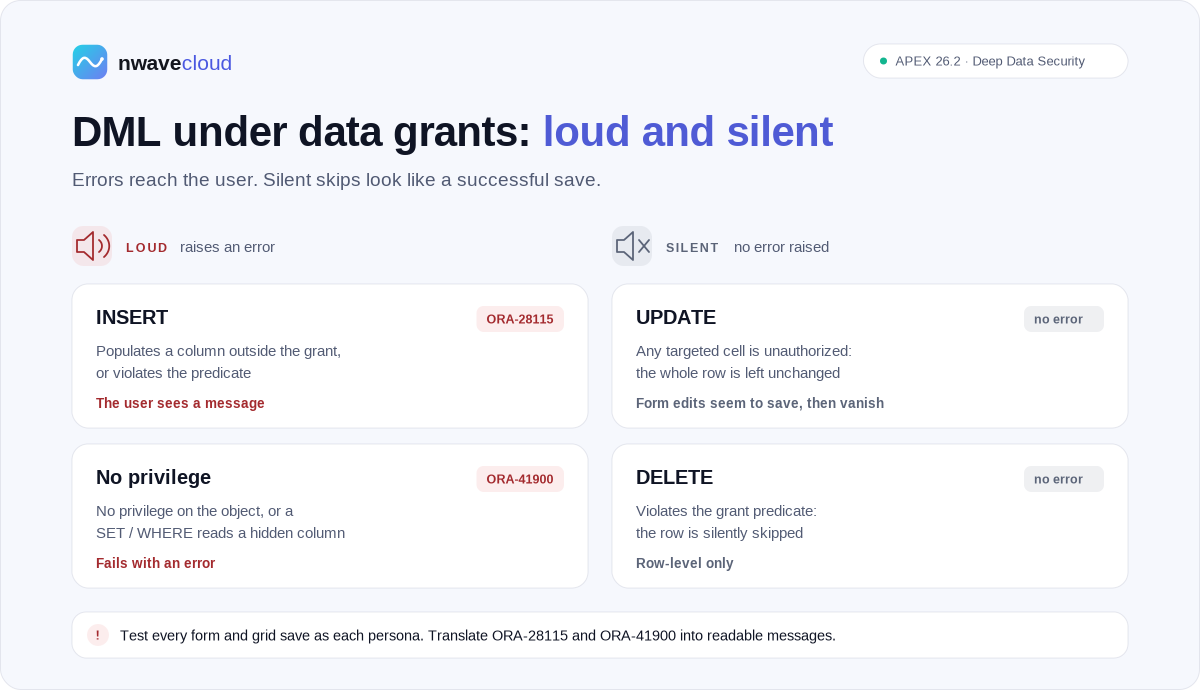
- INSERT succeeds with a row-level privilege, or with column privileges covering every column being populated. Populating a column outside the granted scope, or violating the predicate, fails with ORA-28115.
- UPDATE is a cell-level operation. If any targeted cell in a row is unauthorized, the entire row is left unchanged and no error is raised, provided the user has some UPDATE and SELECT privileges through the grant. A change that violates the predicate raises ORA-28115, and a post-update check works like
WITH CHECK OPTION. - DELETE is row-level only. A delete that violates the predicate is silently skipped, provided the user has some DELETE and SELECT privileges.
- No privilege at all on the object, or a SET expression or WHERE clause that reads a column the user cannot select, fails with ORA-41900.
Errors are the easy case. Silent skips are the real risk: the application can report success while nothing changed.
What masking means for APEX components
This is our analysis of documented database behavior applied to APEX. The APEX documentation we reviewed does not describe component-specific handling of masked values, so treat each point as something to test.
Forms
A masked column loads into its page item as empty. If the user edits other fields and saves, and the form’s UPDATE includes the masked column, the documented rule applies: the whole row is left unchanged, without an error. The edits disappear, and no error reaches the page to tell anyone. Whether a form’s DML touches unchanged columns depends on how it is built, so test every form that can show a masked item. The upside: unless the user holds UPDATE on that column, the masked NULL cannot overwrite the real value.
Validations too: a required-value check on a maskable item fails for a user who was never allowed to fill it. Condition those validations, or keep maskable columns out of editable forms.
Interactive Grids
A grid shows only the rows the user may see, so row counts and pagination reflect the grant, not the table. A grid can save several changed rows at once, and under the rules above some rows can be skipped silently while others commit. Make columns the user cannot update read-only instead of editable blanks; ORA_CHECK_DATA_PRIVILEGE is the documented tool for that kind of per-row check.
Reports, filters and totals
This is where masking misleads most. Oracle’s analytics chapter documents:
SUM,AVG,MINandMAXignore masked values, whileCOUNT(*)still counts every returned row.IS NULLmatches stored and masked NULLs alike. Equality and range filters never match a masked value.- Masked grouping values fall into the NULL group, and masked sort values sort with the NULLs.
- An unauthorized join value is NULL and does not match in an equality join.
So a report aggregate, a chart or a “salary missing” filter can be wrong for everyone without full access, and nothing on screen says so. Oracle’s guidance is to display COUNT(*) alongside COUNT(column):
SELECT manager_id
     , COUNT(*)      AS employees
     , COUNT(salary) AS salaries_visible
     , SUM(salary)   AS visible_salary_total
  FROM hr.employees
 GROUP BY manager_id
The guide also separates input-level substitution (ORA_IS_COLUMN_AUTHORIZED inside the aggregate, which changes results of AVG or COUNT) from output-level substitution (NVL around the finished expression). Choose on purpose: NVL(salary, 0) inside an aggregate turns masked and stored NULLs alike into zero.
CSV and other downloads
A download can only contain what the query returned, so expect the same blanks. Outside the application a blank cell reads as missing data, and files travel further than screens. An explicit “Restricted” value survives that trip.
AI agents
APEX 26.2 runs SQL from supported AI Agent tools under the requesting user’s security context. That is exactly what you want, but a model reading NULLs may confidently report “no salary recorded” or average a partial set. Have tool queries return explicit markers and visible counts, and explain in the system prompt what “Restricted” means and that totals cover visible values only.
Design patterns we recommend
Our recommendations, built on the documented behavior above:
- Purpose-built views. If a page has no reason to show a column, build it on a view without that column. Grants can target views, and with
USE DATA GRANTS ONLY, Oracle enforces the grants whether a user reaches the object directly or through a view. A view is a presentation choice, not a bypass, and a missing column cannot be misread. - Restricted, not blank. Where a sensitive column must appear, expose an
ORA_IS_COLUMN_AUTHORIZEDindicator and render it as a label or icon. - Honest totals. Show visible-value counts next to totals, label them as visible, or remove totals from columns that can be masked.
- Editability from privileges. Decide read-only state with
ORA_CHECK_DATA_PRIVILEGE, never from whether a field happens to be empty. - Readable errors. Translate ORA-28115 and ORA-41900 into messages a business user understands.
A test checklist with personas
Use hypothetical personas modeled on Oracle’s HR example: an HR administrator with broad grants, a manager (direct reports, no SSN, may update salary), an employee (own record only) and a user with no grant. For each, check:
- Row counts on every report and grid match what the grants allow.
- Masked cells show the restricted indicator, and genuine NULLs stay blank.
- Totals and charts show visible counts.
- A form save touching an unauthorized column: what the user sees, and whether anything changed.
- An Interactive Grid save mixing authorized and unauthorized rows.
- An insert with an out-of-scope column returns a readable error.
- Required-value validations on maskable items.
- A CSV download, opened outside the application.
- The same questions to the AI agent, compared against the reports.
- The application’s Deep Sec setting after import in every environment (26.2 adds
APEX_APPLICATION_ADMINandAPEX_APPLICATION_INSTALLprocedures for it).
Persona tests only mean something when test matches production: same database release, identity set-up and grants. Oracle announced APEX 26.2 on October 6, 2026 for on-premises installations, with Oracle Autonomous AI Database following shortly and OCI and multicloud rollouts over the coming weeks. Our Oracle APEX hosting guide covers that platform layer. For matching test and production APEX environments with upgrades and monitoring handled for you, see Cloud Hosting and the plans page.
Bottom line
Deep Data Security moves “who can see what” into the database, which is the right place for it. The price is that a NULL no longer means only “empty”. It can also mean “not for you”, and some writes can quietly do nothing.
ORA_IS_COLUMN_AUTHORIZED tells the difference. Use it, show users when something is restricted, keep totals honest and test as every persona before go-live.
FAQ
Does Deep Data Security raise an error when a user cannot see a column?
No. Unauthorized column values are returned as NULL and rows that fail the grant predicate are filtered out, both without an error.
How do I tell a masked NULL from a real NULL?
Use ORA_IS_COLUMN_AUTHORIZED(column_reference). It returns TRUE when the user may access the value in the current row or the column is not protected, and FALSE otherwise. IS NULL cannot tell the two apart.
Can ORA_IS_COLUMN_AUTHORIZED check update rights?
Yes. The optional privilege argument accepts SELECT (the default), INSERT or UPDATE. DELETE is not allowed and raises ORA-52540.
What happens when an APEX form saves a row with a masked column?
If the UPDATE targets an unauthorized cell, Oracle documents that the whole row is left unchanged without an error. Test each form, since that depends on how its DML is built.
Are report totals correct under Deep Data Security?
Only for the values the user can see. SUM, AVG, MIN and MAX ignore masked values, so show COUNT(*) next to COUNT(column) or label totals as visible only.
Which database release does Deep Data Security require?
Oracle AI Database 26ai. APEX 26.2 adds the integration that passes the authenticated end-user identity to the database.
Sources
- Announcing Oracle APEX 26.2 General Availability
- Oracle APEX 26.2 Release Notes: New Features
- Oracle Deep Data Security Guide (26)
- About Data Grants
- Create Data Grants
- Fine-Grained Data Authorization
- Use Access Check Functions
- ORA_IS_COLUMN_AUTHORIZED (SQL Language Reference)
- Enforce Mandatory Data Privileges
- Mask Unauthorized Cell Values in Query Results
- Understand the Effect of Column Security on Analytical Results
- Oracle Deep Data Security in Autonomous AI Database
- Oracle Deep Data Security FAQ (PDF)
- Oracle Deep Data Security Technical Brief (PDF)