The short version
The social version fits in one line: set Outcomes to YES,NO,UNDECIDED on the task definition and your workflow branches on the answer. When Oracle introduced Action Tasks in APEX 23.2, its blog said plainly: “An Action Task doesn’t have an outcome.” In 26.2, it can have one.
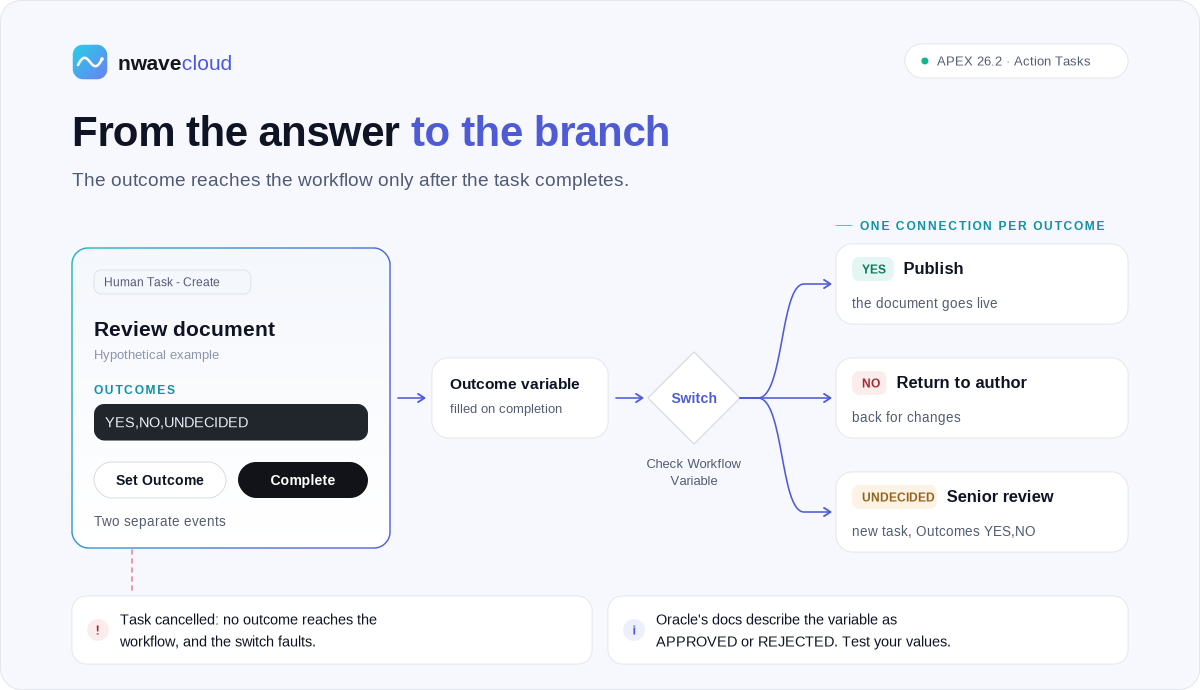
The path from answer to branch has four steps:
- Define the allowed values in the task definition’s Outcomes attribute.
- Set one, from the task details page or with
APEX_HUMAN_TASK.SET_TASK_OUTCOME. - Complete the task, which is a separate step.
- Branch in the workflow on the variable the Human Task - Create activity fills.
Our overview of the 26.2 workflow release introduced the feature. This article goes one level down: each step, the documentation gaps, three hypothetical patterns and a test checklist.
Approval Task or Action Task?
In 26.1, the App Builder documentation described Approval Tasks as tasks with an outcome and Action Tasks as tasks without one. In 26.2, an Approval Task is for approved or rejected outcomes, and an Action Task is for custom outcomes or no outcome at all. Outcomes stay optional.
The types differ beyond outcomes. For approval tasks, the initiator cannot approve their own task unless Initiator Can Complete is enabled. For action tasks, the initiator can own and complete their own task. The APEX_HUMAN_TASK constants still define only APPROVED and REJECTED.
Our rule of thumb: if the answer really is approve or reject and separation of duties matters, keep an Approval Task. If the answer is a status or a choice, use an Action Task with outcomes. If that outcome is effectively a decision on someone else’s request, add Excluded Owner participants, since excluded owners cannot complete the task.
Step 1: Define the outcomes
The Outcomes attribute (action tasks only) takes a comma-separated list: no spaces around commas, no quoted values. The documentation’s example is DONE,DEFERRED; the release notes use YES, NO and UNDECIDED. So YES,NO,UNDECIDED is valid, while YES, NO, UNDECIDED or 'YES','NO' is not.
APEX uses this list when an outcome is set and when it generates the outcome list on the task details page. Two consequences:
- Editing the list later. Oracle does not say whether an already generated details page picks up a changed list. Check the page after every edit.
- Open tasks. Task definition updates apply to new tasks, not existing ones. Assume open tasks keep their original list until tested.
Since the constants know nothing about your values, we keep them in one shared package or lookup table used by pages, PL/SQL and reports.
Step 2: Set the outcome
From the task details page
For an action task, the generated details page offers Save (keeps the task open), Complete (sets the state to Completed) and Set Outcome (updates the outcome). Which buttons appear depends on the task state and the user’s role. Customize the page in Page Designer.
Oracle does not say who may set an outcome; the documentation gives a role rule for excluding participants but none for Set Outcome. Test it with each role you use.
From PL/SQL
APEX_HUMAN_TASK.SET_TASK_OUTCOME takes p_task_id (NUMBER) and p_outcome (VARCHAR2). The example on Oracle’s reference page still passes p_priority, which is not in its syntax block, so follow the syntax.
Because setting the outcome does not complete the task, a custom process that does both calls two procedures. COMPLETE_TASK documents its p_outcome parameter for Approval Tasks only, so we leave it out:
BEGIN
    apex_human_task.set_task_outcome(
          p_task_id => :P5_TASK_ID
        , p_outcome => :P5_OUTCOME );

    apex_human_task.complete_task(
          p_task_id => :P5_TASK_ID );
END;
The page items are hypothetical. Only the actual or a potential owner can call COMPLETE_TASK, and it expects an ASSIGNED task (or UNASSIGNED with p_autoclaim => TRUE). The package needs a valid APEX session.
In APEXlang
The 26.2 APEXlang reference lists setOutcome as an action type of the humanTaskManage process, with an outcomeItem attribute. The 26.1 reference had neither and listed completeWithoutOutcome where 26.2 lists complete. If you keep APEXlang in source control, review that diff after upgrading.
Step 3: React to the Set Outcome event
The task definition action events in 26.2 include Set Outcome, next to Create, Complete, Fail and others. An action on it can be Execute Code, Send Email or Send Push Notification, using actions query columns as bind variables, plus :APEX$TASK_PK.
One gap matters. The APEX$TASK_OUTCOME substitution string is still documented as populated only for approval tasks in the Completed state, and Oracle does not describe how a Set Outcome action reads the new value. Do not depend on APEX$TASK_OUTCOME there until you have tested it.
Our preferred design: the code that sets the outcome also writes it to your business table, and the Set Outcome action handles side effects such as notifications. Oracle does not say whether an outcome can be set more than once, so make those actions safe to run twice.
Step 4: Branch the workflow
The Human Task - Create activity has an optional Outcome attribute: a workflow variable to store the task outcome. For the first Human Task activity, APEX creates TASK_OUTCOME and APPROVER; later activities can reuse them or use your own. With several tasks, we give each its own variable (a hypothetical REVIEW_OUTCOME, for example).
Timing matters. Oracle’s workflow FAQ says the engine sets the outcome variable after the actual owner completes the task. Combined with Set Outcome being a separate event, our reading is that setting an outcome alone does not move the workflow on; completing the task does.
Then add a Check Workflow Variable switch with the outcome variable as Compare Variable, and one connection per outcome, each with an Operator and a target activity. Oracle’s example compares TASK_OUTCOME with = APPROVED and = REJECTED.
That example is the main caveat. The activity documentation and FAQ still describe the variable in APPROVED and REJECTED terms and never mention action tasks. The release notes clearly intend custom outcomes to drive branching, but verify on Workflow Details that YES really arrives as YES.
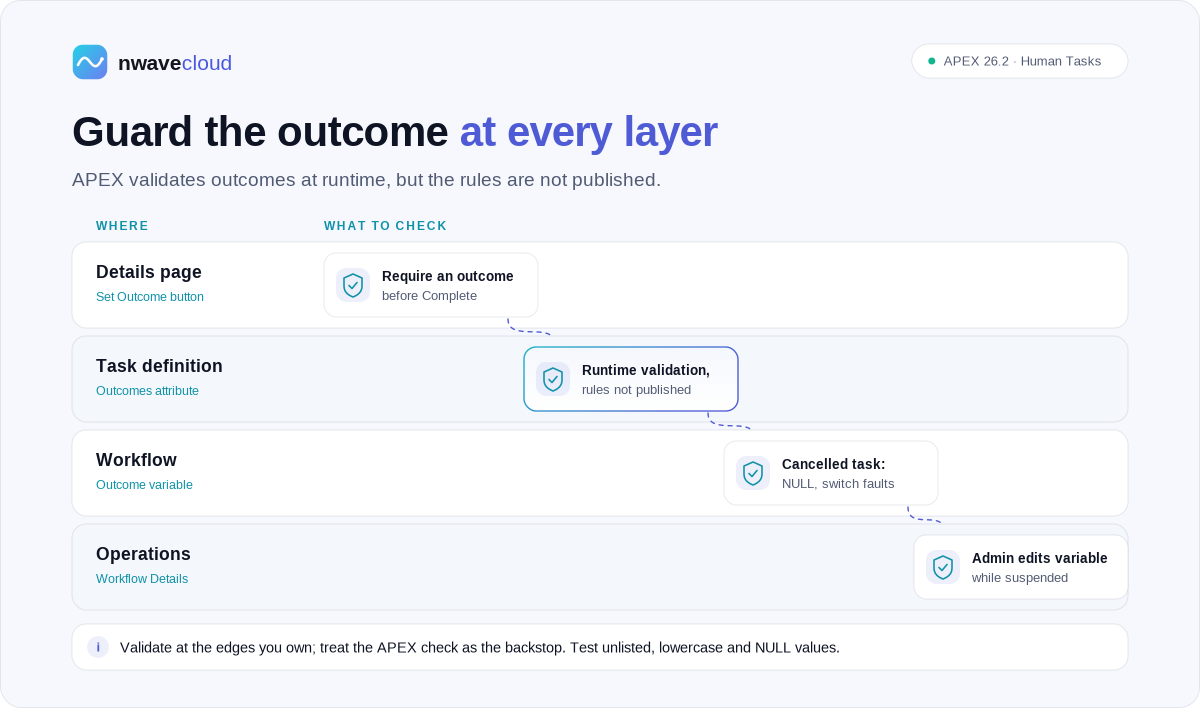
Plan for the empty case. If a task is cancelled, the workflow receives no outcome, continues, and a following outcome switch faults; an errored task faults the workflow. Oracle does not say whether an Action Task with an Outcomes list can be completed without an outcome, so we require one on the page before Complete and, where a gap remains, put a True False switch with the Workflow Variable is NULL condition first.
The FAQ also describes a recovery path, written for approval outcomes: with a short Wait activity after the task, a workflow administrator can suspend the instance, edit the outcome variable on Workflow Details and resume. Variables are editable only while the workflow is suspended or faulted.
Runtime validation: what is documented
The release notes say outcomes can be “set and validated at runtime”, and APEX uses the Outcomes list when an outcome is set. That is all we found. Oracle does not publish whether matching is case-sensitive, what happens when SET_TASK_OUTCOME receives a value outside the list, whether an outcome is required before Complete, or whether it can change after being set.
Validate at the edges you own (a page validation, a check in any PL/SQL wrapper) and treat APEX’s check as the backstop.
Three hypothetical patterns
These are illustrations, not customer stories.
Onboarding readiness check
IT gets an Action Task, “Workstation ready for start date?”, with READY,DELAYED,BLOCKED. READY sends the welcome email. DELAYED notifies the hiring manager and, after a Wait activity, creates a second readiness task. BLOCKED creates a task for the IT lead. Nobody has to approve anything.
Document review with an UNDECIDED loop
A reviewer’s task uses YES,NO,UNDECIDED. YES publishes, NO returns the document to the author. UNDECIDED needs design. We found no Oracle documentation on routing a connection back to an earlier activity, so prototype a loop first and cap it with a counter variable. The straight-line alternative always ends: UNDECIDED creates a task for a senior reviewer whose Outcomes list is just YES,NO.
Field inspection
An inspector closes a site visit with PASSED,FAILED,NO_ACCESS. PASSED closes the job, FAILED creates a corrective action task, NO_ACCESS reschedules. Real processes need an honest answer for “I could not do it”, or users pick the closest wrong one.
Naming outcomes: our guidance
- Uppercase codes, no spaces at all. Use underscores inside values.
- Name the result, not the next step.
NO_ACCESSoutlives a process change better thanCALL_OFFICE. - Avoid APPROVED and REJECTED in action tasks. Those belong to approval tasks.
- Offer UNDECIDED only if a branch handles it.
- Treat the list as a contract. Switches, reports and actions compare these strings, so never rename a value while tasks are open.
- Keep it short. More than five outcomes usually means two decisions in one task.
Test checklist
- Every listed value can be set from the details page.
- The page’s list matches the definition after any edit.
SET_TASK_OUTCOMEwith an unlisted value, a lowercase value and NULL behaves as expected.- Setting an outcome twice: which value wins, and do actions tolerate it?
- Completing without an outcome is blocked or caught by your NULL guard.
- Set Outcome actions read the value you expect.
- After completion, Workflow Details shows the exact custom value.
- Every switch branch is reachable.
- A cancelled task and a forced action error lead to the faulted states you planned for.
- Each role (owner, potential owner, business administrator, excluded owner, outsider) sees the intended buttons.
APEX_TASK_HISTORY, which records operations on a task instance, shows what auditors will ask for.
Workflows and tasks need CREATE JOB on the parsing schema, and every test above belongs in a non-production environment that matches production. At general availability on October 6, 2026, Oracle released APEX 26.2 for on-premises installations, with Autonomous AI Database and OCI rollouts to follow; our APEX 26.2 upgrade checklist covers the move. If you want managed test and production APEX environments, see Cloud Hosting and the plans page.
Bottom line
Custom outcomes close a gap Action Tasks have had since 23.2: the person doing the work can say how it went, and the workflow acts on it without an approval task in disguise or a side table.
The feature is simple to configure and thinly documented at the edges. Keep the list short and stable, set and complete as two steps, store the outcome in your own data, guard the empty case, and test custom values end to end.
FAQ
Can Approval Tasks use custom outcomes?
No. The Outcomes attribute is for action tasks only. Approval Tasks end as APPROVED or REJECTED.
Does setting an outcome complete the task?
No. Setting an outcome is a separate event. Complete the task with the Complete button or APEX_HUMAN_TASK.COMPLETE_TASK; the workflow variable is set after completion.
How do I write the Outcomes list?
Comma-separated, with no spaces around commas and no quotes, for example YES,NO,UNDECIDED.
Can I pass a custom outcome to COMPLETE_TASK?
Its p_outcome parameter is documented for Approval Tasks only. Call SET_TASK_OUTCOME first, then COMPLETE_TASK without an outcome.
What happens to the workflow if the task is cancelled?
It receives no outcome and continues. If the next activity is a switch on the outcome, the switch faults.
Does APEX validate outcomes against the list?
Oracle says outcomes can be validated at runtime but does not publish the rules. Add your own validation and test unlisted values.
Sources
- Oracle APEX 26.2 Release Notes: New Features
- What’s New in Oracle APEX 26.2
- Announcing Oracle APEX 26.2 General Availability
- Creating a Task Definition (26.2)
- Creating a Task Definition (26.1)
- About Task Definitions
- Managing Task Details
- Task Substitution Strings and Bind Variables
- Runtime Views for Tasks
- APEX_HUMAN_TASK (26.2)
- APEX_HUMAN_TASK.SET_TASK_OUTCOME Procedure
- APEX_HUMAN_TASK.COMPLETE_TASK Procedure
- APEX_HUMAN_TASK Constants and Data Types
- Creating a Workflow Activity
- Frequently Asked Questions: Workflows and Tasks
- About the Workflow Console, Workflow Details, and Workflow Dashboard
- process humanTaskManage: APEXlang Reference (26.2)
- process humanTaskManage: APEXlang Reference (26.1)
- Using Action Tasks with Oracle APEX 23.2