The short version
Before 26.2, a human task that hit a non-recoverable error moved to Errored, and no task action could respond to that transition. Unless someone checked, a broken approval just sat there. APEX 26.2 adds a Fail event:
- The event. A task that transitions to Errored raises a Fail event.
- The response. Task Actions with On Event set to Fail run: Send Email, Execute Code, Send Push Notification or a task process plug-in.
- The cleanup. Errored is final. A Business Administrator renews the task, which creates a new one, and a daily job purges errored tasks, so act quickly.
- Workflows. An errored task faults its workflow. Fix the cause, then retry.
If your tasks run inside workflows, our article on APEX 26.2 workflow migration and custom outcomes covers the workflow side. This one stays with the task.
What changed in 26.2
The release notes file it under Improved Task Error Handling: human tasks now raise a Fail event when they transition to Errored, and Task Actions, including sending an email or running PL/SQL code, can respond. Oracle’s 26.2 new features deck calls it “Actionable task failures”.
In 26.1, the documented action events ran from Claim to Expire; 26.2 adds Set Outcome, for Action Task outcomes, and Fail. The End User’s Guide states it plainly: “when a task transitions to the errored state, APEX can run actions configured for the fail event.”
How a task ends up in Errored
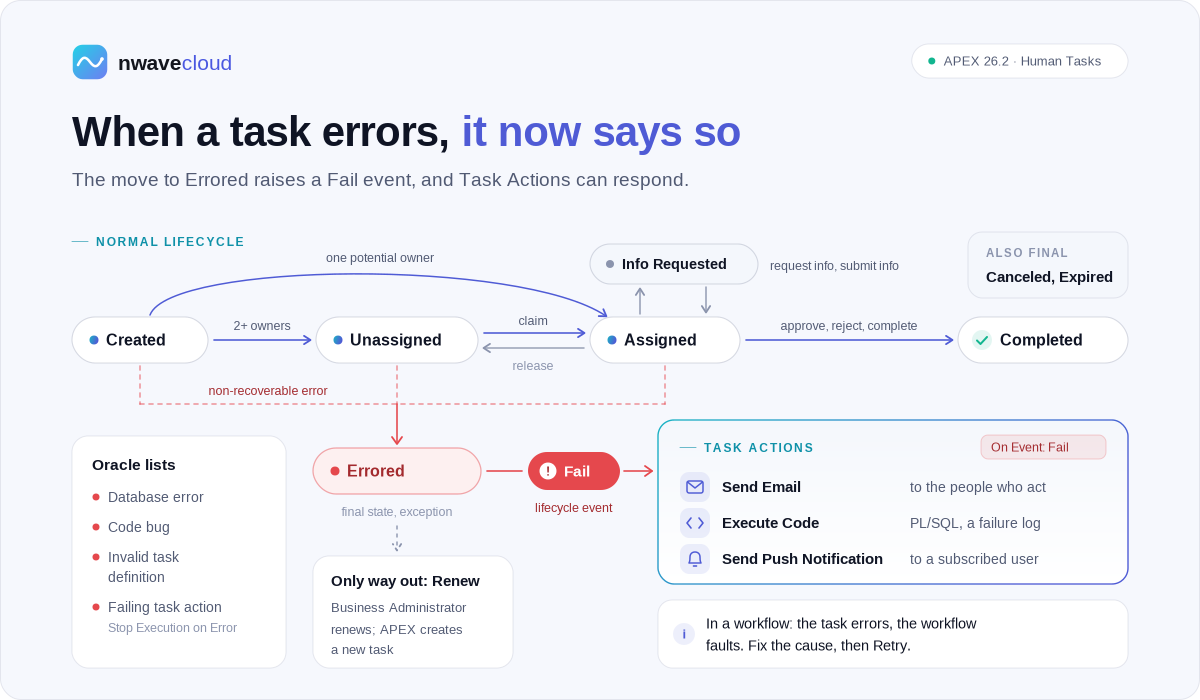
Oracle’s state model for human tasks:
- Created moves to Unassigned when there are several potential owners, or straight to Assigned when there is one.
- Unassigned moves to Assigned when a user claims the task or it is delegated.
- Assigned moves to Completed when the owner approves, rejects or completes the task. It can also be released back to Unassigned, or move to Info Requested, which returns to Assigned when the initiator submits the information.
- Final states: Completed, Errored, Canceled and Expired.
Errored is the only final state in the exception category. Created, Unassigned and Assigned can all move to it after a non-recoverable error during execution, and Oracle lists four causes: an underlying database error, a code bug, an invalid task definition, and an error while executing an action of the task definition.
The last cause is the one you control directly. Each task action has a Stop Execution on Error setting. When it is enabled and the action fails, later actions are skipped and the task goes into ERRORED. The documentation describes only the enabled case, so test what your actions do with it switched off.
Expiry is a separate path, not an error. After the due date, the expiration policy applies: None keeps the task active, Expire moves it to Expired, and Renew also creates a new task, up to 99 times. Expiry has its own Before Expire and Expire events.
In 26.2, the move into Errored raises a task lifecycle event of type Fail. Errored has one documented exit: a Business Administrator renews the task, and APEX creates a new task from the underlying definition.
Configuring a Fail action
Task actions live in the Actions section of the task definition (Shared Components, Task Definitions). The attributes that matter here:
- Type: Execute Code, Send Email or Send Push Notification (to an application user who has subscribed), or a task definition process plug-in.
- On Event: Fail. The full 26.2 list is Claim, Complete, Set Outcome, Delegate, Update Comment, Update Priority, Update Parameter, Release, Cancel, Create, Request Information, Submit Information, Before Expire, Expire and Fail.
- Execution Sequence: actions run from low to high.
- Success Message and Error Message: written to the task history according to Log Messages When (None, Success, Failure or All). Error Message accepts
#SQLERRM#for the ORA error text. - Condition Type and Build Option: decide whether the action runs at all.
Data comes from the definition’s Actions Source, a table or SQL query that can reference :APEX$TASK_PK. Its columns are available to Execute Code as bind variables named after the columns.
What a Fail action does not know
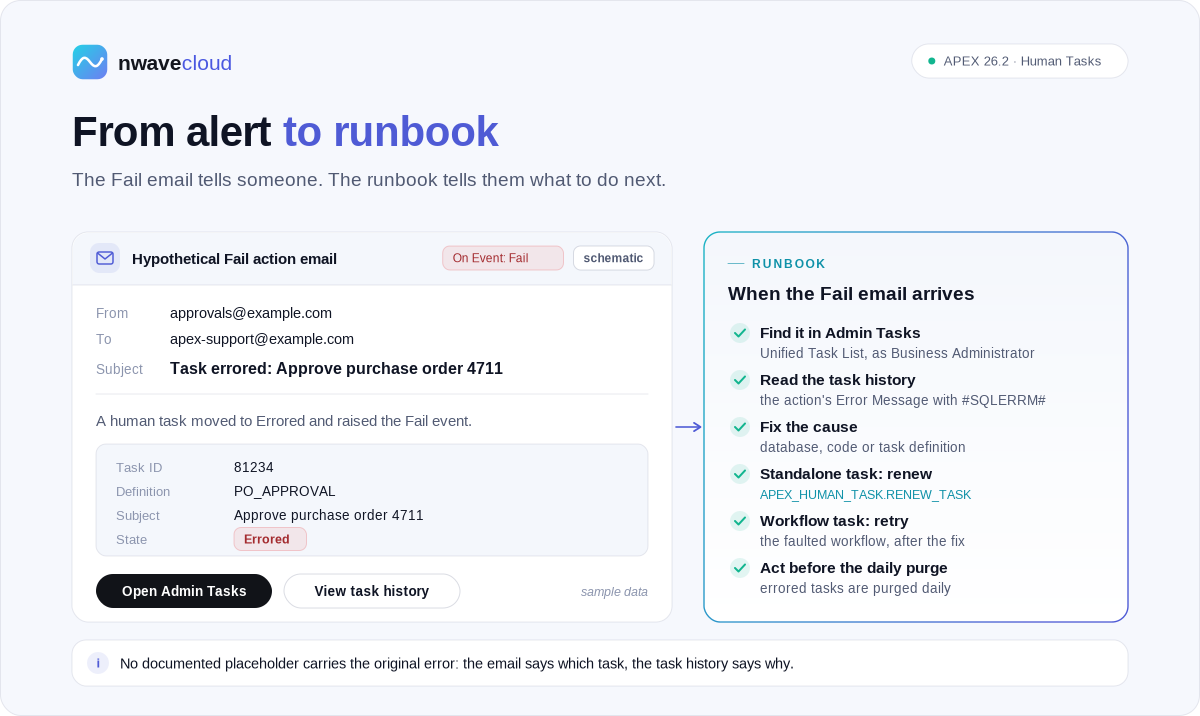
Oracle documents thirteen task substitution strings, including APEX$TASK_ID, APEX$TASK_SUBJECT, APEX$TASK_STATE and APEX$TASK_PK. None carries the error that put the task into Errored, and we found no other documented way to read it in a Fail action. Your alert can say which task failed, not why.
So we set Log Messages When to Failure or All, with an Error Message that includes #SQLERRM#, on every action that can fail. The ORA error then lands in the task history, where the person alerted can read it.
Send Email
Send Email takes From, To, Cc, Bcc, Reply To, Subject, plain text and HTML bodies, an optional email template and attachment SQL. APEX sends from its mail queue, every fifteen minutes according to the End User’s Guide, so a Fail email is not instant. The instance must also be able to send mail at all; our guide to configuring SMTP email sending covers that part. We prefer a shared mailbox the support team watches over one person’s inbox.
Execute Code
Execute Code runs in the Local Database or on a REST Enabled SQL Service. Oracle’s example action, on the Complete event, inserts a row built from the apex_tasks view using :APEX$TASK_ID. The same pattern on Fail, writing to a hypothetical task_failure_log table:
INSERT INTO task_failure_log
     ( task_id
     , task_def_static_id
     , actual_owner
     , task_created_on
     , logged_on )
SELECT task_id
     , task_def_static_id
     , actual_owner
     , created_on
     , SYSDATE
  FROM apex_tasks
 WHERE task_id = :APEX$TASK_ID
Oracle does not document what happens when a Fail action itself fails, or which transaction it runs in. Keep Fail actions short, independent of whatever just broke, and prove them by forcing an error in development.
One more trap: Oracle states that updates to a task definition do not change existing tasks and apply to new ones. A Fail action you add today does not cover tasks already in flight.
After the alert: finding and fixing errored tasks
Unified Task List. The Admin Tasks report context shows every task where the user is a Business Administrator, including Errored, Completed and Canceled tasks. Expired tasks appear only with Show expired tasks.
APIs and views. APEX_HUMAN_TASK.GET_TASKS with the ADMIN_TASKS context returns the same set, with columns such as state, state_code, subject and task_def_static_id. It only returns data in a valid APEX session, not in SQL Workshop. The APEX_TASKS and APEX_TASK_HISTORY views hold task properties and the operations performed on each task. If you filter by state in code, note that the constants include both C_TASK_STATE_ERRORED and C_TASK_STATE_FAILED, while the state model documents only Errored.
Renew. RENEW_TASK reactivates Expired or Errored tasks for a Business Administrator. It creates a new task, links it to the original so users can see where it came from, and returns the new task ID. It is a function, so assign the result:
DECLARE
    l_new_task_id NUMBER;
BEGIN
    l_new_task_id := APEX_HUMAN_TASK.RENEW_TASK(
                         p_task_id  => 1234
                       , p_priority => APEX_HUMAN_TASK.C_TASK_PRIORITY_HIGH
                       , p_due_date => SYSDATE + 10 );
END;
The End User’s Guide’s table of task actions offers Renew only for expired tasks, so plan on the API for errored ones.
Purge. A daily DBMS_SCHEDULER job purges all terminated, canceled and errored tasks. Only completed tasks get a retention period: seven days by default, thirty at most. Eligible tasks are first written to the Archive of Purged Tasks report in Workspace Administration, and the APEX_PURGEABLE_TASKS view lets you copy them into your own tables. In our reading, an errored task can be gone within a day, which is the strongest argument for capturing what you need in the Fail action itself.
Inside a workflow
Oracle’s workflow FAQ says that when a task transitions to Errored, control returns to the workflow, which transitions to Faulted. The workflow administrator fixes the underlying cause and retries, either with Retry on the workflow console details page or with APEX_WORKFLOW.RETRY(p_instance_id => ...). Retry re-executes the activity where the workflow faulted, then continues. There is no automatic retry.
The same FAQ says a Business Administrator cannot manually renew or change the due date of a workflow-created task, because the workflow timeout governs its due date. So for tasks inside workflows, the Fail action is the alert and Retry is the fix. Canceled tasks are a separate case: they send no outcome, and a switch that depends on it faults, as our article on Action Task custom outcomes explains.
A short checklist
- A Fail action on every task definition that matters, sent to a watched mailbox
- Failure logging with
#SQLERRM#on actions that can fail - Stop Execution on Error chosen deliberately for each action
- SMTP configured and the mail queue monitored
- A forced failure in development that proves the Fail action fires
- A runbook naming who renews and who retries
Alerts need a platform that sends mail and runs scheduler jobs. Oracle announced APEX 26.2 on October 6, 2026 for on-premises installations, with Oracle Autonomous AI Database following shortly and OCI and multicloud rollouts over the coming weeks. For managed development, test and production APEX environments with upgrades and monitoring handled for you, see Cloud Hosting and the plans page.
Bottom line
The Fail event closes a real gap: a broken approval can now tell someone. Add a Fail action to each task definition, send it where people look, and log action errors so the alert leads to a reason.
Then plan the response. Errored is final, the purge is daily, and inside a workflow the fix is a retry. An alert without a runbook only tells you sooner that something is stuck.
FAQ
What does the Fail event do in APEX 26.2?
When a human task transitions to Errored, it raises a Fail event, and Task Actions with On Event set to Fail run, such as Send Email or Execute Code.
What puts a human task into the Errored state?
A non-recoverable error during execution. Oracle lists an underlying database error, a code bug, an invalid task definition and an error while executing a task action. An action with Stop Execution on Error enabled moves the task to ERRORED when it fails.
Can a Fail action include the original error message?
Not as far as the documentation shows: no documented substitution string carries it. Log action failures with #SQLERRM# so the error is recorded in the task history.
How do I get an errored task going again?
Errored is final. A Business Administrator renews it with APEX_HUMAN_TASK.RENEW_TASK, which creates a new task linked to the original. For a workflow-created task, fix the cause and retry the faulted workflow.
What happens to a workflow when its task errors?
The workflow transitions to Faulted. After fixing the cause, the workflow administrator retries it, which re-executes the faulted activity.
How long do errored tasks stay in APEX?
Not long. A daily scheduler job purges all terminated, canceled and errored tasks; only completed tasks have a retention period. APEX_PURGEABLE_TASKS lets you copy them before cleanup.
Sources
- Oracle APEX 26.2 Release Notes: New Features
- About Task States and Transitions (APEX 26.2)
- About Task States and Transitions (APEX 26.1)
- About Task Definitions (APEX 26.2)
- About Task Definitions (APEX 26.1)
- Creating a Task Definition (APEX 26.2)
- Editing a Task Definition (APEX 26.2)
- Task Substitution Strings and Bind Variables (APEX 26.2)
- Managing Unified Task Lists (APEX 26.2)
- Runtime Views for Tasks (APEX 26.2)
- About Task Retention and Task Purging (APEX 26.2)
- Workflow Frequently Asked Questions (APEX 26.2)
- About Tasks, End User’s Guide (APEX 26.2)
- Troubleshooting Tasks, End User’s Guide (APEX 26.2)
- APEX_HUMAN_TASK Constants and Data Types (APEX 26.2)
- APEX_HUMAN_TASK.GET_TASKS Function (APEX 26.2)
- APEX_HUMAN_TASK.RENEW_TASK Function (APEX 26.2)
- APEX_WORKFLOW.RETRY Procedure (APEX 26.2)
- Oracle APEX 26.2 New Features (deck)
- Announcing Oracle APEX 26.2 General Availability