The short version
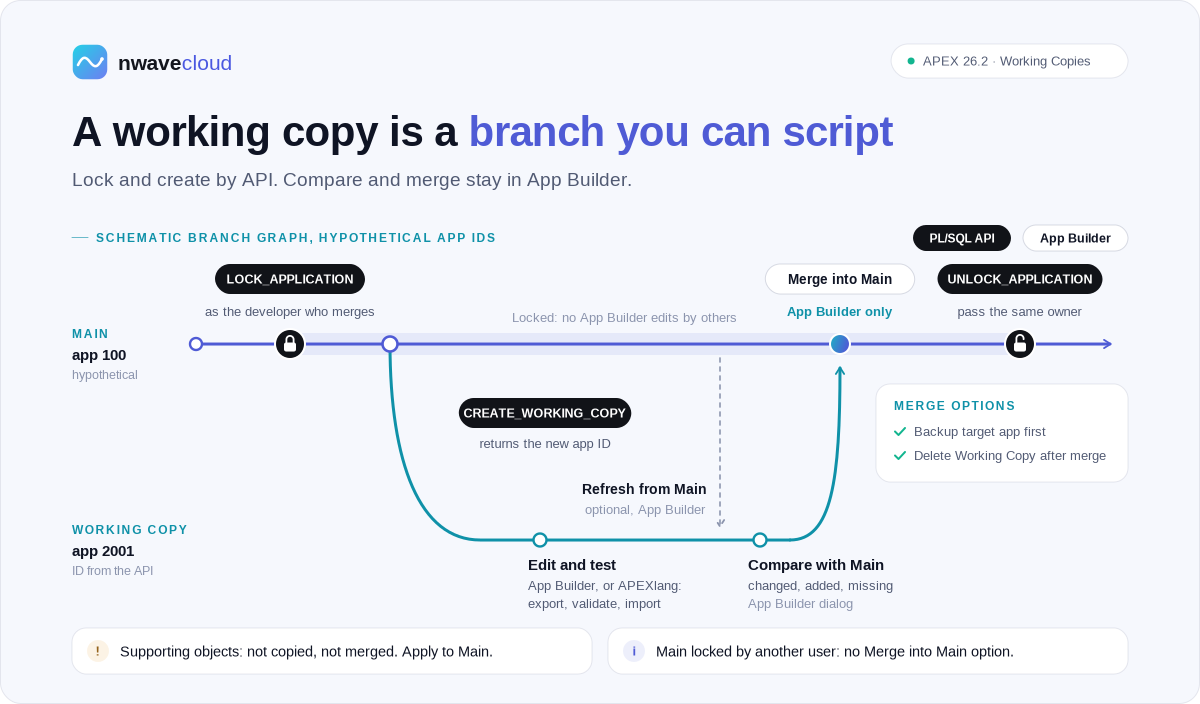
A Working Copy is App Builder’s branch: a copy of a main application that you change, compare and merge back. APEX 26.2 makes the start and the end of that cycle scriptable through APEX_APPLICATION_ADMIN:
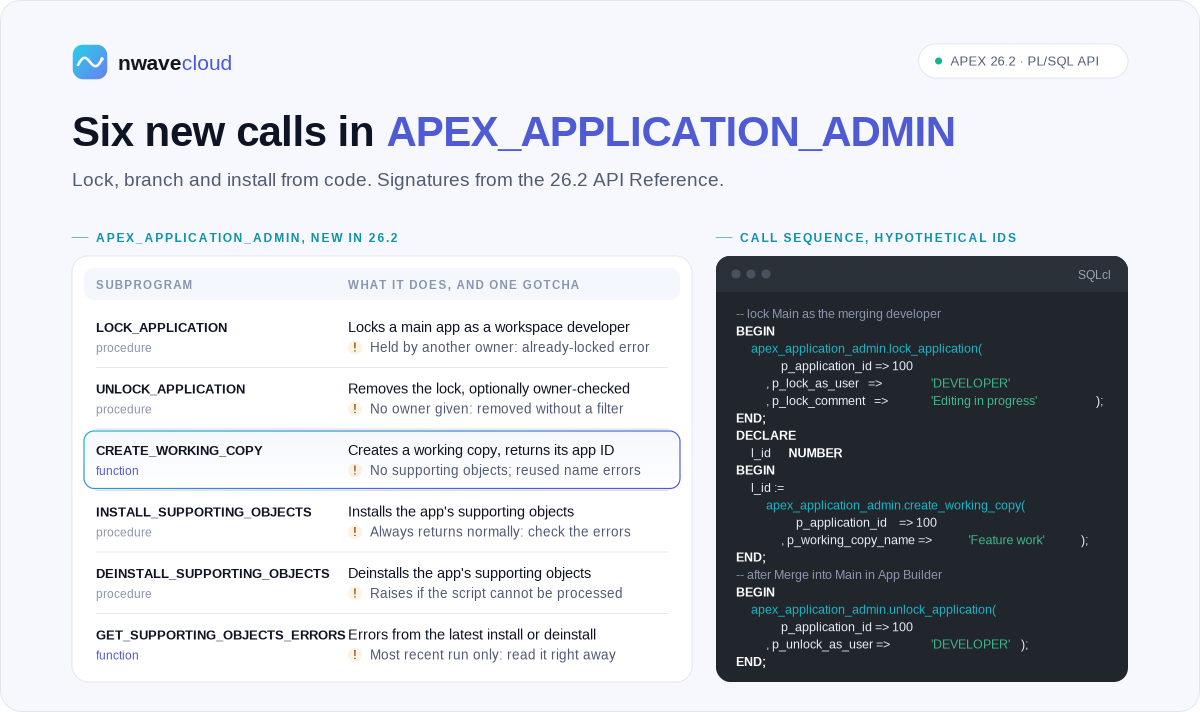
LOCK_APPLICATIONlocks a main application for an existing workspace developer or administrator. The same owner can repeat it to update the comment; a different owner gets an already-locked error.UNLOCK_APPLICATIONremoves the lock, optionally only if a named owner holds it.CREATE_WORKING_COPYcreates a Working Copy and returns its new application ID. Supporting objects are not copied.INSTALL_SUPPORTING_OBJECTS,DEINSTALL_SUPPORTING_OBJECTSandGET_SUPPORTING_OBJECTS_ERRORSinstall and remove an application’s supporting objects from code and report what went wrong.
What is not scriptable: compare, refresh, merge and delete. The 26.2 release notes list no API for them, so the merge stays in App Builder, or goes through APEXlang when there is a conflict.
Working Copies in one minute
Oracle’s App Builder guide describes a Working Copy as a special copy of an application in which developers make changes and then merge them back into the main application. The Developer’s Companion places it in the same workspace, calls it “a personal sandbox for each developer” and compares it to a temporary branch.
The lifecycle runs in App Builder:
- Create from Working Copy Tasks on the Application home page, with a name and a description.
- Compare with main, or with another Working Copy. App Builder exports both as split YAML, generates checksums per file and lists what was changed, added or is missing.
- Refresh brings main’s changes into the copy.
- Merge into Main imports the copy’s pages and shared components into main. You can deselect individual changes, and the dialog offers Backup target app first and Delete Working Copy after merge.
Rules worth knowing before you automate any of it:
- Merge replaces. An existing page or component in main is replaced, so main changes that are not in the copy are overwritten.
- Some things are not merged. Translations, themes, theme templates, supporting objects, application properties and workspace-level components such as credentials and remote servers are not merged automatically. Oracle suggests merging, deleting the copy, then applying those changes by hand.
- Limits. You cannot copy a Working Copy, deleted pages and components must be deleted in main by hand, and automations are disabled in a new Working Copy.
- Background jobs. Compare runs its exports as a background job, so
JOB_QUEUE_PROCESSESmust be greater than zero. In a multitenant database, check the CDB setting too. - Different IDs. A Working Copy has its own application ID. Logic that needs the main ID should use
MAIN_APP_IDinstead ofAPP_ID. - Known issues. On Oracle Database 19c, merge, refresh and compare can fail with ORA-00600 (upgrade to 19.16 or higher), and merging components whose names are not unique raises ORA-00001.
Locks and Working Copies together
An application lock gives one developer exclusive access and stops other developers from changing the application through App Builder. Oracle’s guide mentions locking an application to prevent changes to the main version when a Working Copy is created. Only the lock owner can edit or unlock it in App Builder, and locking main does not lock its Working Copies.
One interaction decides how you script this: if main is locked by another user, Merge into Main is not available for its Working Copy. Whoever holds the lock must be the one who merges, or the lock must be released first.
The APIs in detail
The signatures below come from the APEX 26.2 API Reference. One detail: the release notes group CREATE_WORKING_COPY and GET_SUPPORTING_OBJECTS_ERRORS with the procedures, but the reference documents both as functions.
LOCK_APPLICATION
It takes p_application_id, p_lock_as_user and p_lock_comment. The lock owner must be an existing workspace developer or administrator. The parameter table calls the comment optional, but the documented signature shows no default, so we pass it, as Oracle’s example does.
A repeat by the same developer succeeds and updates the comment, so the step is safe to rerun. A request for an application locked by another developer raises an already-locked error. That is what you want: a pipeline should fail loudly, not take over a colleague’s lock.
UNLOCK_APPLICATION
It takes p_application_id and p_unlock_as_user, which defaults to NULL. With an owner supplied, the application must be locked by that user, matched without regard to case. With NULL, the lock is removed without an owner filter, and repeated calls on an unlocked application succeed.
Note the contrast with App Builder, where only the lock owner can unlock. Our rule: pipelines always pass the owner, because an unfiltered unlock in a cleanup step can release a lock a colleague just took.
CREATE_WORKING_COPY
A function with p_application_id, p_working_copy_name and an optional p_working_copy_description, returning the new application ID as a NUMBER. It works on an accessible main application. A second request with the same name for the same main application raises an error and creates nothing, so derive the name from something unique, such as a branch or ticket. Supporting objects are not copied.
A hypothetical sequence for application 100, built from Oracle’s reference examples:
BEGIN
    apex_application_admin.lock_application(
          p_application_id => 100
        , p_lock_as_user   => 'DEVELOPER'
        , p_lock_comment   => 'Editing in progress' );
END;

DECLARE
    l_working_copy_id NUMBER;
BEGIN
    l_working_copy_id := apex_application_admin.create_working_copy(
          p_application_id           => 100
        , p_working_copy_name        => 'Feature work'
        , p_working_copy_description => 'Changes for the next release' );
END;

-- after Merge into Main in App Builder
BEGIN
    apex_application_admin.unlock_application(
          p_application_id => 100
        , p_unlock_as_user => 'DEVELOPER' );
END;
Oracle’s example only assigns the returned ID to a variable; passing it to later pipeline steps is up to you.
Supporting objects: install, deinstall, errors
Supporting objects are the installation scripts that define an application’s database objects, images and seed data, plus any preinstallation validations. App Builder manages their install, upgrade and deinstall scripts on the Supporting Objects page. APEX 26.2 adds:
INSTALL_SUPPORTING_OBJECTS(p_application_id)installs them. Calling it is always successful: prerequisite, validation and installation errors are returned only byGET_SUPPORTING_OBJECTS_ERRORS.DEINSTALL_SUPPORTING_OBJECTS(p_application_id)deinstalls them and raises an error if the deinstall script cannot be processed.GET_SUPPORTING_OBJECTS_ERRORStakes no parameters and returns the errors from the most recent installation or deinstallation asWWV_FLOW_T_VARCHAR2.
The install procedure is the trap: a job that calls it and checks nothing reports success whatever happened. Read the errors right afterwards and fail the job if there are any.
Where the APIs fit with APEXlang and SQLcl
Oracle designed these APIs for “trusted CI/CD and development integrations, including SQLcl Projects and AI-assisted development workflows”, and says they respect existing workspace permissions and locking rules; the 26.2 new features deck frames them for command-line and CI/CD workflows. SQLcl Projects support APEXlang applications since SQLcl 26.2, and APEX 26.2 requires SQLcl 26.3.0 or later. Oracle publishes no reference pipeline, so this is the shape we would use:
- Open the branch. Lock main as the developer who will merge, not as a service account, then create the Working Copy and keep the returned ID.
- Work in the copy. Oracle documents exporting a Working Copy to APEXlang, editing it with code editors, AI coding agents or diff tools, and importing it back, with APEX preserving the link to main. The documented SQLcl export is
apex export -applicationid 104 -exptype apexlang; passing the Working Copy’s ID there is our inference, so test it. Runapex validateoffline before every import. - Merge in App Builder. The lock owner compares, deselects anything unwanted and merges, with Backup target app first ticked.
- Close the branch. Unlock with
p_unlock_as_userset. - Apply what merge skips. Supporting objects, theme, translation and application property changes go to main as their own step.
- Release a full application. Export main, validate, deploy. Where a deployment installs supporting objects through the new procedure, gate the job on
GET_SUPPORTING_OBJECTS_ERRORS.
When a conflict blocks the merge in App Builder, Oracle documents an APEXlang route: export main and the Working Copy, resolve the conflict with external tools, validate main with apex validate, import the merged result over main, then delete the conflicted copy. It is the only documented merge path outside App Builder, and it overwrites main, so we only run it while main is locked. Our article on APEXlang file-level import covers the import side.
Open questions to test
The pages we read leave three gaps:
- Privileges and session context. The reference does not say which database user or APEX session the calls need. Test from the exact connection your pipeline uses.
- Locks and imports. Oracle describes the lock in App Builder terms. We found nothing saying whether an import through SQLcl honors it.
- Cleanup. The 26.2 release notes list no API that deletes a Working Copy, so abandoned copies are removed in App Builder.
Scripted branches only pay off when development, test and production run the same APEX, ORDS and SQLcl versions; APEX 26.2 requires ORDS 26.3.0 or later as well. Oracle announced APEX 26.2 on October 6, 2026 for on-premises installations, with Oracle Autonomous AI Database following shortly and OCI and multicloud rollouts over the coming weeks. For managed APEX environments with upgrades and monitoring handled for you, see Cloud Hosting and the plans page.
Bottom line
APEX 26.2 gives Working Copies a scriptable front door and back door: lock, branch and unlock from PL/SQL, with the new application ID handed straight back. The middle of the cycle, compare and merge, still belongs to App Builder or to the APEXlang conflict route.
Lock as the person who merges, unlock with the owner named, plan a separate step for everything merge skips, and never trust a supporting objects install you did not check.
FAQ
Can I merge a Working Copy with an API in APEX 26.2?
Not that we found: the 26.2 release notes list none. Merge into Main is an App Builder action. Outside App Builder, Oracle documents exporting both applications to APEXlang, resolving the conflict, validating and importing the result over main.
Does CREATE_WORKING_COPY copy supporting objects?
No. The release notes state that supporting objects are not copied, and supporting objects are also not merged back automatically.
What happens if another developer already holds the lock?
LOCK_APPLICATION raises an already-locked error. A repeat by the current owner succeeds and updates the lock comment.
What does UNLOCK_APPLICATION do without p_unlock_as_user?
It removes the lock without an owner filter, and repeated calls on an unlocked application succeed. With an owner supplied, the application must be locked by that user, matched without regard to case.
How do I know whether INSTALL_SUPPORTING_OBJECTS failed?
Call GET_SUPPORTING_OBJECTS_ERRORS right after it. The install call always returns normally, and errors are reported only through that function.
Can I create a Working Copy of a Working Copy?
No. Oracle lists this as a limitation of the feature.
Sources
- Oracle APEX 26.2 Release Notes: New Features
- Oracle APEX 26.2 Release Notes: About These Release Notes
- Oracle APEX 26.2 Release Notes: Open Bugs and Known Issues
- APEX_APPLICATION_ADMIN (APEX 26.2 API Reference)
- LOCK_APPLICATION Procedure
- UNLOCK_APPLICATION Procedure
- CREATE_WORKING_COPY Function
- INSTALL_SUPPORTING_OBJECTS Procedure
- DEINSTALL_SUPPORTING_OBJECTS Procedure
- GET_SUPPORTING_OBJECTS_ERRORS Function
- About Working Copies (App Builder User’s Guide 26.2)
- Creating a Working Copy of an Application
- About Working Copy Menus and Tasks
- Comparing Changes between a Working Copy and Main
- Merging Changes from a Working Copy into Main
- Refreshing a Working Copy with Changes from Main
- Deleting a Working Copy
- Locking and Unlocking an Application
- How to Create a Custom Application (Supporting Objects)
- Isolating Changes with Working Copies (Developer’s Companion 26.2)
- Using App Builder and External Tools Together
- Using SQLcl with APEXlang (APEX 26.2)
- Oracle APEX 26.2 New Features (deck)
- Announcing Oracle APEX 26.2 General Availability
- SQLcl Changelog