The short version
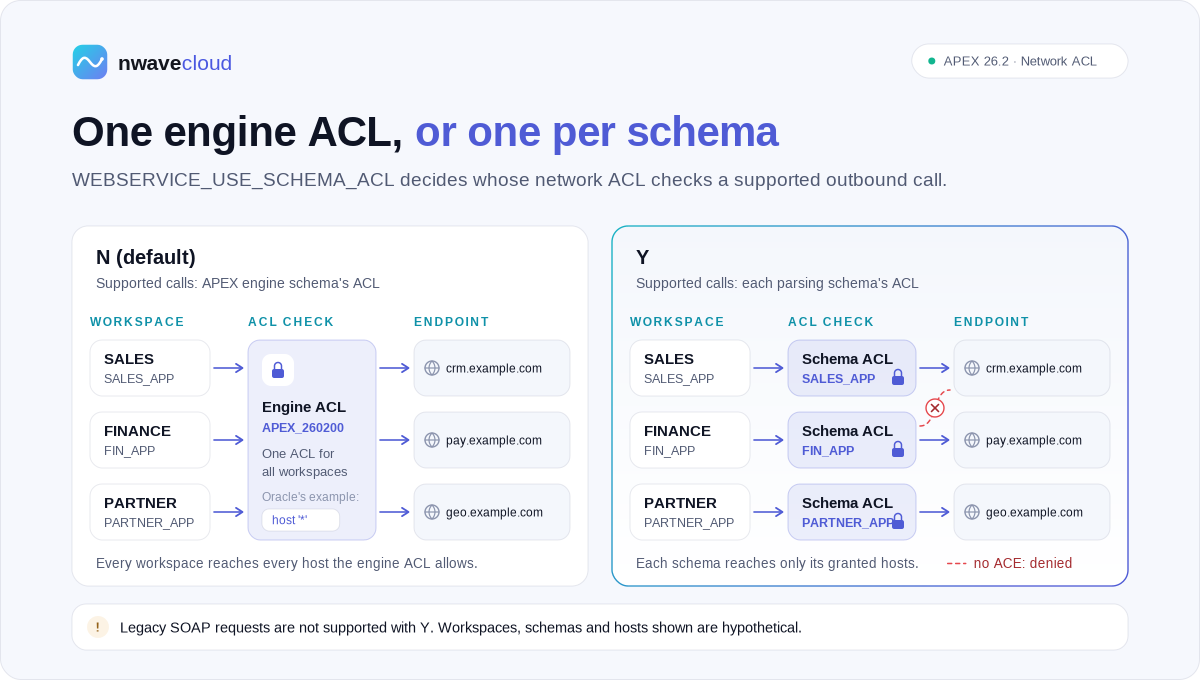
On a typical self-managed APEX instance, every workspace shares one outbound network identity: the APEX engine schema. If that schema may reach a host, every application in every workspace can reach it. APEX 26.2 adds an instance parameter that changes this:
WEBSERVICE_USE_SCHEMA_ACL = N(default): supported outbound calls use the APEX engine schema’s network ACLs, exactly as before.WEBSERVICE_USE_SCHEMA_ACL = Y: supported outbound calls use the network connect privileges of the application’s parsing schema or the calling schema.- Legacy SOAP: not supported when the parameter is Y.
- Setup: host ACEs per schema with
DBMS_NETWORK_ACL_ADMIN.APPEND_HOST_ACE, thenAPEX_INSTANCE_ADMIN.SET_PARAMETERand a commit.
On an instance that hosts several teams or customers, that is the difference between “every workspace can call what any workspace needs” and “each workspace calls its own endpoints”. It is also a switch that can break integrations all at once, so this article ends with the rollout plan we would use.
How outbound access works today
The APEX installation guide states that the ability to interact with network services is disabled by default in Oracle Database. DBAs grant connect privileges with DBMS_NETWORK_ACL_ADMIN to the database user that owns the APEX schema, APEX_260200 in 26.2. Without that grant, Oracle lists problems with outbound mail, REST and other web services, outbound LDAP calls and remote print servers.
The guide is explicit about scope: the grant applies to the entire APEX instance and enables all applications in all workspaces to make outbound calls. Its first example grants connect on host *, which means any host. Individual workspace schemas need their own grants only when applications also call native packages such as UTL_HTTP and UTL_SMTP.
Two more facts matter for planning. An APEX upgrade configures network services from the previous version’s configuration, so your engine ACL carries forward. And on Oracle Autonomous AI Database, enabling network services does not apply at all: APEX reaches external endpoints without extra configuration. Oracle does not describe how WEBSERVICE_USE_SCHEMA_ACL behaves there, so this article is about self-managed instances.
Why it matters on a shared instance
With one engine ACL, the instance’s allowlist is the union of every workspace’s needs. A new payment integration for one customer opens that host for all of them. The Administration Guide’s workspace isolation settings already cap volume per workspace (Maximum Web Service Requests, the MAX_WEBSERVICE_REQUESTS parameter, defaults to 1,000 outbound requests per workspace in a rolling 24-hour period), but nothing there says which hosts a workspace may call.
That is the gap Y fills. In our view, it turns host ACEs into a per-tenant allowlist that a DBA can review, grant and revoke per parsing schema, which is a much easier conversation with a security auditor than “the engine can reach *”.
What Y changes
The release notes describe the goal as letting administrators “control which external endpoints each workspace can access rather than applying the same access across the entire APEX instance.” The API reference defines the two values: at Y, supported web service requests use the network ACL of the calling schema; at N, they keep the existing APEX engine schema behavior. The installation guide adds the parsing schema: supported outbound calls use the network connect privileges of the application’s parsing schema or the calling schema, instead of the shared engine schema.
The parsing schema is, per the Administration Guide, the schema whose privileges APEX uses when it dynamically executes an application’s SQL and PL/SQL at runtime. With Y, it also becomes the identity the database checks for supported outbound calls.
Which calls count as supported
Oracle does not publish the list. The API reference speaks of “supported web service requests”, the installation guide of “supported outbound network calls”, and the only documented exclusion is legacy SOAP. Mail, LDAP and remote print servers also depend on network services, but we found no statement on whether they follow the schema ACL under Y. If you send mail through APEX_MAIL and SMTP, include it in your tests. Authentication is a separate question: our article on OCI managed identities for Web Credentials covers how calls sign in, while this setting governs which hosts they may reach.
The term legacy SOAP request is not defined further either. The 26.2 App Builder guide still has a chapter on legacy Web Service References, including references based on a WSDL, which can only be created in applications that already have them. The APEX_WEB_SERVICE package can call both SOAP and RESTful services. In our reading, both belong in your inventory. Oracle also does not say what a legacy SOAP request does when Y is set, so find out on a test instance, not in production.
An instance parameter with a workspace column
The release notes and the parameter’s own note call it an instance parameter. Yet the API reference lists it in the table of parameters that can be set at instance level with SET_PARAMETER and at workspace level with SET_WORKSPACE_PARAMETER, which overrides the instance value for one workspace. That suggests a per-workspace pilot, but Oracle describes no such rollout. We would test a workspace override on a non-production instance before building a plan on it.
Granting each parsing schema its hosts
With Y, each schema needs its own ACEs. APPEND_HOST_ACE takes a host, an optional TCP port range and an ACE. Here is a hypothetical workspace SALES, whose parsing schema SALES_APP calls a hypothetical CRM API on port 443, built from Oracle’s documented syntax and examples:
BEGIN
    DBMS_NETWORK_ACL_ADMIN.APPEND_HOST_ACE(
          host       => 'crm.example.com'
        , lower_port => 443
        , ace        => xs$ace_type( privilege_list => xs$name_list('connect')
                                   , principal_name => 'SALES_APP'
                                   , principal_type => xs_acl.ptype_db ) );
END;
/
What the database documentation adds:
- Who can run it.
EXECUTEonDBMS_NETWORK_ACL_ADMINis granted to the DBA role andEXECUTE_CATALOG_ROLEby default. - Hosts. A name or IP address, with wildcards for a domain or subnet. Host names are case-insensitive. If
upper_portis NULL,lower_portis assumed. - Precedence. A host’s ACL takes precedence over its domains’ ACLs, and for
connect, an ACE on a port range takes precedence over one without. - Principals. The Security Guide says
principal_nameis case-insensitive unless enclosed in double quotation marks. - Undo.
REMOVE_HOST_ACEtakes the same host, ports and ACE.
Our opinion: Y is only worth turning on if you grant narrowly. Copying the engine schema’s * ACE to every parsing schema changes the identity, not the exposure.
Setting the parameter
APEX_INSTANCE_ADMIN can be executed by SYS, SYSTEM and any user granted APEX_ADMINISTRATOR_ROLE. SET_PARAMETER needs a commit to take effect:
BEGIN
    APEX_INSTANCE_ADMIN.SET_PARAMETER(
          p_parameter => 'WEBSERVICE_USE_SCHEMA_ACL'
        , p_value     => 'Y' );
    COMMIT;
END;
/
To read the current value, adapt Oracle’s GET_PARAMETER example, or query the APEX_INSTANCE_PARAMETERS dictionary view:
DECLARE
    L_VAL VARCHAR2(4000);
BEGIN
    L_VAL := APEX_INSTANCE_ADMIN.GET_PARAMETER('WEBSERVICE_USE_SCHEMA_ACL');
    DBMS_OUTPUT.PUT_LINE('WEBSERVICE_USE_SCHEMA_ACL is: ' || L_VAL);
END;
/
Rollback is the same SET_PARAMETER call with 'N', which Oracle documents as the existing engine schema behavior.
A careful rollout plan
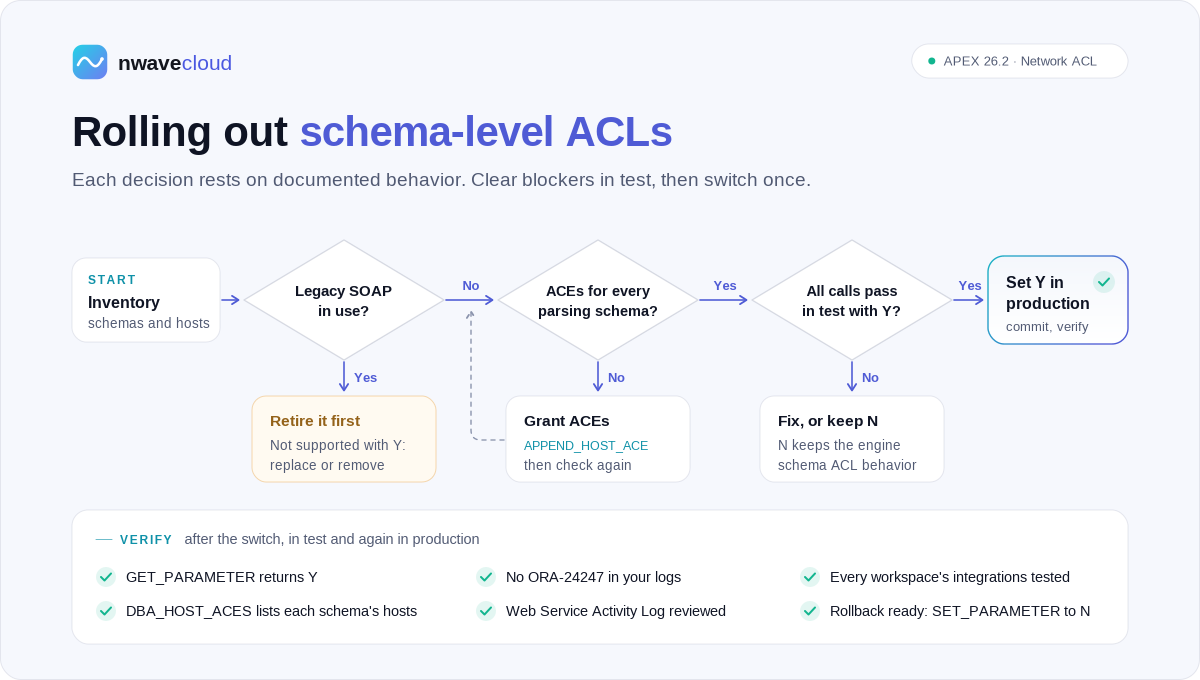
- Inventory parsing schemas. In Administration Services, Manage Workspaces, the Parsing Schemas report shows the current parsing schema of each application in any workspace.
- Inventory outbound hosts per workspace. REST Data Sources,
APEX_WEB_SERVICEcalls, mail and print servers. The Web Service Activity Log under Workspace Administration, Monitor Activity is a starting point; theWEBSERVICE_LOGGINGparameter sets it to always, never or per workspace. - Find legacy SOAP. Replace or retire it before Y, because it is not supported there.
- Grant ACEs on a non-production instance that mirrors production: same APEX release, same schemas, same hosts.
- Switch that instance to Y and test every integration in every workspace. The database’s documented error for a call blocked by an ACL is
ORA-24247: network access denied by access control list (ACL), so search your logs for it. - Switch production in a change window. Grants first, then
SET_PARAMETERand commit, then verify. Rollback is N. - Review the engine schema’s ACEs last. Oracle does not say which calls still use them under Y. We keep them until every remaining call is traced, accepting that isolation stays partial until then.
Verify
Oracle’s PL/SQL Packages reference shows how to list every ACE that applies to a host, in precedence order, by combining DBA_HOST_ACES with DBMS_NETWORK_ACL_UTILITY.CONTAINS_HOST. Adapted to our hypothetical host:
SELECT HOST
     , LOWER_PORT
     , UPPER_PORT
     , ACE_ORDER
     , PRINCIPAL
     , GRANT_TYPE
     , PRIVILEGE
  FROM ( SELECT ACES.*
              , DBMS_NETWORK_ACL_UTILITY.CONTAINS_HOST( 'crm.example.com'
                                                      , HOST ) PRECEDENCE
           FROM DBA_HOST_ACES ACES )
 WHERE PRECEDENCE IS NOT NULL
 ORDER BY PRECEDENCE DESC
        , LOWER_PORT NULLS LAST
        , UPPER_PORT NULLS LAST
        , ACE_ORDER
Expect SALES_APP on that host and no other parsing schema. Connected as a schema, USER_HOST_ACES shows the status of that user’s own network privileges.
A rollout like this goes best when test really mirrors production, so ACL grants, schemas and APEX versions should be scripted, not clicked. Our APEX 26.2 upgrade checklist covers the release itself; Oracle announced 26.2 on October 6, 2026 for on-premises installations, with Autonomous AI Database following shortly and OCI and multicloud rollouts over the coming weeks. For managed APEX environments where test and production are kept in step for you, see Cloud Hosting and the plans page.
Bottom line
WEBSERVICE_USE_SCHEMA_ACL = Y is the first built-in way to give each APEX workspace its own outbound allowlist, and on a shared instance we think it is worth the work. The default stays N, so nothing changes until you decide.
Treat the switch as a migration, not a toggle: inventory, retire legacy SOAP, grant narrow ACEs per parsing schema, test every integration, then flip it once, with N as your rollback.
FAQ
What does WEBSERVICE_USE_SCHEMA_ACL do?
At Y, supported outbound web service calls use the network ACL of the application’s parsing schema or the calling schema instead of the APEX engine schema’s ACL, so each workspace can be limited to its own endpoints.
What is the default?
N. Supported outbound calls keep using the central APEX engine schema’s network ACLs, which apply to every workspace on the instance.
Does it work with legacy SOAP?
No. Oracle documents that legacy SOAP requests are not supported when the parameter is Y. Find and replace or retire them first.
How do I let a parsing schema reach a host?
Grant a connect ACE with DBMS_NETWORK_ACL_ADMIN.APPEND_HOST_ACE, naming the host, optionally a port range, and the schema as a database principal.
Can I enable it for one workspace only?
The API reference lists the parameter among those settable per workspace with APEX_INSTANCE_ADMIN.SET_WORKSPACE_PARAMETER, but Oracle calls it an instance parameter and describes no per-workspace rollout. Test that path before relying on it.
Does this apply on Autonomous AI Database?
Oracle says enabling network services does not apply to APEX on Autonomous AI Database, and does not describe this parameter’s behavior there. This article targets self-managed instances.
Sources
- Oracle APEX 26.2 Release Notes: New Features
- Oracle APEX 26.2 Release Notes: Changed Behavior
- Enabling Network Services in Oracle Database (APEX 26.2 Installation Guide)
- APEX_INSTANCE_ADMIN (APEX 26.2 API Reference)
- Available Parameter Values (APEX 26.2 API Reference)
- SET_PARAMETER Procedure (APEX 26.2)
- GET_PARAMETER Function (APEX 26.2)
- SET_WORKSPACE_PARAMETER Procedure (APEX 26.2)
- APEX_WEB_SERVICE (APEX 26.2 API Reference)
- Managing Legacy Web Services (APEX 26.2 App Builder User’s Guide)
- Viewing the Parsing Schemas Report (APEX 26.2 Administration Guide)
- Isolating All Workspaces in an Instance (APEX 26.2 Administration Guide)
- Monitoring Activity Within a Workspace (APEX 26.2 Administration Guide)
- DBMS_NETWORK_ACL_ADMIN (Oracle AI Database 26 PL/SQL Packages and Types Reference)
- Managing Fine-Grained Access in PL/SQL Packages and Types (Oracle AI Database 26 Security Guide)
- Announcing Oracle APEX 26.2 General Availability