The short version
Upgrading APEX upgrades the server. If your source of truth is APEXlang in Git, the files need one more step:
- Why. A new release can change how APEXlang is written: the version stamp, file splits, omitted defaults, renamed files.
- Who. Teams that treat APEXlang files in Git as the definitive copy. Teams that build in App Builder and export APEXlang only as a backup may not need this.
- What. For every application, even unchanged ones: branch,
apex import,apex export ... -force, commit, merge. - Careful.
-forcedeletes and rewrites the app alias directory, and the import overwrites the app on the server.
Why the files change
Oracle lists what can happen when you export an application in APEXlang from a newer release:
- “The APEXlang version in the hidden file .apex/apexlang.json always changes.”
- “Components that were previously stored together may be separated into individual files.”
- “Default, redundant, or obsolete content may be omitted to make the source more concise.”
- “Files or directories may be renamed, added, or removed as the file and directory structures evolve.”
So the instruction is direct: if Git is your definitive copy, “import and re-export each application after upgrading APEX”. Oracle adds: “Do this even for applications you have not modified.” Skip it, and the first developer to export after the upgrade drags hundreds of unrelated file changes into a feature pull request.
The steps
Oracle’s procedure, with its example of app 100, alias demo:
- Create a branch to hold the upgrade, so all the changes land in one pull request.
- Import and export with SQLcl. Import the application from its APEXlang directory, then export it again with
-force. - Commit and merge into
main. Following the usual Git workflow, all other branches then update frommain.
demo-project $ git switch -c upgrade-apexlang-src
demo-project $ git push -u origin upgrade-apexlang-src
demo-project $ sql -name dev
SQL> apex import -input demo
SQL> apex export -exptype apexlang -applicationid 100 -force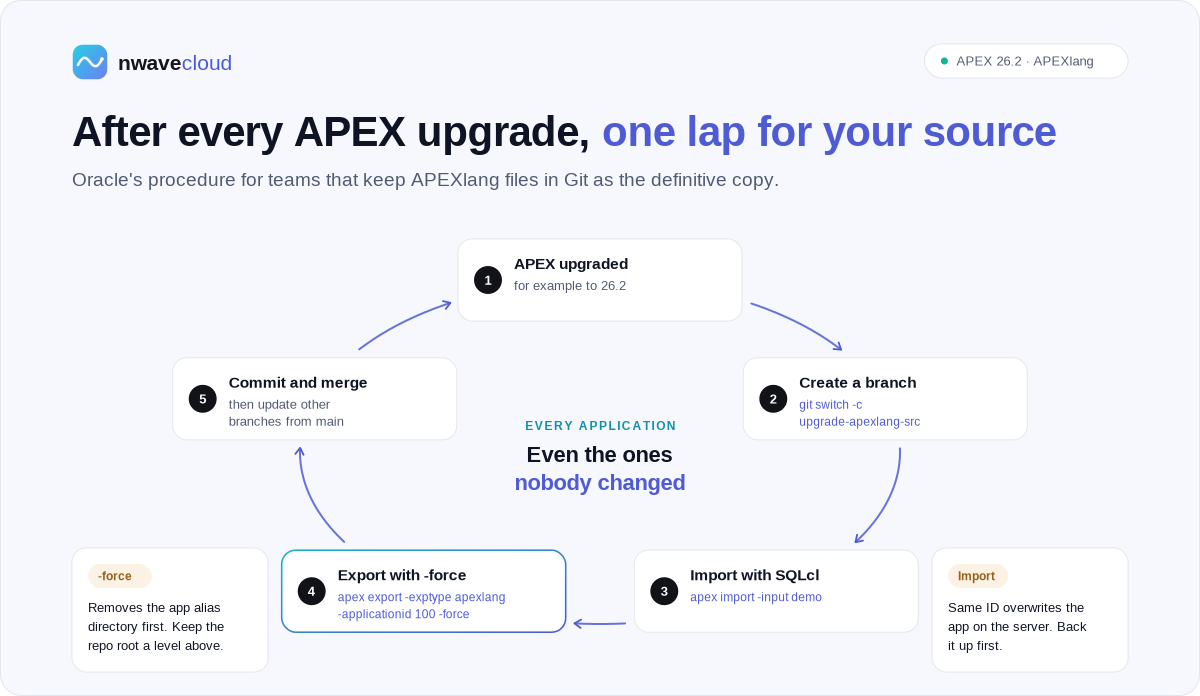
Two cautions
The import overwrites. “If you import using the same application ID, the import overwrites any changes on the APEX server. Oracle recommends backing up the current application.” Do this in a quiet window, and make sure nobody has unexported work in that app.
-force deletes first. Oracle explains that -force is required so structural changes are applied correctly and no stale files remain, but “it removes the app alias directory before writing out a new one with the fresh contents. Therefore, your git repo root directory should be at least one directory level above this app alias directory.” Back up any uncommitted files, and keep anything that is not APEXlang source out of the app alias directory.
What the diff looks like
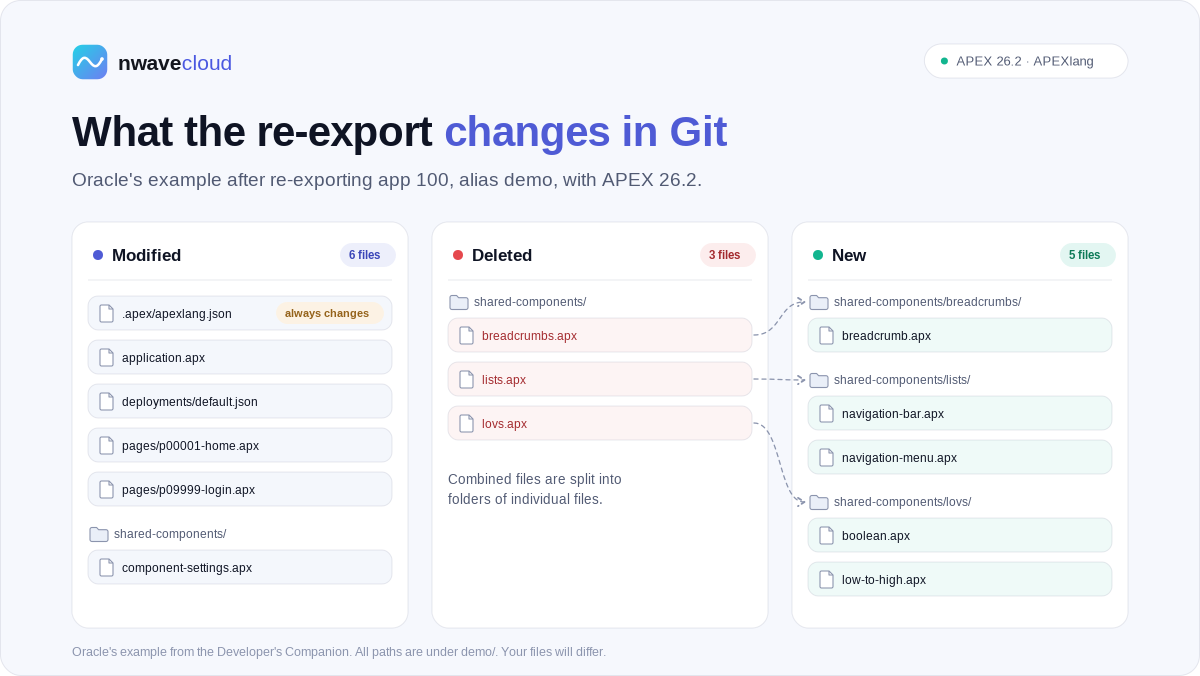
Oracle’s example shows the result after re-exporting app 100 from 26.2. Modified files include .apex/apexlang.json, application.apx, deployments/default.json, two page files and shared-components/component-settings.apx. Three shared component files are deleted, breadcrumbs.apx, lists.apx and lovs.apx, and new files appear in their place, such as shared-components/lists/navigation-menu.apx and shared-components/lovs/boolean.apx.
That is the “stored together may be separated into individual files” rule in action. Review the pull request for structure, not logic: the app did not change, its files did.
Coordinating the team
- Tooling first. APEX 26.2 needs ORDS 26.3.0 and SQLcl 26.3.0 or later, and the import method you use decides which product must be current: App Builder needs ORDS, the command line needs SQLcl, VS Code needs SQL Developer for VS Code.
- One owner per app. One person runs the lap for each application, while feature work pauses or waits to rebase.
- Merge quickly. Every open branch must update from
mainafterwards, so a short-lived upgrade branch keeps conflicts small. - Validate offline. Run
apex validateon the re-exported source in CI, as we described in validating APEXlang without a database.
Checking your own code against the new release
APEXlang covers the application definition. Your PL/SQL calls into APEX packages are a separate question. Oracle’s release notes point to the APEX Diff app at oracleapex.com/apexdiff “to compare changes and updates in PL/SQL APIs between versions 19.2 through 26.2”. Oracle’s blog describes it as an app to compare APEX views and PL/SQL APIs across versions side by side. Use it to review the packages your code calls before you sign off the upgrade.
A short checklist
- APEX, ORDS and SQLcl upgraded together, as our 26.2 upgrade checklist describes
- Every application backed up before its import
- Repository root at least one level above each app alias directory
- Uncommitted files committed or backed up
- One upgrade branch, one pull request, reviewed for structure
- All open branches updated from
mainafter the merge - APEX Diff checked for the APIs your packages call
Or let us run the upgrade for you: we operate managed Oracle APEX environments where APEX, ORDS and patching are handled. See Cloud Hosting and the plans page.
Bottom line
An APEX upgrade is not finished when the server says 26.2. If Git holds your apps, finish it in the repository: one branch, one import and forced export per app, one reviewed merge.
Do it once, right after the upgrade, and every later pull request shows only real changes.
FAQ
Do I need to re-export applications I did not change?
Yes, if Git is your definitive copy. Oracle says to import and re-export each application after upgrading APEX, “even for applications you have not modified”.
What if we develop in App Builder and export APEXlang only as a backup?
Oracle notes you may not need to follow the procedure in that case.
Why does the export need -force?
So files that are no longer part of the new export are removed and structural changes apply cleanly. It deletes the app alias directory before writing a new one, so keep your repository root above it.
Will the import overwrite my application?
Importing with the same application ID overwrites any changes on the APEX server. Back up the application first.
Which files always change?
The APEXlang version in .apex/apexlang.json always changes. Other changes depend on the release, such as components split into individual files.
How do I see PL/SQL API changes between releases?
Use Oracle’s APEX Diff app, which compares PL/SQL APIs between APEX 19.2 and 26.2.
Sources
- Upgrading APEXlang Source with a New APEX Release (APEX 26.2 Developer’s Companion)
- Oracle APEX 26.2 Release Notes: New Features
- Understanding APEXlang Deployment Files (APEX 26.2 Developer’s Companion)
- APEXlang Commands (SQLcl User’s Guide)
- Introducing the APEX Diff App (Oracle blog)
- Announcing Oracle APEX 26.2 General Availability