The short version
APEXlang turns an APEX application into readable files. Oracle’s new quick start shows the shortest path from an empty editor to an app that runs, with an AI agent doing the typing:
- What you need. An APEX 26.1 or newer workspace, VS Code, the Oracle SQL Developer extension, a connection to the workspace schema and an AI coding agent.
- The step people skip.
skills syncin SQLcl installs Oracle’s APEXlang skills, so the agent learns APEX’s rules instead of guessing them. - The loop. Generate from the APEX node, open
application.apx, click run, check App Builder. - The habit that matters. Agents work against a development schema. Production gets imports from Git, not prompts.
What each piece does
Oracle’s post, “Configure Your Workstation for APEXlang” by Scott Spendolini, is deliberately short. It “focuses on the what, not the how or why”. Here is the why, one piece at a time.
- APEX 26.1 or newer. That is “the minimum version required for APEXlang”, plus a workspace to inspect and run what you generate.
- VS Code and SQL Developer for VS Code. Oracle calls the extension “the easiest path to generating APEXlang”. Turn on Auto Update so you always run the current version. Any editor works in theory, since SQLcl can compile APEXlang files too.
- A direct schema connection. Compiling APEXlang from your machine needs direct access to the schema. Oracle suggests a free container with Oracle Database and APEX, or an Always Free Autonomous Database, if you have nothing else.
- An AI agent. Oracle’s example uses Codex from the VS Code Marketplace and says “others will work and can be configured similarly”. It also warns that free tiers may restrict usage or models.
- The APEXlang skills. These teach the model to “generate proper APEXlang”.
The APEX 26.2 Developer’s Companion puts the bigger picture plainly: “SQLcl, ORDS, and SQL Developer share a common APEXlang compiler driven by the rules that Page Designer has used for years”, and “APEX skills for popular AI coding agents enable rich, new ways of collaborating with AI coding agents for app development.”
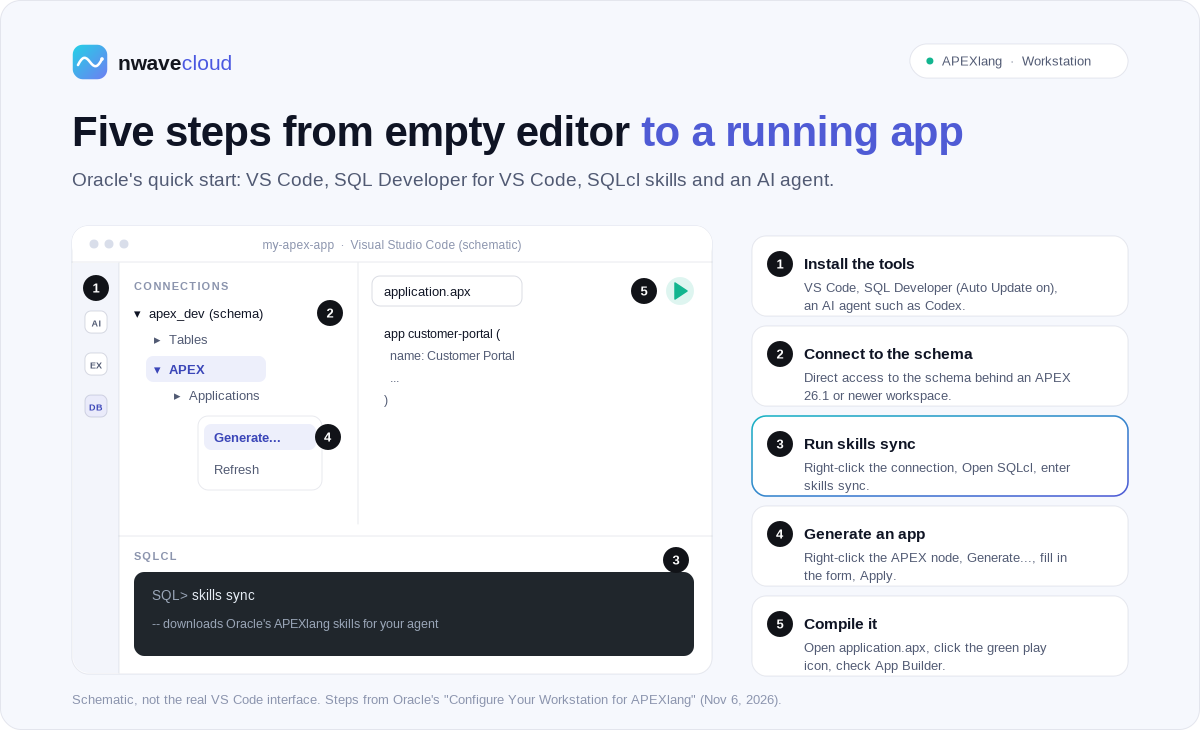
The five steps
- Install the tools. VS Code, then the Oracle SQL Developer extension from the Marketplace with Auto Update selected, then your agent.
- Add the connection. Schema name, password and connection details for the schema behind your APEX workspace.
- Install the skills. Right-click the connection, select Open SQLcl, enter
skills syncand close the SQLcl window. - Generate an application. Expand the connection, right-click the APEX node, select Generate…, fill in the form and click Apply.
- Compile it. Open the folder with the generated files, select
application.apx, click the green play icon, pick the connection if prompted, then log in to App Builder and run the app.
That is the whole setup. The interesting part is what you do on day two.
What skills sync actually installs
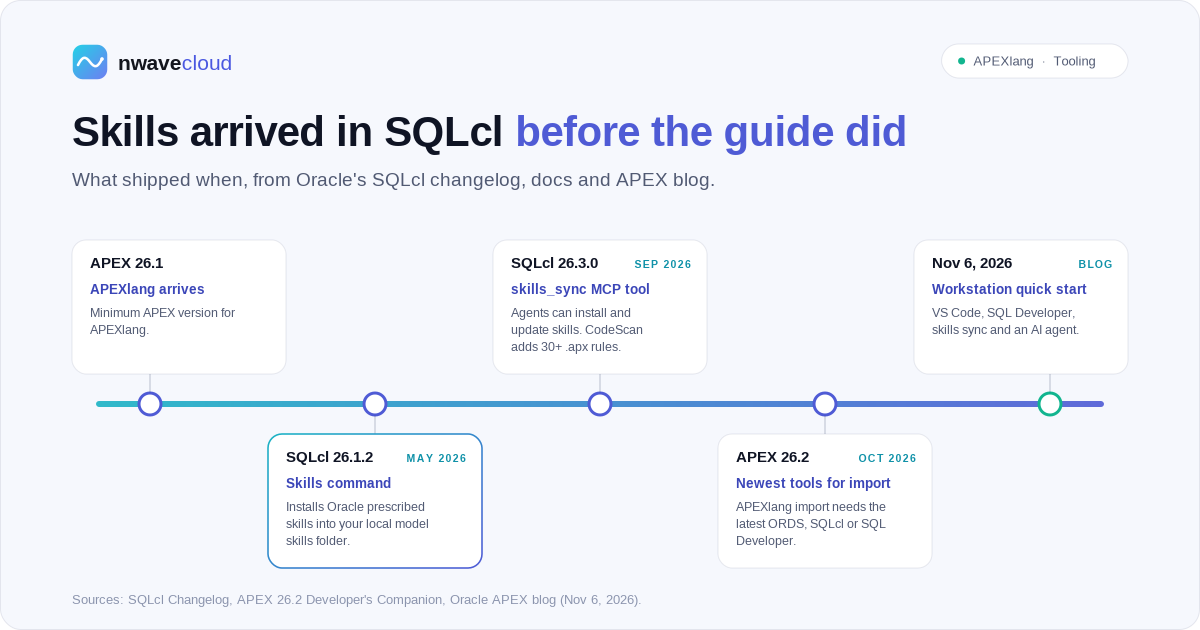
The SQLcl changelog dates the Skills command to SQLcl 26.1.2 (May 2026) and describes it as a command “to install Oracle prescribed skills from Oracle Github repository to your local model skills folder”, to “support APEXLang use with APEX 26.1”. SQLcl 26.3.0 (September 2026) adds a skills_sync MCP tool that installs and updates AI skills, so an agent connected through SQLcl’s MCP server can refresh them itself.
The pages we checked do not document the exact target folder per agent, so look at what the command reports on your machine and check that your agent actually picks the skills up.
Habits for an agent-assisted APEX workflow
The quick start gets you running. These are the habits we would add before a team uses it every day.
- Development schemas only. The agent’s connection should point at a development workspace. Releases to test and production go through import from Git, the same way every time.
- Keep tools and skills in step. The Developer’s Companion says importing APEXlang “requires the most recent versions of ORDS, SQLcl, or Oracle SQL Developer for VS Code”. When you update SQLcl or the extension, run
skills syncagain so the agent’s rules match the compiler. - Validate before you import.
apex validatechecks an APEXlang folder without a database connection. Make it part of the agent’s loop and your CI. Our offline validation guide shows how. - Commit the files. The
.apxfiles are the point of APEXlang. Review what the agent changed as a diff, not as a finished app. - Small imports in development. APEX 26.2 can import selected files instead of the whole app, in development. See file-level import.
A short checklist
- APEX 26.1 or newer workspace for development
- SQL Developer for VS Code installed with Auto Update
- Agent connected to a development schema only
skills syncrun, and run again after tool updatesapex validatein the agent loop and in CI- Generated
.apxfiles committed and reviewed in Git
Running APEX environments for a team that works this way? nwavecloud Cloud Hosting keeps APEX, ORDS and the database patched together, see the plans page.
Bottom line
The workstation is five steps. The step that changes results is skills sync: an agent that knows APEX’s rules writes APEX that compiles. Keep it on a development schema, keep the skills current and let Git carry the result forward.
FAQ
Which APEX version do I need for APEXlang?
APEX 26.1 or newer. Oracle’s quick start calls 26.1 “the minimum version required for APEXlang”.
What does skills sync do?
It installs Oracle’s APEXlang skills for your AI coding agent. The SQLcl changelog describes the Skills command as installing Oracle prescribed skills from Oracle’s GitHub repository into your local model skills folder.
Do I have to use Codex?
No. Oracle’s example uses Codex, and the post says other agents work and can be configured similarly.
Do I need VS Code?
No. Any text editor works, and SQLcl can compile APEXlang files. Oracle calls SQL Developer for VS Code the easiest path.
Where do I run skills sync?
In SQLcl. Oracle’s steps open it from the database connection in SQL Developer for VS Code: right-click the connection, Open SQLcl, then skills sync.
Should the agent connect to production?
We would not. Let agents work in development and promote changes by importing reviewed APEXlang files.
Sources
- Configure Your Workstation for APEXlang (Oracle APEX blog, November 6, 2026)
- Working with APEXlang (APEX 26.2 Developer’s Companion)
- Using SQLcl with APEXlang (APEX 26.2 Developer’s Companion)
- Upgrading APEXlang Source with a New APEX Release (APEX 26.2 Developer’s Companion)
- SQLcl Changelog
- Oracle SQL Developer for VS Code documentation